
1. Introduction
This instruction manual provides essential information for the proper installation, operation, and maintenance of your Furutech FT-212(R) Rhodium-Plated Banana Terminals. Please read this manual thoroughly before use to ensure optimal performance and longevity of the product. These terminals are designed for connecting speaker cables to audio equipment, offering a secure and high-quality connection.
2. Product Overview
The Furutech FT-212(R) banana terminals are engineered for high-performance audio applications. They feature a robust construction designed for ease of use and reliable signal transfer.
Key Features:
- Main Conductor: Rhodium-plated α (Alpha) pure copper for excellent conductivity.
- Housing: Black nylon/fiberglass with Piezo Ceramic resin for vibration damping.
- Body Insulation: Black POM resin-injected for superior insulation.
- End Ring: Stainless steel for durability.
- Termination: Secure set screw mechanism, eliminating the need for soldering.
- Compatibility: Designed for speaker cable core diameters up to 4.2mm (8 AWG) and core insulation diameters up to 7.8mm.
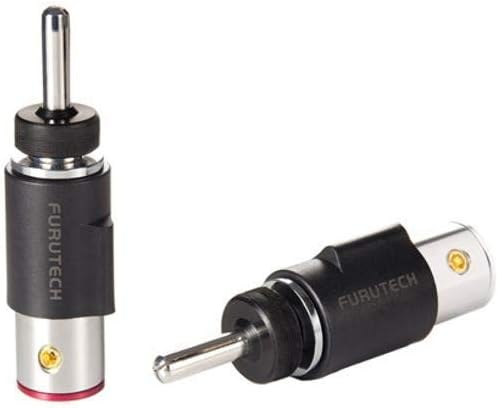
This image displays two Furutech FT-212(R) Rhodium-Plated Banana Terminals. One terminal is shown upright, highlighting its banana plug tip, black housing with 'FURUTECH' branding, silver base, and a red ring at the very bottom. The other terminal is shown lying horizontally, revealing its set screw termination point and the overall construction.
3. Setup and Installation
Follow these steps to properly install the Furutech FT-212(R) banana terminals onto your speaker cables.
- Prepare the Speaker Cable: Carefully strip approximately 10-15mm (0.4-0.6 inches) of insulation from the end of your speaker cable, exposing the bare wire conductors. Ensure the exposed wire is clean and free of frayed strands.
- Insert Wire: Unscrew the rear cap of the FT-212(R) terminal. Insert the prepared bare speaker wire into the opening at the rear of the terminal.
- Secure Connection: Locate the set screw on the side of the terminal. Using an appropriate small screwdriver, tighten the set screw firmly onto the speaker wire. Ensure the wire is securely clamped and cannot be easily pulled out. Do not overtighten, as this may damage the wire or the terminal.
- Reassemble: Screw the rear cap back onto the terminal until it is snug.
- Connect to Equipment: Insert the banana plug end of the terminal into the corresponding banana jack on your amplifier, receiver, or speaker. Ensure a firm and complete insertion.
Repeat these steps for all speaker cable connections. Always ensure correct polarity (positive to positive, negative to negative) when connecting your audio components.
4. Operating Instructions
Once installed, the Furutech FT-212(R) banana terminals operate passively as part of your audio system. Their primary function is to provide a stable and low-resistance connection for audio signals.
- Ensure all connections are secure before powering on your audio equipment.
- Avoid pulling on the cables directly; always grasp the terminal body when connecting or disconnecting.
- Do not expose the terminals to excessive moisture or extreme temperatures.
5. Maintenance
Regular maintenance helps preserve the performance and appearance of your banana terminals.
- Cleaning: Periodically wipe the terminals with a soft, dry, lint-free cloth to remove dust and fingerprints. Avoid using abrasive cleaners or solvents, as these can damage the plating or housing.
- Connection Check: Occasionally check the set screw connections to ensure they remain tight. Over time, vibrations or temperature changes can cause slight loosening.
- Storage: If disconnecting for an extended period, store the terminals in a clean, dry environment away from direct sunlight.
6. Troubleshooting
If you experience issues with your audio system after installing the banana terminals, consider the following:
- No Sound or Intermittent Sound:
- Check that the speaker wire is securely fastened by the set screw within the terminal.
- Ensure the banana terminal is fully inserted into the corresponding jack on your audio equipment.
- Verify that the speaker cables are connected with correct polarity (+ to +, - to -).
- Inspect the speaker wire for any damage or breaks.
- Poor Sound Quality (e.g., distortion, weak signal):
- Ensure all connections are tight and free from corrosion.
- Confirm that the exposed wire strands are not touching each other or the terminal housing, which could cause a short circuit.
If problems persist, consult the instruction manuals for your amplifier, receiver, and speakers, or contact a qualified audio technician.
7. Specifications
| Feature | Detail |
|---|---|
| Brand | Furutech |
| Model Number | FT212R |
| Main Conductor | Rhodium-plated α (Alpha) pure copper |
| Housing Material | Black nylon/fiberglass with Piezo Ceramic resin |
| Body Insulation | Black POM resin-injected |
| End Ring | Stainless steel |
| Termination Method | Set screw |
| Max Core Diameter | 4.2mm (8 AWG) |
| Max Core Insulation Diameter | 7.8mm |
| Housing Dimensions | 18.0 x 16.0φ x 19.8mm (overall height) |
| Total Overall Length | 56.0 mm approx. |
| Item Weight | 3.52 ounces (approx. 0.22 lbs) |
| Product Dimensions | 0.39 x 0.39 x 0.39 inches (packaging/shipping dimensions) |
| Indoor/Outdoor Usage | Indoor |
8. Support
For further assistance or inquiries regarding your Furutech FT-212(R) Rhodium-Plated Banana Terminals, please refer to the official Furutech website or contact your authorized dealer. Keep your purchase receipt for any potential warranty claims.