
Introduction
The Canon FD 70-210mm f/4.0 Zoom Lens is a versatile telephoto zoom lens designed for Canon FD mount cameras. Known for its one-ring push/pull zooming and focusing control, it allows for efficient operation. This lens also features a macro function, enabling close-up photography with a minimum focusing distance of 0.44 meters and a magnification of 0.25X.

Figure 1: Overview of the Canon FD 70-210mm f/4.0 Zoom Lens, showcasing its compact design and textured grip.
Setup
Before using your Canon FD 70-210mm f/4.0 Zoom Lens, ensure your camera body is compatible with the Canon FD mount system. This lens is designed for manual focus operation.
Mounting the Lens
- Align the red dot on the lens mount with the red dot on your camera's lens mount.
- Insert the lens into the camera mount.
- Rotate the lens clockwise until it clicks into place, indicating it is securely locked.
- Ensure the aperture ring on the lens is set to the 'A' (Automatic) position if your camera supports aperture-priority or program modes, or set it to a desired f-stop for manual exposure.
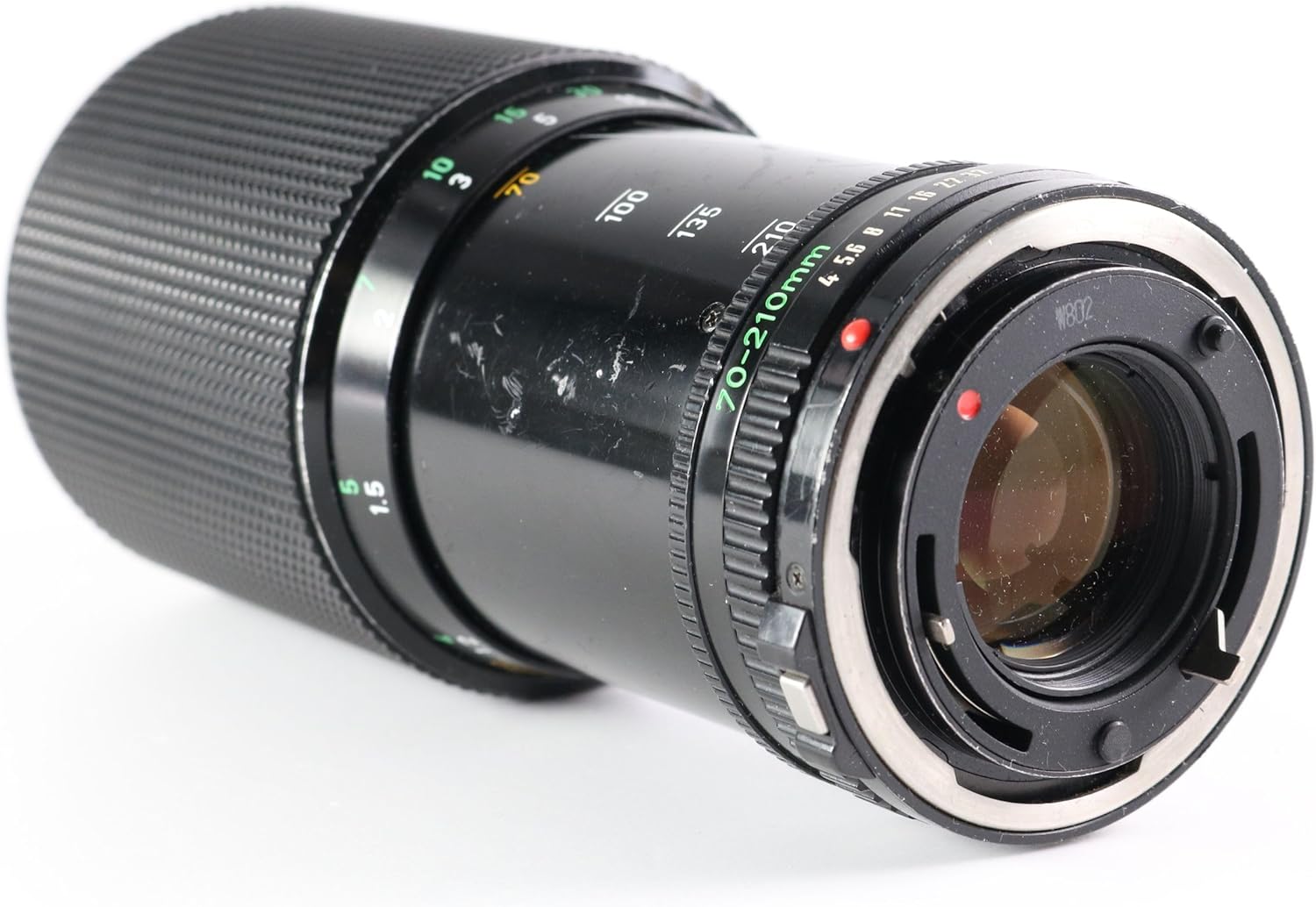
Figure 2: The rear of the lens, highlighting the Canon FD mount for attachment to compatible camera bodies.
Operating the Lens
This lens features a convenient one-ring push/pull mechanism for both zooming and focusing.
Zooming
- To zoom, push or pull the main textured ring on the lens barrel.
- Pushing the ring towards the camera body will zoom out (towards 70mm).
- Pulling the ring away from the camera body will zoom in (towards 210mm).
Focusing
- While holding the main textured ring, rotate it to adjust focus.
- Observe the distance scale on the lens barrel for approximate focus distance.
- Utilize your camera's viewfinder or live view to achieve precise focus.
Aperture Control
- The aperture ring is located near the camera mount.
- Rotate the aperture ring to select your desired f-stop (e.g., f/4, f/5.6, f/8, etc.).
- For automatic exposure modes, ensure the aperture ring is set to the 'A' position.
Macro Function
- To engage the macro function, zoom the lens to its maximum telephoto setting (210mm).
- Continue to extend the zoom ring past the 210mm mark into the macro range.
- Focus manually within the macro range for close-up subjects. The minimum focusing distance is 0.44 meters.

Figure 3: The lens barrel displaying the focus distance scale in meters and feet, along with the zoom markings from 70mm to 210mm.
Maintenance
Proper care and maintenance will extend the life and performance of your lens.
Cleaning the Lens
- Use a soft, lint-free microfiber cloth specifically designed for optics to clean the lens elements.
- For stubborn smudges, apply a small amount of lens cleaning solution to the cloth, not directly to the lens.
- Use a blower brush to remove dust particles from the lens surface before wiping.
- Avoid touching the lens elements with your fingers.
Storage
- Always attach front and rear lens caps when the lens is not in use.
- Store the lens in a cool, dry place, away from direct sunlight and extreme temperatures.
- If storing for extended periods, consider using a dehumidified cabinet to prevent mold growth.

Figure 4: The front element of the lens, displaying the Canon branding and lens specifications, including "LENS MADE IN JAPAN".
Troubleshooting
If you encounter issues with your lens, refer to the following common problems and solutions.
- Lens not mounting securely: Ensure the red dots on the lens and camera body are aligned, and rotate until a click is heard. Check for any obstructions on the mount.
- Difficulty focusing: This is a manual focus lens. Ensure your camera's focus mode is set to manual (MF). Practice rotating the focus ring slowly and deliberately while observing the viewfinder.
- Images appear dark or overexposed: Verify that the aperture ring is set correctly for your desired exposure mode. If using automatic modes, ensure the aperture ring is on the 'A' setting. Check your camera's exposure settings.
- Dust or smudges on images: Inspect the front and rear lens elements for dust or smudges. Clean the lens carefully as described in the Maintenance section. Also, check your camera's sensor for dust.
For issues not resolved by these steps, professional service may be required.
Specifications
Key technical specifications for the Canon FD 70-210mm f/4.0 Zoom Lens:
| Feature | Detail |
|---|---|
| Lens Construction | 9 groups, 12 elements |
| Coating | S. S. C. (Super Spectra Coating) |
| Zoom/Focus Control | One-ring push/pull |
| Weight | 645g (1.65 pounds) |
| Length | 151 mm (6.85 inches) |
| Max. Diameter | 72.2mm (2.85 inches) |
| Minimum Focusing Distance | 0.44 meters |
| Macro Magnification | 0.25X |
| Compatible Mountings | Canon FD |
| Origin | Made in Japan |
Warranty and Support
This Canon FD 70-210mm f/4.0 Zoom Lens is a renewed product. Renewed products typically undergo inspection and testing to ensure they function and look like new. Please refer to the specific seller's return policy for details regarding returns and replacements.
For this specific product, a 90-day return/replacement policy is typically offered by the seller. Any additional protection plans would be purchased separately.
For technical support or service inquiries, please contact the seller or a qualified camera repair technician specializing in vintage lenses.