
1. Introduction
This manual provides essential instructions for the safe and effective use of your Tohnichi Adjustable Torque Wrench, model QL100N4-3/8. This precision tool is designed for applying specific torque values in the range of 20-100 Newton Meters (NM) with 1 NM graduations, featuring a 3/8 square drive ratcheting head. Please read this manual thoroughly before operation and retain it for future reference.

Figure 1: Tohnichi QL100N4-3/8 Adjustable Torque Wrench. This image shows the full length of the torque wrench with its black resin grip and chrome-plated body, featuring the ratcheting head at one end.
2. Safety Information
Always observe the following safety precautions to prevent injury and damage to the tool or workpiece:
- Read the Manual: Familiarize yourself with all instructions before use.
- Wear Eye Protection: Always wear safety glasses to protect against flying debris.
- Inspect Tool: Before each use, inspect the torque wrench for any signs of damage or wear. Do not use a damaged tool.
- Proper Grip: Hold the wrench by the grip only. Do not extend your grip beyond the designated handle area.
- Avoid Over-Torquing: Do not exceed the maximum torque capacity of the wrench (100 NM).
- Cleanliness: Keep the tool clean and free from oil, grease, or other contaminants that could affect grip or accuracy.
- Storage: Store the torque wrench in a clean, dry place, preferably at its lowest torque setting to relieve spring tension.
- Professional Use: This tool is intended for professional use. If you are unsure about its application, consult a qualified professional.
3. Setup
3.1 Unpacking and Inspection
Carefully remove the torque wrench from its packaging. Inspect the tool for any visible damage that may have occurred during shipping. Verify that the Certificate of Calibration is included.
3.2 Identifying Components

Figure 2: Top view of the Tohnichi QL100N4-3/8 Torque Wrench. This image provides a clear overhead view, highlighting the ratcheting head, the main body with measurement markings, and the resin grip with the adjustment mechanism.
Familiarize yourself with the main parts of the torque wrench:
- Ratcheting Head: The square drive where sockets are attached.
- Main Scale: The primary scale on the wrench body for setting torque values.
- Micrometer Scale (or Vernier Scale): The finer scale on the grip for precise adjustments.
- Adjustment Knob/Grip: The rotating part of the handle used to set the torque.
- Locking Mechanism: A switch or collar to secure the set torque value.
3.3 Setting the Torque Value
- Unlock the Grip: Locate the locking mechanism, typically at the base of the handle, and unlock it. This may involve pulling down a collar or flipping a switch.
- Adjust Main Scale: Rotate the grip until the desired primary torque value aligns with the edge of the micrometer scale. For example, to set 80 NM, rotate until the '80' mark on the main scale is visible.
- Fine Adjustment (Micrometer Scale): Continue rotating the grip until the desired fine adjustment (e.g., 0, 1, 2, etc.) on the micrometer scale aligns with the center line of the main scale. For example, to set 85 NM, first set the main scale to 80 NM, then rotate the grip until the '5' mark on the micrometer scale aligns with the center line.
- Lock the Grip: Once the desired torque value is set, engage the locking mechanism to prevent accidental changes during use.

Figure 3: Close-up of the Tohnichi QL100N4-3/8 Torque Wrench grip and scale. This image details the resin grip, the main torque scale, and the micrometer scale, showing how torque values are read and set.
4. Operating Instructions
4.1 Attaching Sockets
Select the appropriate 3/8 square drive socket for your fastener. Firmly push the socket onto the square drive of the ratcheting head until it clicks into place. Ensure the socket is securely seated.
4.2 Applying Torque
- Position: Place the socket onto the fastener. Ensure the wrench is perpendicular to the fastener and the direction of rotation is correct for tightening.
- Smooth Pull: Apply a slow, steady, and continuous pull to the handle. Do not use jerky movements or sudden force.
- Listen for the Click: As the preset torque value is reached, the wrench will produce an audible "click" and a slight impulse will be felt in the handle. This indicates that the desired torque has been achieved.
- Stop Immediately: Cease applying force as soon as the click is heard/felt. Continuing to apply force will over-torque the fastener.
- Reset: After each application, release pressure on the handle. The wrench will automatically reset for the next use.
Note: For critical applications, it is recommended to perform a test click on a non-critical fastener or a torque tester to confirm the setting.
5. Maintenance
5.1 Cleaning and Storage
- Cleaning: Wipe the wrench clean with a soft, dry cloth after each use. Do not use solvents or abrasive cleaners, as these can damage the finish or internal components.
- Storage: Store the torque wrench in its protective case (if applicable) or a clean, dry environment. Always set the torque wrench to its lowest setting (20 NM) before storing to relieve tension on the internal spring mechanism. This helps maintain accuracy over time.
5.2 Recalibration
Your Tohnichi torque wrench is a precision instrument and includes a Certificate of Calibration. To maintain its accuracy, periodic recalibration by an authorized service center is recommended. The frequency of recalibration depends on usage, but a general guideline is once every 12 months or after 5,000 cycles, whichever comes first.
6. Troubleshooting
If you encounter issues with your torque wrench, consider the following:
- No Click:
- Ensure the torque setting is above the minimum range (20 NM).
- Verify the locking mechanism is engaged after setting the torque.
- Apply force smoothly and steadily. Jerky movements can prevent the click mechanism from engaging properly.
- If the issue persists, the wrench may require recalibration or service.
- Inaccurate Readings (Suspected):
- Confirm the torque value was set correctly on both the main and micrometer scales.
- Ensure the wrench was held by the grip and not extended.
- Avoid dropping or subjecting the wrench to impact, as this can affect calibration.
- If accuracy is critical and suspected to be off, arrange for professional recalibration.
For issues not covered here, please contact Tohnichi customer support or an authorized service center.
7. Specifications
| Feature | Specification |
|---|---|
| Model Number | QL100N4-3/8 |
| Brand | Tohnichi |
| Torque Range | 20 - 100 Newton Meters (NM) |
| Graduations | 1 NM |
| Accuracy | +/-3% of indicated value |
| Drive Size | 3/8 inch Square Drive |
| Head Style | Fixed Square, Ratcheting |
| Operation Mode | Mechanical |
| Measurement Standard | Metric |
| Grip Material | Resin |
| Finish | Powder Coated |
| Item Length | 13.5 Inches (approximately 34.3 cm) |
| Item Weight | 0.69 Kilograms (approximately 1.52 lbs) |
| Included | Certificate of Calibration |
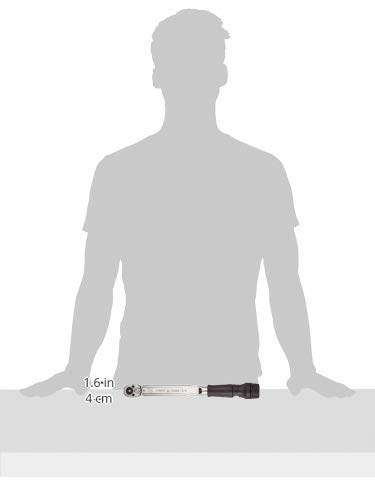
Figure 4: Size comparison of the Tohnichi QL100N4-3/8 Torque Wrench. This image illustrates the compact size of the wrench relative to a human figure, indicating its approximate length of 13.5 inches (34.3 cm).
8. Warranty and Support
Tohnichi products are manufactured to high standards and come with a Certificate of Calibration, ensuring their accuracy at the time of purchase. For specific warranty details, service, or technical support, please refer to the documentation provided with your product or contact Tohnichi directly through their official website or authorized distributors. Regular recalibration is essential to maintain the tool's accuracy and is typically not covered under standard warranty unless due to manufacturing defect.