
1. Product Overview
The Omron HBF-514C Full Body Sensor with Scale is designed to provide a comprehensive understanding of your body composition. This device utilizes full body sensing technology, which measures through both hands and feet, offering a more accurate assessment compared to foot-only measurements.
It measures seven key fitness indicators:
- Body Fat Percentage: The amount of fat in your body relative to your total weight.
- Body Mass Index (BMI): A measure of body fat based on height and weight.
- Skeletal Muscle Percentage: The percentage of muscle attached to your bones.
- Resting Metabolism: The number of calories your body burns at rest.
- Visceral Fat Level: The fat surrounding your internal organs.
- Body Age: An assessment of your body's physical age based on your body composition.
- Body Weight: Your total body mass.
The monitor includes a four-person memory profile, allowing multiple users to track their progress. It also stores up to 90 days of measurement data for each user, providing a 3-month record of your health trends. The device supports individuals up to 330 pounds and 6.5 feet tall.

Figure 1.1: The Omron HBF-514C Full Body Sensor with Scale, showing the main unit with the detachable handheld sensor.
2. Safety Information
Please read all instructions carefully before using the Omron HBF-514C. Failure to follow these instructions could result in inaccurate readings or personal injury.
- Do not use this device if you have a pacemaker or other implanted medical device.
- Pregnant women should consult their doctor before using this device.
- Keep the device away from water and extreme temperatures.
- Ensure the scale is placed on a hard, flat surface for accurate measurements. Carpets or uneven floors can affect accuracy.
- Do not jump on the scale or use it for purposes other than body composition measurement.
- Clean the device with a soft, damp cloth. Do not use abrasive cleaners.
- Proposition 65 Warning: This product may contain chemicals known to the State of California to cause cancer and birth defects or other reproductive harm.
Important: Statements regarding dietary supplements have not been evaluated by the FDA and are not intended to diagnose, treat, cure, or prevent any disease or health condition.
3. Initial Setup
3.1. Battery Installation
- Locate the battery compartment on the underside of the scale.
- Open the battery cover.
- Insert the required batteries (typically AA or AAA, refer to the battery compartment label) ensuring correct polarity (+/-).
- Close the battery cover securely.
3.2. User Profile Setup
Before first use, you must set up your personal profile. The device can store up to four user profiles (P1, P2, P3, P4).
- Press the POWER button to turn on the device.
- Select an empty user profile (P1-P4) using the UP/DOWN arrows and press SET.
- Enter your personal data:
- Height: Use UP/DOWN arrows to adjust and SET to confirm.
- Age: Use UP/DOWN arrows to adjust and SET to confirm.
- Gender: Select Male or Female using UP/DOWN arrows and SET to confirm.
- The device will save your profile.
3.3. Initial Calibration
For the most accurate weight readings, it is recommended to perform an initial calibration or re-calibration if the scale has been moved.
- Place the scale on a hard, flat, and stable surface.
- Lightly step on the scale until the display shows '0.0' or a similar calibration indicator.
- Step off the scale. It is now calibrated and ready for use.
4. Operating Instructions
4.1. Taking a Measurement
For accurate full body composition measurements, follow these steps:
- Ensure your feet are clean and dry.
- Press the POWER button.
- Select your user profile (P1-P4) using the UP/DOWN arrows and press START.
- Step onto the scale barefoot, ensuring your heels are aligned with the electrodes on the foot pads. Stand still.
- Grasp the handheld sensor unit firmly with both hands, extending your arms straight out at a 90-degree angle to your body. Ensure your palms are in full contact with the electrodes on the handle.
- Remain still until the measurement is complete and all results are displayed on the screen. This typically takes a few seconds.
- The device will display your weight first, followed by other body composition indicators.

Figure 4.1: A user demonstrating the correct posture for taking a full body composition measurement with the Omron HBF-514C, holding the handheld sensor at a 90-degree angle.
4.2. Understanding the Display
The digital display shows various readings and indicators. Here's a general guide:
- Weight: Displayed in pounds (lb) or kilograms (kg).
- Body Fat %: Percentage of body fat.
- BMI: Body Mass Index value.
- Skeletal Muscle %: Percentage of skeletal muscle.
- Visceral Fat Level: A numerical indicator of visceral fat.
- Resting Metabolism: Estimated daily calorie expenditure at rest.
- Body Age: An age estimation based on your body composition.
- User Number (P1-P4): Indicates the active user profile.
- Memory Indicator: Shows when past measurements are being viewed.
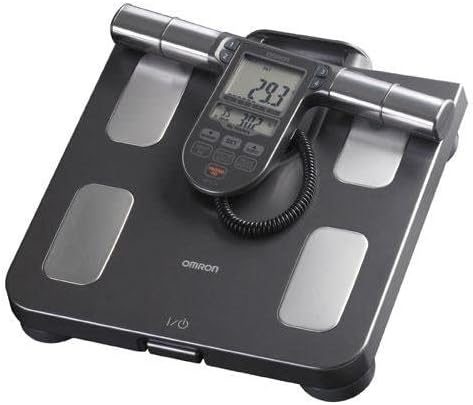
Figure 4.2: A close-up view of the Omron HBF-514C's digital display, showing various body composition readings and user interface elements.
4.3. Recalling Past Measurements
The device stores up to 90 days of data for each user profile.
- Press the POWER button.
- Select your user profile (P1-P4) and press the MEMORY button.
- Use the UP/DOWN arrows to scroll through past measurements.
5. Maintenance
5.1. Cleaning the Device
To ensure hygiene and proper function, clean your scale regularly.
- Wipe the surface of the scale and handheld unit with a soft, damp cloth.
- Do not use abrasive cleaners, alcohol, or benzene, as these can damage the surface.
- Ensure no water enters the display or battery compartment.
5.2. Battery Replacement
When the battery indicator appears on the display, it is time to replace the batteries.
- Turn off the device.
- Open the battery compartment on the underside of the scale.
- Remove the old batteries and dispose of them according to local regulations.
- Insert new batteries, ensuring correct polarity.
- Close the battery cover.
5.3. Storage
Store the device in a safe, dry place when not in use.
- Avoid direct sunlight, high temperatures, and high humidity.
- Do not place heavy objects on the scale.
6. Troubleshooting
If you encounter issues with your Omron HBF-514C, refer to the following common problems and solutions:
| Problem | Possible Cause | Solution |
|---|---|---|
| No display or weak display | Dead or low batteries; incorrect battery installation. | Replace batteries with new ones, ensuring correct polarity. |
| Inaccurate weight readings | Scale on uneven surface; not calibrated; user profile incorrect. | Place scale on a hard, flat surface. Perform initial calibration (step on, then off). Verify user profile settings. |
| Error message (e.g., 'Err') | Movement during measurement; improper contact with electrodes; weight exceeds capacity. | Stand still during measurement. Ensure bare feet and hands have full contact with electrodes. Check if weight is within 330 lbs limit. |
| Body composition data not displayed | Improper contact with electrodes; user profile not set up. | Ensure bare feet and hands have full contact with electrodes. Complete user profile setup. |
If the problem persists after trying these solutions, please contact Omron customer support for further assistance.
7. Product Specifications
- Model Number: HBF-514C
- Manufacturer: Omron
- Product Dimensions: 15 x 12.7 x 3.2 inches
- Product Weight: Approximately 4.63 Pounds
- Weight Capacity: Up to 330 pounds (150 kg)
- Height Range: Up to 6.5 feet (199.5 cm)
- User Profiles: 4
- Memory: 90 days of data per user
- Power Source: Batteries (type specified in battery compartment)
- Measurement Indicators: Body Weight, Body Fat Percentage, BMI, Skeletal Muscle Percentage, Resting Metabolism, Visceral Fat Level, Body Age
- Date First Available: March 25, 2013
8. Warranty and Support
Omron products are manufactured to high-quality standards. For specific warranty information regarding your HBF-514C Full Body Sensor with Scale, please refer to the warranty card included in your product packaging or visit the official Omron Healthcare website.
If you require technical assistance, have questions about your device, or need to report a defect, please contact Omron customer support. Contact details can typically be found on the Omron Healthcare website or in the product documentation.


