
SINGER 4562
SINGER Deluxe Free-Arm Sewing Machine Model 4562 User Manual
Model: 4562
Introduction
Welcome to the user manual for your SINGER Deluxe Free-Arm Sewing Machine Model 4562. This manual provides comprehensive instructions for setting up, operating, maintaining, and troubleshooting your sewing machine to ensure optimal performance and longevity. Please read this manual thoroughly before using your machine.
Safety Instructions
Always follow basic safety precautions when using electrical appliances to reduce the risk of fire, electric shock, or injury to persons.
- Always unplug the machine from the electrical outlet when removing covers, lubricating, or when making any other user servicing adjustments mentioned in the instruction manual.
- Do not allow to be used as a toy. Close attention is necessary when this machine is used by or near children.
- Use this appliance only for its intended use as described in this manual. Use only attachments recommended by the manufacturer as contained in this manual.
- Never operate this sewing machine if it has a damaged cord or plug, if it is not working properly, if it has been dropped or damaged, or dropped into water.
- Keep fingers away from all moving parts. Special care is required around the sewing machine needle.
- Always use the proper needle plate. The wrong plate can cause the needle to break.
- Do not pull or push fabric while stitching. This may deflect the needle causing it to break.
- Turn the sewing machine off when making any adjustments in the needle area, such as threading the needle, changing the needle, threading the bobbin, or changing the presser foot.
Product Overview
The SINGER Model 4562 is a versatile free-arm sewing machine designed for various sewing projects. Familiarize yourself with its main components.
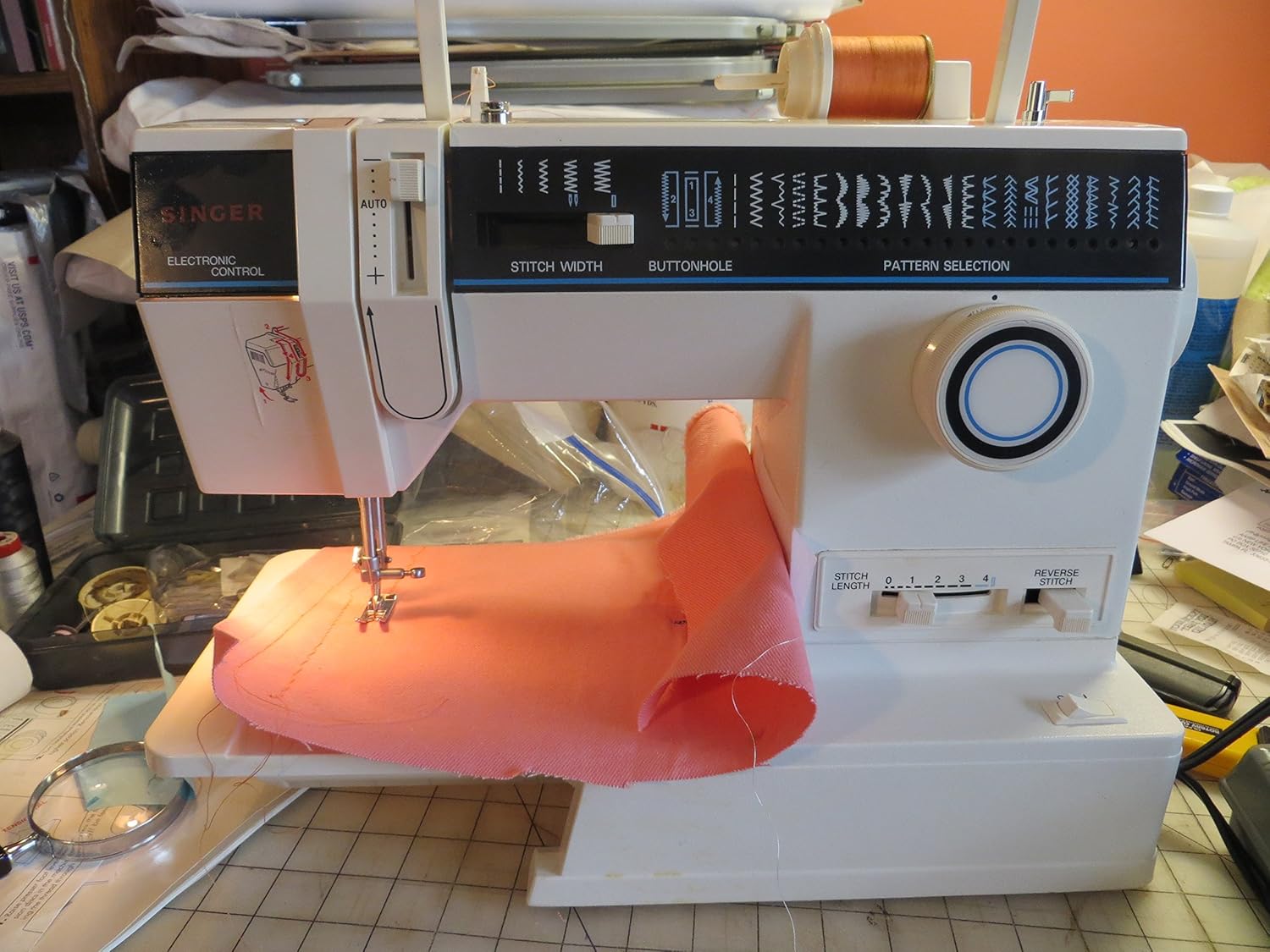
Figure 1: Front View of SINGER Model 4562. This image displays the front of the sewing machine, highlighting the needle area, presser foot, stitch selection panel, and the free arm feature with fabric in place. Key controls like stitch width and buttonhole settings are visible on the top panel.
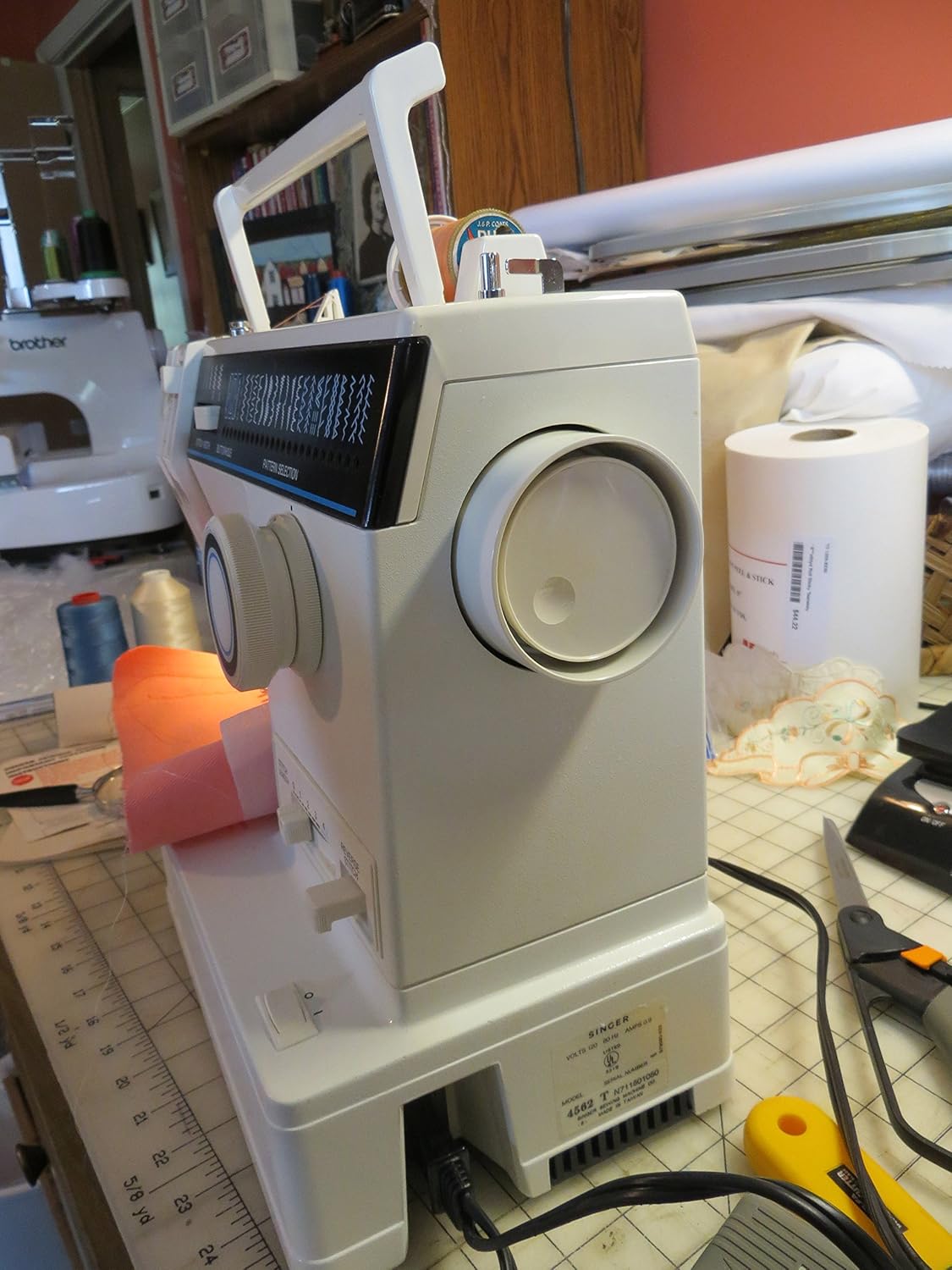
Figure 2: Side View and Power Connection. This view shows the right side of the sewing machine, including the handwheel, power input, and foot pedal connection. The model number "4562" is visible on the machine's base.
Key Components:
- Stitch Selection Dial: Located on the front panel, used to choose from 32 available stitch patterns.
- Stitch Length/Width Dials: Adjusts the length and width of stitches for various sewing needs.
- Free Arm: Allows for easy sewing of cylindrical items like sleeves and pant hems.
- Foot Pedal Connection: For connecting the foot controller to operate the machine.
- Thread Spool Pins: Holds the upper thread spool.
- Bobbin Winder: For winding thread onto the bobbin.
Setup
1. Threading the Machine
The SINGER Model 4562 features an easy threading system. Follow the numbered guides on the machine for correct upper thread path.

Figure 3: Threading Reference. This image shows the sewing machine alongside its instruction manual, open to a page detailing the threading process. Refer to your physical manual for detailed, step-by-step threading diagrams.
- Place a spool of thread on the spool pin.
- Guide the thread through the upper thread guide.
- Follow the numbered path down to the tension discs and up to the take-up lever.
- Thread the take-up lever from right to left.
- Continue guiding the thread down to the needle bar thread guide.
- Finally, thread the needle from front to back.
2. Winding the Bobbin
Proper bobbin winding is crucial for balanced stitches.
- Place an empty bobbin onto the bobbin winder spindle.
- Guide the thread from the spool through the bobbin winding tension disc.
- Wrap the thread around the bobbin a few times, then push the bobbin winder spindle to the right.
- Press the foot controller to start winding. The machine will stop automatically when the bobbin is full.
- Cut the thread and return the bobbin winder spindle to the left.
3. Inserting the Bobbin
Insert the wound bobbin into the bobbin case according to the machine's markings, ensuring the thread unwinds in the correct direction.
Operating Instructions
1. Stitch Selection
Your SINGER Model 4562 offers 32 built-in stitch patterns, including utility, decorative, and buttonhole stitches.

Figure 4: Stitch Pattern Selection. This close-up shows the stitch pattern display panel, illustrating the various stitch options available on the SINGER Model 4562, including straight stitches, zig-zag, decorative patterns, and buttonhole steps.
- Turn the Pattern Selection dial to choose your desired stitch.
- Adjust the Stitch Width and Stitch Length dials as needed for the selected stitch and fabric type.
2. Basic Sewing
Before starting, ensure your machine is properly threaded and the bobbin is inserted correctly.

Figure 5: Needle and Presser Foot in Action. This detailed shot focuses on the needle and presser foot as they sew through fabric, demonstrating the machine's operation during stitching.

Figure 6: Sewing Operation. This image shows the SINGER Model 4562 actively sewing a piece of orange fabric, illustrating the machine's free-arm capability and the fabric feed during operation.
- Plug in the machine and foot controller.
- Place your fabric under the presser foot.
- Lower the presser foot lever.
- Gently press the foot controller to begin sewing. Guide the fabric smoothly.
- To secure stitches at the beginning and end of a seam, use the reverse lever for backstitching.
- When finished, raise the needle to its highest position, lift the presser foot, and pull the fabric away. Cut the threads using the thread cutter.
3. Using the Free Arm
To use the free arm, simply slide off the accessory storage compartment. This exposes the narrow free arm, ideal for sewing cuffs, collars, and pant hems.
Maintenance
Regular maintenance ensures your sewing machine operates smoothly and extends its lifespan.
- Cleaning: Regularly remove lint and dust from the bobbin area and feed dogs using a small brush. Unplug the machine before cleaning.
- Needle Replacement: Change the needle frequently, especially when sewing different fabric types or if it becomes dull or bent. A dull needle can cause skipped stitches or fabric damage.
- Oiling: Refer to your specific machine's manual for oiling points and frequency. Use only high-quality sewing machine oil.
- Storage: When not in use, cover your machine to protect it from dust.
Troubleshooting
| Problem | Possible Cause | Solution |
|---|---|---|
| Skipped Stitches | Incorrect needle, bent needle, improper threading, wrong needle size for fabric. | Change needle, re-thread machine, use correct needle type/size. |
| Thread Breaking | Incorrect threading, tension too tight, burr on needle plate, poor quality thread. | Re-thread machine, adjust tension, check for burrs, use good quality thread. |
| Fabric Not Feeding | Feed dogs lowered, presser foot not lowered, lint in feed dogs. | Raise feed dogs, lower presser foot, clean feed dogs. |
| Machine Not Starting | Not plugged in, foot controller not connected, power switch off. | Check power connections, ensure foot controller is securely plugged in, turn power switch on. |
Specifications
- Model Number: 4562
- Brand: SINGER
- Stitch Patterns: 32 built-in stitches
- Arm Type: Deluxe Free Arm
- Motor: Fully enclosed motor
- Threading System: Easy threading system
- Color: White, Blue
- Power: Electric
- UPC: 037431117618
- Manufacturer: Singer Sewing Machine Company
- First Available: May 25, 2012
Warranty and Support
For specific warranty information, please refer to the warranty card included with your SINGER Deluxe Free-Arm Sewing Machine Model 4562 or visit the official SINGER website. For technical support, parts, or service, please contact SINGER customer service directly.
You can find more information and support resources on the SINGER Store on Amazon.
Related documents4562


Ask a question about this manual
Ask about setup, troubleshooting, compatibility, parts, safety, or missing instructions. Manuals+ will review the question and use this page’s manual context to help answer it.