
1. Introduction and Safety Information
Thank you for choosing the Hotpoint MWK 212 K HA Microwave Oven. This manual provides essential information for the safe and efficient operation of your appliance. Please read these instructions carefully before use and keep them for future reference.
Important Safety Instructions:
- Read all instructions before using the appliance.
- Do not attempt to operate this oven with the door open as this can result in harmful exposure to microwave energy.
- Do not place any object between the oven front face and the door or allow soil or cleaner residue to accumulate on sealing surfaces.
- Do not operate the oven if it is damaged. It is particularly important that the oven door closes properly and that there is no damage to the: (1) door (bent), (2) hinges and latches (broken or loosened), (3) door seals and sealing surfaces.
- Only qualified service personnel should adjust or repair the oven.
- Ensure the appliance is properly grounded.
- Do not use corrosive chemicals or vapors in this appliance.
- Supervise children closely when the appliance is in use.
2. Product Overview
The Hotpoint MWK 212 K HA is a 24-liter microwave oven designed for convenient food preparation. Familiarize yourself with its components for optimal use.
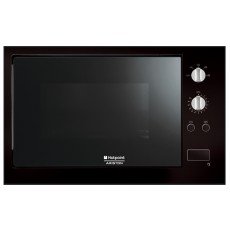
Figure 2.1: Front view of the Hotpoint MWK 212 K HA Microwave Oven. This image shows the appliance's exterior, including the door, control panel, and ventilation slots.
Main Components:
- Control Panel: Used to set cooking time, power level, and select functions.
- Oven Door: Equipped with a safety lock system.
- Turntable: Ensures even cooking by rotating food.
- Oven Cavity: The interior space where food is placed.
- Door Release Button: Opens the oven door.
3. Setup and Installation
Proper installation is crucial for the safe and efficient operation of your microwave oven.
Unpacking:
- Remove all packaging materials from inside and outside the oven.
- Check the oven for any damage, such as a misaligned or bent door, damaged door seals and sealing surface, broken or loose door hinges and latches, or dents inside the cavity or on the door. If any damage is present, do not operate the oven and contact your dealer.
Placement:
- Place the oven on a flat, stable surface that can support its weight and the heaviest food item likely to be cooked in the oven.
- Allow at least 10 cm (4 inches) of space on the top, sides, and back for proper ventilation. Do not block any ventilation openings.
- Do not place the oven near heat sources such as a conventional oven or radiator.
- Ensure the power cord is not trapped or kinked.
Electrical Connection:
Plug the power cord into a properly installed and grounded electrical outlet. Ensure the voltage and frequency match the specifications on the rating label of the appliance.
4. Operating Instructions
This section guides you through the basic functions of your Hotpoint MWK 212 K HA microwave oven.
Setting the Clock (if applicable):
- Press the "Clock" button.
- Use the dial or number pad to set the current time.
- Press "Clock" again to confirm.
Basic Microwave Cooking:
- Place food in a microwave-safe container on the turntable.
- Close the oven door securely.
- Press the "Power Level" button repeatedly to select the desired power level (e.g., P100 for full power, P70 for 70% power).
- Use the dial or number pad to set the cooking time.
- Press the "Start" button to begin cooking.
Reheat Function:
The MWK 212 K HA features a dedicated reheat function for convenient warming of pre-cooked food.
- Place the food to be reheated in a microwave-safe dish.
- Press the "Reheat" button (or equivalent function on your control panel).
- The oven may prompt you to select the food type or weight, or it may use a pre-set time. Follow the on-screen instructions.
- Press "Start" to begin reheating.
Stopping/Pausing Cooking:
- To pause cooking, open the door or press the "Stop/Cancel" button once.
- To resume cooking, close the door and press "Start".
- To cancel cooking completely, press the "Stop/Cancel" button twice.
5. Maintenance and Cleaning
Regular cleaning and maintenance will ensure the longevity and optimal performance of your microwave oven.
Cleaning the Oven Exterior:
- Wipe the exterior with a damp cloth and mild detergent.
- Avoid abrasive cleaners or scouring pads.
Cleaning the Oven Interior:
- For light spills, wipe with a damp cloth immediately.
- For stubborn stains, place a bowl of water with lemon slices inside and microwave on high for 2-3 minutes. The steam will loosen food particles, making them easier to wipe away.
- Clean the turntable and roller ring with warm, soapy water. They are usually dishwasher safe.
Door Seals:
Keep the door seals and adjacent parts clean. Use a soft cloth with warm, soapy water. Do not use harsh cleaners or abrasive pads.
6. Troubleshooting
If you encounter issues with your microwave oven, refer to the following common problems and solutions before contacting service.
| Problem | Possible Cause | Solution |
|---|---|---|
| Oven does not start | Power cord not plugged in; Door not closed properly; Fuse blown or circuit breaker tripped. | Ensure plug is securely in outlet; Close door firmly; Check household fuse/circuit breaker. |
| Food not heating | Incorrect cooking time/power level set; Microwave-safe dish not used. | Adjust time/power; Use appropriate cookware. |
| Turntable not rotating | Turntable not correctly placed; Obstruction under turntable. | Ensure turntable and roller ring are correctly seated; Remove any obstructions. |
| Sparks in oven cavity | Metal or foil used in oven; Food residue. | Remove all metal objects; Clean oven cavity thoroughly. |
7. Specifications
Key technical specifications for the Hotpoint MWK 212 K HA Microwave Oven.
- Brand: Hotpoint
- Model Number: MWK 212 K HA
- Color: Black
- Volume: 24 Liters
- ASIN: B0084L776W
- First Available Date: 18 May 2012
- Feature: Reheat Function
8. Warranty and Support
For warranty information and customer support, please refer to the warranty card included with your purchase or visit the official Hotpoint website. Keep your proof of purchase for any warranty claims.
For technical assistance or spare parts, contact Hotpoint customer service in your region. Contact details can typically be found on the manufacturer's website or in the documentation provided with the appliance.


