
1. Introduction
This manual provides essential information for the safe and efficient operation, installation, and maintenance of your Honeywell VNT5150H1000 TRUEBREEZE Heat Recovery Ventilator (HRV). Please read this manual thoroughly before installation or use and retain it for future reference. Proper installation and maintenance are crucial for optimal performance and longevity of the unit.
2. Safety Information
WARNING: Risk of Electric Shock. Disconnect power before servicing.
- Ensure all electrical connections comply with local codes and ordinances.
- Installation and servicing must be performed by a qualified technician.
- Do not operate the unit with damaged wiring or components.
- Keep hands and foreign objects away from moving parts.
- This appliance is not intended for use by persons (including children) with reduced physical, sensory or mental capabilities, or lack of experience and knowledge, unless they have been given supervision or instruction concerning use of the appliance by a person responsible for their safety.
3. Product Overview
The Honeywell VNT5150H1000 TRUEBREEZE Heat Recovery Ventilator is designed to provide fresh air to your home while recovering energy from the outgoing stale air. This process helps maintain indoor air quality and reduce heating and cooling costs.
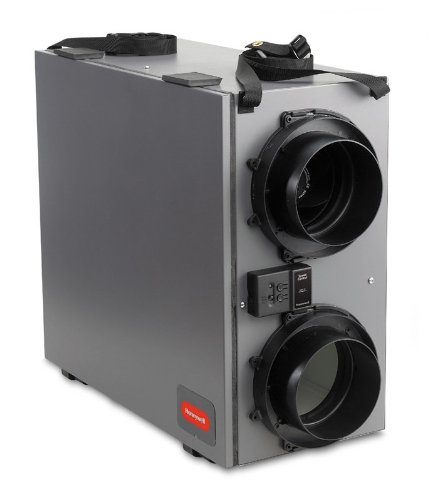
This image displays the Honeywell VNT5150H1000 TRUEBREEZE Heat Recovery Ventilator. The unit is a rectangular gray box with two prominent circular duct connections on one side, designed for air intake and exhaust. A small control panel is visible between the ducts. Black straps are attached to the top for handling or mounting. The Honeywell logo is visible on the lower front side.
Key Components:
- Heat Recovery Core: Transfers heat between incoming and outgoing air streams.
- Fans: Two independent fans for supply and exhaust air.
- Filters: Protect the core and fans from dust and debris.
- Duct Connections: Ports for connecting to the home's ventilation system.
- Control Panel: Interface for operating the unit.
4. Setup and Installation
Installation of the Honeywell VNT5150H1000 HRV requires adherence to local building codes and HVAC best practices. It is recommended that a certified HVAC professional perform the installation.
General Installation Steps:
- Location Selection: Choose a suitable location, typically in a utility room, basement, or attic, ensuring adequate space for maintenance and duct connections.
- Mounting: Securely mount the unit using appropriate hangers or brackets, ensuring it is level.
- Ductwork Connection: Connect the supply and exhaust ducts to the unit's ports. Ensure all duct connections are sealed to prevent air leakage.
- Condensate Drain: Install a condensate drain line, ensuring proper slope for drainage.
- Electrical Wiring: Connect the unit to a dedicated electrical circuit as per wiring diagrams provided in the full installation guide (not included in this manual). Ensure power is off during wiring. The unit uses a 3-Pin power connector and operates on 12 Volts (DC).
- Control Wiring: Connect the wall control (if applicable) to the unit.
- Testing: After installation, power on the unit and test its operation according to the operating instructions.
5. Operating Instructions
The Honeywell VNT5150H1000 HRV is designed for continuous ventilation. Operation is typically managed via a wall-mounted control (sold separately or integrated into the HVAC system).
Basic Operation:
- Power On/Off: Use the main power switch or wall control to turn the unit on or off.
- Fan Speed: Adjust the fan speed (e.g., low, medium, high) based on ventilation needs and outdoor conditions. Higher speeds provide more air exchange.
- Operating Modes: Some controls offer different modes such as continuous ventilation, intermittent operation, or boost mode for rapid air exchange. Refer to your specific wall control's manual for detailed instructions.
- Defrost Cycle: The unit automatically enters a defrost cycle in cold climates to prevent ice buildup on the heat recovery core. This is a normal function and requires no user intervention.
6. Maintenance
Regular maintenance ensures the efficient and reliable operation of your HRV. Always disconnect power to the unit before performing any maintenance.
Recommended Maintenance Schedule:
- Monthly:
- Inspect and clean air filters. Washable filters can be cleaned with warm, soapy water and thoroughly dried before reinstallation. Replace disposable filters as needed.
- Every 3-6 Months:
- Inspect the heat recovery core. If dirty, remove and clean it according to the manufacturer's instructions (typically by vacuuming or washing).
- Check condensate drain pan and line for blockages and clean if necessary.
- Annually:
- Inspect all duct connections for leaks and seal if required.
- Check fan motors for unusual noises or vibrations.
- Have a qualified technician perform a comprehensive inspection.
7. Troubleshooting
Refer to the following table for common issues and their potential solutions. If the problem persists, contact customer support.
| Problem | Possible Cause | Solution |
|---|---|---|
| Unit not operating | No power; tripped circuit breaker; faulty wiring; unit switch off. | Check power supply; reset breaker; verify wiring; turn unit switch on. |
| Reduced airflow | Clogged filters; dirty heat recovery core; blocked ducts. | Clean or replace filters; clean heat recovery core; inspect and clear ducts. |
| Excessive noise | Loose components; fan imbalance; motor issue. | Check for loose parts; contact technician for fan/motor inspection. |
| Condensate overflow | Blocked drain line; improper slope. | Clear drain line; ensure proper slope for drainage. |
8. Specifications
| Specification | Value |
|---|---|
| Model | VNT5150H1000 |
| Brand | Honeywell |
| Air Flow Capacity | 150 Cubic Feet Per Minute (CFM) |
| Maximum Rotational Speed | 1800 RPM |
| Cooling Method | Forced Air |
| Wattage | 50 watts |
| Voltage | 12 Volts (DC) |
| Power Connector Type | 3-Pin |
| Manufacturer | HONEYWELL |
| Date First Available | September 5, 2023 |
9. Warranty Information
Honeywell products are manufactured to high-quality standards. This product is covered by a limited warranty against defects in materials and workmanship. The specific terms and duration of the warranty may vary. Please refer to the warranty card included with your product or visit the official Honeywell website for detailed warranty information. Keep your proof of purchase for warranty claims.
10. Customer Support
For technical assistance, troubleshooting not covered in this manual, or warranty inquiries, please contact Honeywell Customer Support.
- Online Support: Visit the official Honeywell website for FAQs, product documentation, and support contact options.
- Phone Support: Refer to your product packaging or the Honeywell website for regional customer service phone numbers.
When contacting support, please have your product model number (VNT5150H1000) and date of purchase readily available.