
Craig CR45372
Craig CR45372 LED Alarm Clock with AM/FM Radio User Manual
Model: CR45372
1. Important Safety Information
Please read these instructions carefully before operating the unit and retain them for future reference. Observe all warnings and instructions marked on the product.
- Power Source: Operate the unit only from the type of power source indicated on the marking label.
- Ventilation: Do not block any ventilation openings. Ensure adequate space around the unit for proper airflow.
- Water and Moisture: Do not use this product near water (e.g., bathtub, sink, wet basement, swimming pool).
- Cleaning: Unplug this product from the wall outlet before cleaning. Use a dry cloth for cleaning. Do not use liquid cleaners or aerosol cleaners.
- Heat: Do not place the product near heat sources such as radiators, heat registers, stoves, or other products (including amplifiers) that produce heat.
- Servicing: Do not attempt to service this product yourself as opening or removing covers may expose you to dangerous voltage or other hazards. Refer all servicing to qualified service personnel.
2. Product Overview
Familiarize yourself with the various parts and controls of your Craig CR45372 LED Alarm Clock with AM/FM Radio.
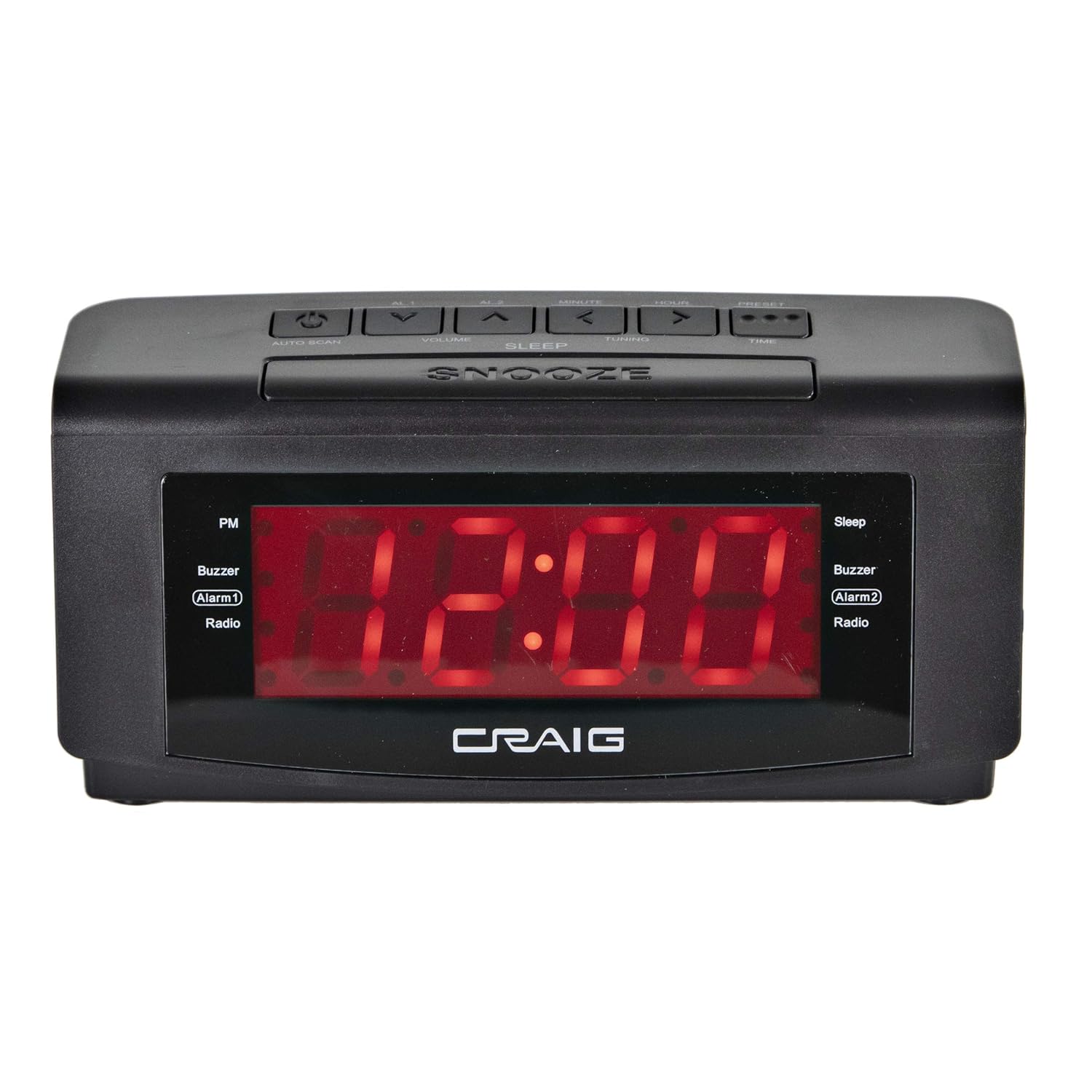
Image 2.1: Front view of the Craig CR45372 LED Alarm Clock. This image displays the large red LED time display, the 'PM' indicator, and indicators for Alarm 1 (Buzzer/Radio) and Alarm 2 (Buzzer/Radio), along with the 'Sleep' indicator. The 'CRAIG' logo is visible below the display.

Image 2.2: Labeled features of the Craig CR45372 LED Alarm Clock. This diagram highlights key features such as Dual Alarm Clock with Radio, Battery Backup, Red LED Display, Digital PLL FM Radio, Snooze and Sleep Function, and 30 FM Preset Radio Stations.
Top Panel Controls
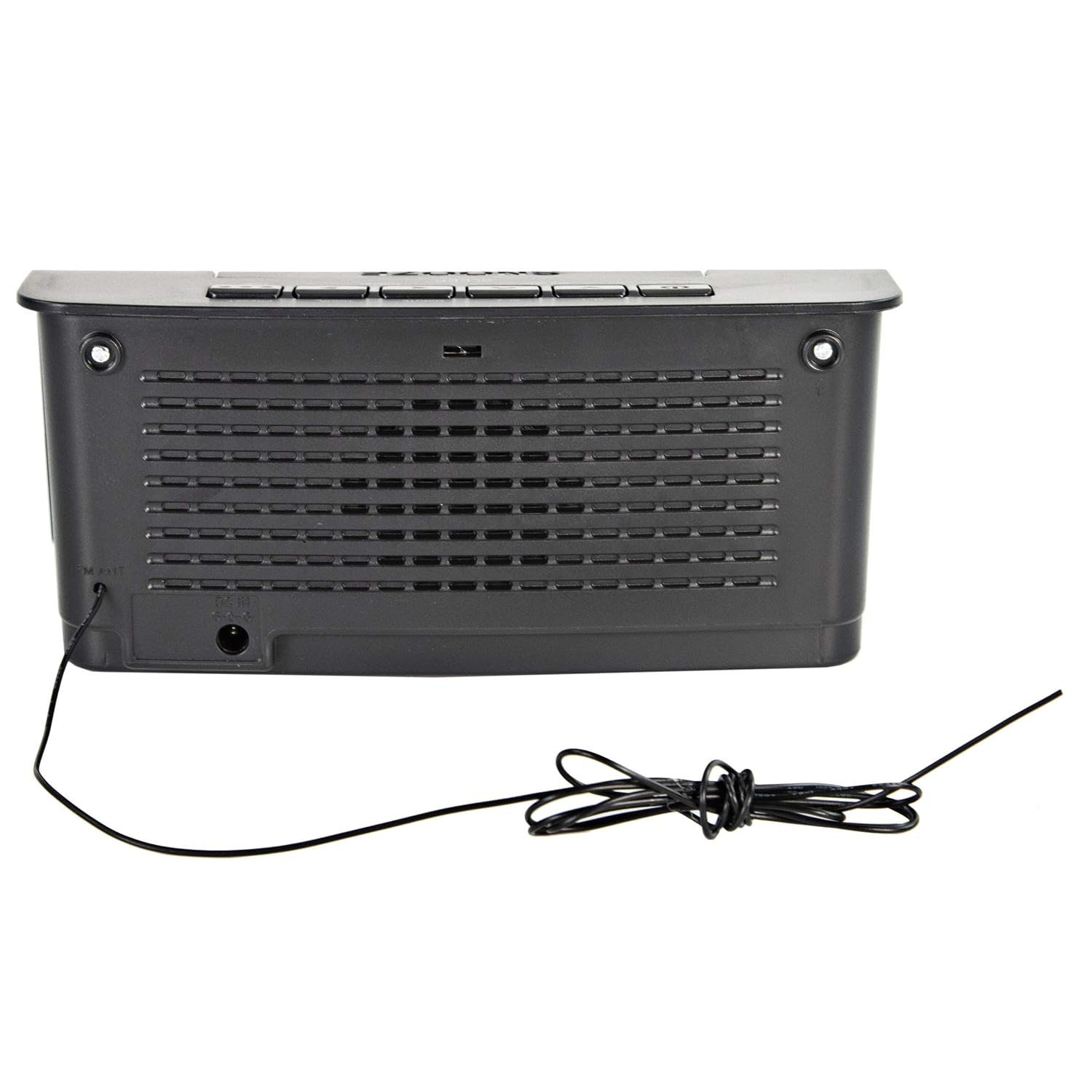
Image 2.3: Top view of the Craig CR45372 LED Alarm Clock, illustrating the control buttons. From left to right, these include the Power/Auto Scan button, AL1, AL2, Volume Down, Volume Up, Minute, Hour, Preset, and Time Set buttons. The large 'SNOOZE' bar is located at the front of the top panel.
- Power Button (⏻): Turns the unit on or off.
- AL1 / AL2 Buttons: Used to set and activate Alarm 1 and Alarm 2.
- Volume Up/Down (▲ / ▼): Adjusts the radio volume.
- Minute (◀) / Hour (▶): Used to set the time and alarm times.
- Preset Button: Used to save and recall radio stations.
- Time Set Button: Initiates time setting mode.
- Auto Scan Button: Automatically scans and saves FM radio stations.
- SNOOZE Bar: Temporarily silences the alarm for a short period.
- SLEEP Button: Activates the sleep timer function.
Rear Panel Features

Image 2.4: Rear view of the Craig CR45372 LED Alarm Clock. This image shows the built-in wire antenna for FM reception, the DC IN jack for the power adapter, and the battery compartment cover.
- FM Antenna: Wire antenna for FM radio reception. Extend fully for best reception.
- DC IN Jack: Connects to the provided AC/DC power adapter.
- Battery Compartment: Holds a 9V battery for time and alarm backup during power outages.
3. Setup
3.1 Power Connection
To power your alarm clock, connect the supplied AC/DC adapter to the DC IN jack on the rear of the unit and then plug the adapter into a standard wall outlet.

Image 3.1: The Craig CR45372 LED Alarm Clock shown with its accompanying AC/DC power adapter. The adapter is a black wall-plug type with a cable connecting to the unit.
3.2 Battery Backup Installation
For continuous timekeeping and alarm settings during a power interruption, install a 9V battery (not included) into the battery compartment located on the rear of the unit.
- Open the battery compartment cover on the rear of the unit.
- Insert one 9V battery, observing the correct polarity (+ and -).
- Close the battery compartment cover securely.
Note: The battery backup only maintains time and alarm settings. The display will not illuminate during a power outage.
4. Operating Instructions
4.1 Setting the Current Time
- Press and hold the TIME SET button. The hour digits will begin to flash.
- While holding TIME SET, press the HOUR (▶) button repeatedly to adjust the hour. Observe the PM indicator for afternoon hours.
- While holding TIME SET, press the MINUTE (◀) button repeatedly to adjust the minute.
- Release the TIME SET button to confirm the time.
4.2 Setting the Alarms (Alarm 1 and Alarm 2)
This unit features two independent alarms.
- Press and hold the AL1 button (for Alarm 1) or AL2 button (for Alarm 2). The alarm hour digits will flash.
- While holding the respective alarm button, press the HOUR (▶) button to set the alarm hour.
- While holding the respective alarm button, press the MINUTE (◀) button to set the alarm minute.
- Release the alarm button. The alarm time is now set.
- To select the alarm source (Buzzer or Radio), press the AL1 or AL2 button repeatedly (without holding) until the desired indicator (Buzzer or Radio) lights up next to the alarm number on the display.
4.3 Snooze Function
When an alarm sounds, press the large SNOOZE bar on the top of the unit. The alarm will temporarily stop and sound again after approximately 9 minutes.
4.4 Stopping the Alarm
To stop the alarm completely until the next day, press the AL1 or AL2 button once. The alarm indicator on the display will turn off.
4.5 Radio Operation
4.5.1 Turning On/Off and Volume
- Press the POWER (⏻) button to turn the radio on.
- Press the POWER (⏻) button again to turn the radio off.
- Use the VOLUME UP (▲) and VOLUME DOWN (▼) buttons to adjust the listening volume.
4.5.2 Tuning to Stations
- Manual Tuning: Press the HOUR (▶) or MINUTE (◀) buttons briefly to tune the radio frequency step by step.
- Automatic Tuning: Press and hold the HOUR (▶) or MINUTE (◀) buttons for a few seconds. The radio will scan for the next available strong station and stop.
- Auto Scan and Save: Press the AUTO SCAN button. The radio will automatically scan and save all available FM stations to preset memory locations.
4.5.3 Saving and Recalling Preset Stations
- Tune to your desired station using manual or automatic tuning.
- Press and hold the PRESET button. The preset number will flash on the display.
- Use the HOUR (▶) or MINUTE (◀) buttons to select the desired preset number (P01-P30).
- Press the PRESET button again to save the station to the selected preset number.
- To recall a preset station, briefly press the PRESET button repeatedly to cycle through the saved stations.
4.5.4 Improving FM Reception
Extend the built-in wire antenna fully and adjust its position for optimal FM radio reception.
4.6 Sleep Timer Function
The sleep timer allows the radio to play for a set duration before automatically turning off.
- While the radio is playing, press the SLEEP button repeatedly to cycle through the available sleep times (e.g., 90, 60, 30, 15 minutes, OFF).
- The 'Sleep' indicator will illuminate on the display. The radio will turn off automatically after the selected time.
5. Maintenance
5.1 Cleaning the Unit
Unplug the unit from the power outlet before cleaning. Use a soft, dry cloth to wipe the exterior surfaces. Do not use abrasive cleaners, waxes, or solvents as they may damage the finish.
5.2 Battery Replacement
If the unit experiences frequent power outages or if the time/alarm settings are not retained during a power interruption, replace the 9V backup battery. Follow the instructions in Section 3.2.
6. Troubleshooting
| Problem | Possible Cause | Solution |
|---|---|---|
| Unit does not power on. | Power adapter not connected or faulty. | Ensure the power adapter is securely plugged into the unit and a working wall outlet. |
| Alarm does not sound. | Alarm not set or turned off. Incorrect alarm source selected. | Verify alarm time is set and the alarm indicator (Buzzer/Radio) is lit. Ensure volume is audible if radio alarm is selected. |
| Poor radio reception. | FM antenna not extended or positioned correctly. Interference. | Fully extend and adjust the FM wire antenna. Move the unit away from other electronic devices that may cause interference. |
| Time/alarm settings lost during power outage. | No 9V backup battery or battery is depleted. | Install a fresh 9V battery in the battery compartment. |
7. Specifications

Image 7.1: Dimensions of the Craig CR45372 LED Alarm Clock. The image indicates a width of 16cm and a height of 12cm for the unit.
- Brand: Craig
- Model: CR45372
- Display Type: Digital LED
- Color: Black
- Special Features: Alarm, AM/FM Radio, Snooze, Sleep Timer, Battery Backup
- Power Source: AC 120V ~ 60Hz (via AC/DC adapter), 1 x 9V battery (for backup, not included)
- Radio Bands: AM/FM
- Dimensions (LxWxH): Approximately 18 x 6.8 x 9.1 cm (7.1 x 2.7 x 3.6 inches)
- Item Weight: 454 g (1 lb)
8. Warranty and Support
For warranty information or technical support, please refer to the documentation included with your purchase or contact Craig customer service directly. Keep your proof of purchase for warranty claims.
Related documentsCR45372

Ask a question about this manual
Ask about setup, troubleshooting, compatibility, parts, safety, or missing instructions. Manuals+ will review the question and use this page’s manual context to help answer it.