
1. Introduction
This manual provides comprehensive instructions for the Brondi Bravo Gold Cordless Telephone. It covers essential information regarding setup, daily operation, maintenance, and troubleshooting to ensure you get the most out of your device. Please read this manual carefully before using the telephone.
2. Product Features
- Large alphanumeric backlit display for clear visibility.
- High volume for both ringtones and listening during calls.
- Large, easy-to-press keys for simplified dialing and navigation.
- Selection of 5 polyphonic and 5 standard ringtones.
- Phonebook with 20 alphanumeric memory entries.
- Three dedicated direct memory keys (M1, M2, M3) for frequently called numbers.
- Caller ID function to display incoming call numbers (requires subscription to service).
- BOOST key for amplified listening and tone control during calls.
- High sensitivity speaker for clear audio output.
3. Setup

Image 1: Brondi Bravo Gold Cordless Telephone handset on its charging base.
3.1. Unpacking
Carefully remove all components from the packaging. Ensure all parts are present: handset, base station, power adapter, and telephone line cord.
3.2. Battery Installation
- Locate the battery compartment cover on the back of the handset.
- Slide the cover off.
- Insert the two AAA NiMH rechargeable batteries (not included, typically) into the compartment, observing the correct polarity (+ and - markings).
- Replace the battery compartment cover until it clicks securely into place.
3.3. Base Station Connection
- Connect the small end of the power adapter to the 'DC IN' port on the back of the base station.
- Plug the other end of the power adapter into a standard electrical wall outlet.
- Connect one end of the telephone line cord to the 'LINE' port on the base station.
- Plug the other end of the telephone line cord into your telephone wall jack.
3.4. Initial Charging
Place the handset onto the base station's charging cradle. Ensure the handset is seated correctly. The display on the handset should indicate that it is charging. For optimal battery performance, allow the handset to charge continuously for at least 12-15 hours before its first use, even if the display shows a full charge sooner.
4. Operating Instructions
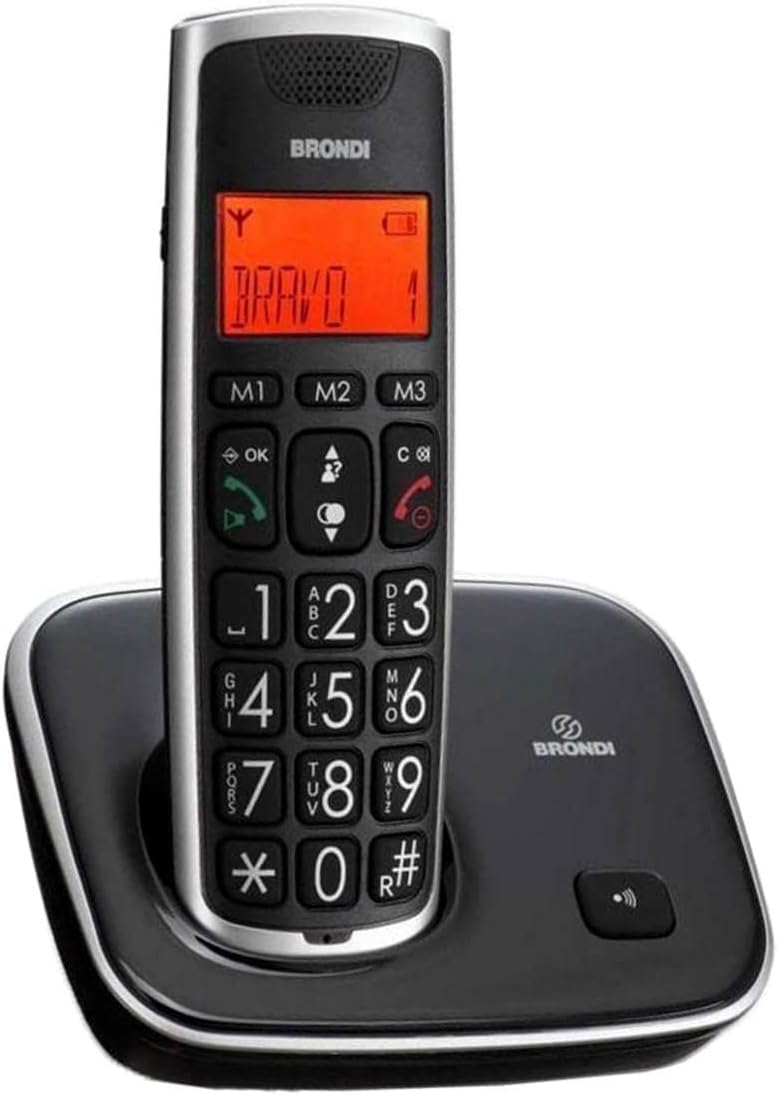
Image 2: Brondi Bravo Gold Cordless Telephone handset displaying 'BRAVO' on its screen.
4.1. Making a Call
- Pick up the handset or press the green call button (✆).
- Enter the desired phone number using the large numeric keypad.
- Press the green call button (✆) again to initiate the call.
4.2. Receiving a Call
When the telephone rings, press the green call button (✆) to answer the call.
4.3. Adjusting Volume
- During a call, use the up/down navigation buttons (often integrated with the OK button or separate arrows) to adjust the listening volume.
- To activate amplified listening, press the BOOST key during a call. Press it again to deactivate.
4.4. Using Direct Memories (M1, M2, M3)
The Brondi Bravo Gold features three direct memory keys for quick dialing of important numbers.
To Store a Number:
- Press and hold one of the direct memory keys (M1, M2, or M3) until the display prompts for input.
- Enter the phone number you wish to store using the keypad.
- Press the same direct memory key (M1, M2, or M3) again to save the number.
To Dial a Stored Number:
Simply press the desired direct memory key (M1, M2, or M3). The phone will automatically dial the stored number.
4.5. Phonebook
The phonebook allows you to store up to 20 alphanumeric entries. Access the phonebook menu via the handset's navigation buttons and display prompts to add, edit, or delete contacts.
4.6. Ringtones
You can customize your phone's ringtone. Navigate through the handset's settings menu to find the ringtone options. Choose from 5 polyphonic melodies or 5 standard ringtones.
4.7. Caller ID
If you subscribe to Caller ID service from your telephone provider, the incoming caller's number will be displayed on the handset screen before you answer the call.
5. Maintenance
5.1. Cleaning
To clean the handset and base station, use a soft, slightly damp cloth. Do not use abrasive cleaning agents, solvents, or strong chemicals, as these can damage the device's surface or internal components.
5.2. Battery Care
To ensure optimal battery life and performance, always place the handset on the base station when not in use to keep it charged. If the telephone will not be used for an extended period, it is recommended to remove the batteries from the handset to prevent leakage.
6. Troubleshooting
If you encounter issues with your Brondi Bravo Gold, please refer to the following common problems and solutions:
6.1. No Dial Tone
- Ensure the base station's power adapter is securely plugged into both the base station and a working electrical outlet.
- Verify that the telephone line cord is properly connected to the base station and the telephone wall jack.
- Check if the handset batteries are sufficiently charged. Place the handset on the base station for charging.
6.2. Cannot Make or Receive Calls
- Confirm all connections (power, telephone line) are secure.
- Ensure the handset is registered to the base station. If not, refer to the registration process in the full manual (if applicable).
- Check with your telephone service provider for any service interruptions in your area.
6.3. Poor Sound Quality
- Ensure the handset is within the operational range of the base station. Move closer to the base station if necessary.
- Check for potential interference from other electronic devices (e.g., Wi-Fi routers, microwaves) and move the base station or handset away from them.
- Clean the speaker and microphone areas on the handset if they appear obstructed.
6.4. Display Not Working
- Verify that the handset batteries are charged.
- If the issue persists, try resetting the device: Disconnect the power adapter from the base station and remove the batteries from the handset for a few minutes. Then, reinsert batteries and reconnect power.
7. Specifications
| Feature | Specification |
|---|---|
| Brand | Brondi |
| Model | Bravo Gold |
| Type | Cordless Telephone |
| Frequency | 1880 Mhz / 1900 Mhz |
| Display | Large alphanumeric, backlit |
| Ringtones | 5 polyphonic, 5 standard |
| Phonebook Capacity | 20 alphanumeric entries |
| Direct Memory Keys | 3 (M1, M2, M3) |
| Special Features | BOOST key for amplified listening, Caller ID |
| Batteries | 2 x AAA NiMH rechargeable (not included) |
| Material | Acrylonitrile Butadiene Styrene (ABS) |
| Dimensions (L x W x H) | Approx. 7 x 21 x 16 cm (Base station and handset) |
| Compatible Devices | Standard telephone networks |
8. Warranty and Support
Warranty information for the Brondi Bravo Gold Cordless Telephone is typically included with the product packaging at the time of purchase. Please refer to the documentation provided in your product box for details regarding warranty coverage and terms.
For further assistance, technical support, or to inquire about replacement parts, please visit the official Brondi website or contact their customer service department directly. Contact information can usually be found on the manufacturer's website or in the product packaging.