
1. Introduction
This manual provides instructions for the proper installation, operation, and maintenance of the Appleton JBX100L UNILET Round Outlet Box. This product is designed for use in electrical conduit systems to provide access to conductors for splicing, pulling, and making connections, as well as for mounting electrical devices.
Please read this manual thoroughly before installation and retain it for future reference. Ensure all local and national electrical codes are followed during installation.
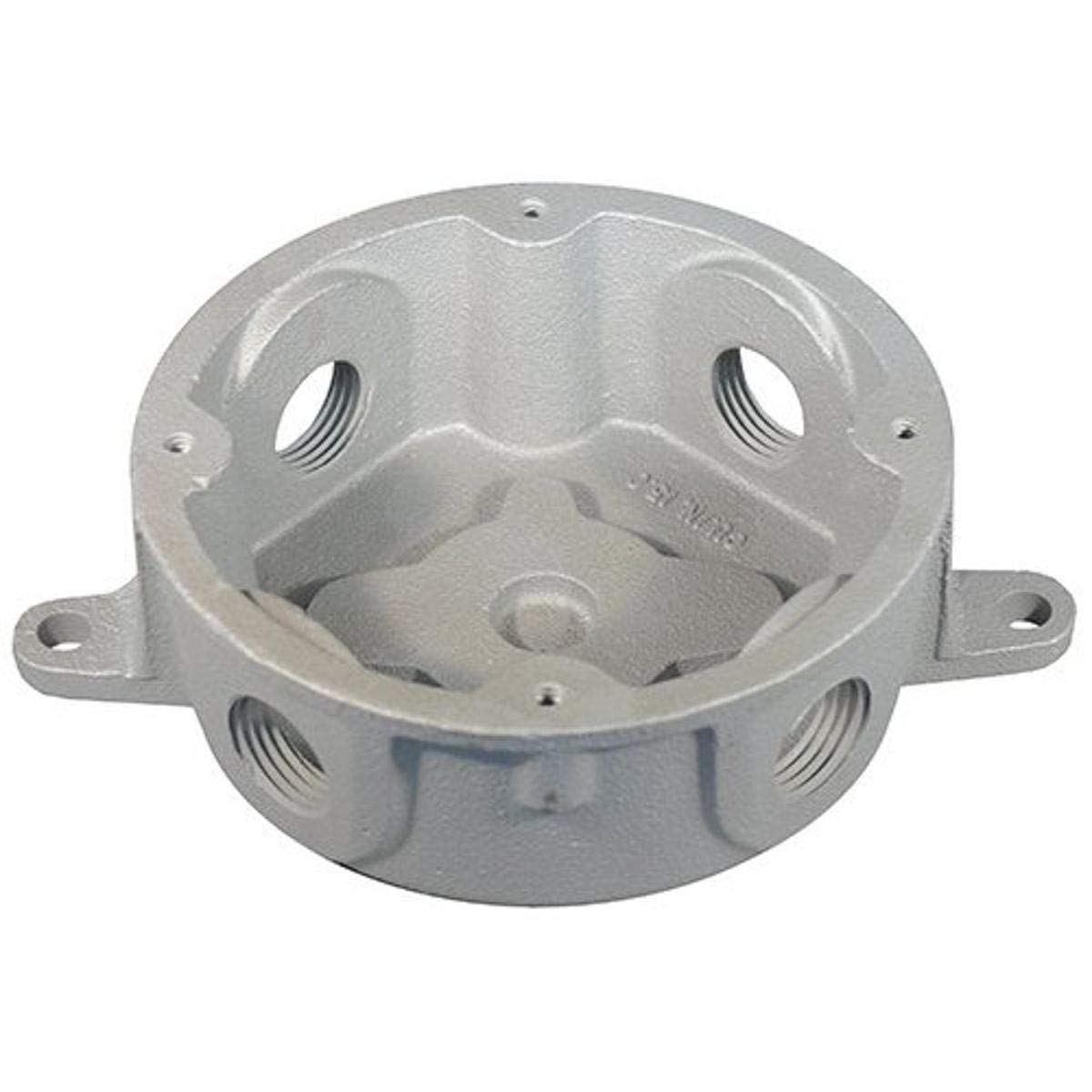
Figure 1: Appleton JBX100L UNILET Round Outlet Box. This image shows the robust construction of the round outlet box, typically made from malleable iron, designed for durability in various environments.
2. Safety Information
WARNING: Risk of electric shock. Installation must be performed by a qualified electrician in accordance with all applicable electrical codes and regulations.
- Always disconnect power at the circuit breaker or fuse box before installing or servicing any electrical equipment.
- Use only tools and equipment suitable for electrical work.
- Ensure all connections are secure and properly insulated.
- Do not install in wet locations unless specifically rated for such use.
- Inspect the product for any damage before installation. Do not install damaged components.
3. Setup & Installation
The Appleton JBX100L UNILET Round Outlet Box is designed for secure mounting and easy access within conduit systems. Follow these steps for proper installation:
- Preparation:
- Ensure power to the circuit is OFF. Verify with a voltage tester.
- Gather necessary tools: screwdriver, wire strippers, conduit wrench, mounting hardware (not included).
- Mounting:
- Position the outlet box at the desired location.
- Securely fasten the box to a structural surface using appropriate screws or bolts through the mounting holes. Ensure the box is level and stable.
- Conduit Connection:
- Connect conduits to the threaded hubs of the outlet box. Use a conduit wrench to tighten connections securely, ensuring a proper seal.
- If using flexible conduit, ensure appropriate connectors are used and tightened.
- Wiring:
- Pull conductors through the conduits into the outlet box.
- Perform necessary wire splices or connections within the box, ensuring adequate wire bending space and proper insulation.
- Connect grounding wires as required by code.
- Cover Installation:
- Once wiring is complete, install the appropriate cover (sold separately) onto the outlet box. Ensure the cover is securely fastened to maintain environmental protection and prevent accidental contact with live parts.
- Final Check:
- Double-check all connections and ensure no bare wires are exposed.
- Restore power to the circuit.
4. Operation
The Appleton JBX100L UNILET Round Outlet Box is a passive component designed to house electrical connections and devices within a conduit system. Its primary function is to:
- Provide a safe enclosure for wire splices and connections.
- Allow for changes in direction of conduit runs.
- Facilitate pulling of conductors through the conduit system.
- Offer a mounting point for electrical devices such as switches, receptacles, or light fixtures (with appropriate covers).
Once properly installed, the box operates by maintaining the integrity of the electrical system, protecting internal components from environmental factors and physical damage.
5. Maintenance
The Appleton JBX100L UNILET Round Outlet Box requires minimal maintenance. Regular inspections are recommended to ensure continued safe and reliable operation.
- Periodic Inspection: Annually, or more frequently in harsh environments, inspect the box and its connections for signs of wear, corrosion, or damage.
- Tightness Check: Ensure all conduit connections and cover screws remain tight. Loose connections can lead to electrical hazards.
- Cleaning: If necessary, clean the exterior of the box with a damp cloth. Do not use abrasive cleaners or solvents that could damage the finish. Ensure power is disconnected before cleaning.
- Damage: If the box or its cover becomes damaged, disconnect power immediately and replace the affected components with genuine Appleton parts or equivalent.
6. Troubleshooting
Most issues related to an outlet box stem from improper installation or external factors. Here are some common scenarios and troubleshooting steps:
| Problem | Possible Cause | Solution |
|---|---|---|
| Loose cover or conduit connection | Vibration, improper initial tightening, or material expansion/contraction. | WARNING: Disconnect power. Tighten all screws and conduit connections securely. |
| Water or moisture inside the box | Improperly sealed conduit connections, damaged gasket on cover, or unsuitable box for environment. | WARNING: Disconnect power. Inspect conduit connections and cover gasket. Replace damaged gaskets or re-seal connections. Ensure the box's NEMA rating is appropriate for the environment. |
| Visible damage to the box (cracks, dents) | Physical impact or excessive stress. | WARNING: Disconnect power. The box's integrity is compromised. Replace the damaged box immediately. |
| Electrical issues (e.g., short circuits, intermittent power) | Loose wire connections, damaged insulation, or incorrect wiring within the box. | WARNING: Disconnect power. Have a qualified electrician inspect all wiring and connections inside the box. |
If you are unable to resolve an issue, contact a qualified electrician or Appleton customer support.
7. Specifications
| Feature | Detail |
|---|---|
| Model Number | JBX100L |
| Brand | Appleton |
| Type | UNILET Round Outlet Box |
| Material | Malleable Iron (typical for Appleton UNILET boxes) |
| Dimensions (Approx.) | 5 x 5 x 9 inches (Product Dimensions) |
| Item Weight | 2 Pounds |
| UPC | 781381465557 |
| Style | Compact |
Note: Specifications are subject to change without notice. Refer to the product packaging or Appleton's official website for the most current information.
8. Warranty Information
Appleton products are manufactured to high standards and are typically covered by a manufacturer's warranty against defects in materials and workmanship. Specific warranty terms and conditions may vary by region and product type.
For detailed warranty information, please refer to the documentation included with your purchase or visit the official Appleton website. Retain your proof of purchase for warranty claims.
9. Customer Support
If you have any questions regarding the installation, operation, or maintenance of your Appleton JBX100L UNILET Round Outlet Box, please contact Appleton customer support.
Appleton Official Website: www.emerson.com/en-us/automation/brands/appleton
For technical assistance or to locate a distributor, please visit the website or consult your local Appleton representative.