
1. Introduction
The uxcell KSD301 Thermostat Temperature Control Switch is designed for temperature control and protection in various household electric appliances. This normally closed (N.C.) switch remains closed, allowing current to flow, until its surface temperature reaches 135°C. Upon reaching this temperature, the switch automatically opens, interrupting the circuit. Once the temperature drops, the switch automatically resets and closes again.
These thermostats are general-purpose, automatic reset devices known for their low cost, large capacity, and suitability for minute current applications. They are commonly used in appliances such as microwave ovens, irons, refrigerators, electronic ovens, heating units, coffeepots, and water heaters.

Figure 1: uxcell KSD301 Thermostat Temperature Control Switches (5 Pcs). This image displays five KSD301 thermostat switches, highlighting their compact design and terminal connections. The text overlay indicates they are 250V 10A 135°C N.C. switches.
2. Safety Information
WARNING: Electrical shock hazard. Always disconnect power before installing or servicing this device. Installation should be performed by a qualified professional if you are not familiar with electrical wiring.
- Ensure the power supply matches the voltage and current ratings of the thermostat (250V 10A).
- Do not exceed the specified electrical ratings to prevent damage or fire.
- Avoid exposing the thermostat to moisture or corrosive environments unless specifically designed for such conditions.
- Handle with care to prevent physical damage to the device.
3. Product Overview
The KSD301 thermostat features a double metal chip design, providing a speed dynamic type action that is sensitive, reliable, and ensures a stable action temperature. Its construction is designed for a long service life with no arc phenomenon during switching.
Key Features:
- Model: KSD301
- Action Type: Normally Closed (N.C.) - Circuit is closed when cold, opens when hot.
- Action Temperature: 135°C
- Voltage/Current Rating: 250V 10A
- Automatic Reset: Resets automatically once temperature drops.
- Material: Metal, Plastic
- Application: Suitable for various household electric appliances requiring temperature control or thermal protection.
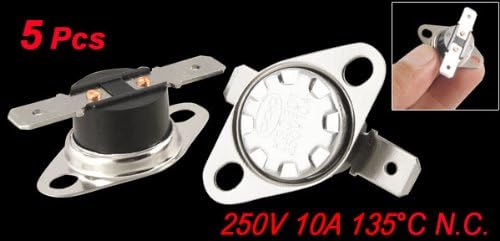
Figure 2: Various KSD301 Thermostat Switches. This image displays several KSD301 thermostat switches, illustrating the different base colors (black and white) and the metal mounting flanges with electrical terminals.
4. Setup and Installation
Proper installation is crucial for the safe and effective operation of the KSD301 thermostat. Always ensure power is disconnected before beginning any installation work.
Installation Steps:
- Disconnect Power: Locate the circuit breaker or fuse box and turn off the power to the appliance or circuit where the thermostat will be installed. Verify power is off using a voltage tester.
- Identify Mounting Location: Choose a location where the thermostat can accurately sense the temperature of the component or area it is intended to protect. The flat metal surface of the thermostat should be in good thermal contact with the surface to be monitored.
- Mount the Thermostat: Secure the KSD301 thermostat using its mounting holes. Ensure it is firmly attached to allow for efficient heat transfer.
- Wire the Thermostat: Connect the thermostat in series with the load (e.g., heating element, motor) that it is intended to control or protect. For a Normally Closed (N.C.) switch, the circuit will be complete until the activation temperature is reached. Use appropriate gauge wiring for the 250V 10A rating.
- Secure Connections: Ensure all electrical connections are tight and properly insulated to prevent short circuits or loose connections.
- Restore Power and Test: Once installation is complete and all connections are secure, restore power to the circuit. Monitor the appliance to ensure the thermostat functions as expected, opening the circuit when the temperature reaches 135°C and closing when it cools down.
If you are unsure about any step of the installation process, consult a qualified electrician or appliance repair technician.
5. Operating Instructions
The KSD301 thermostat operates automatically based on temperature. As a Normally Closed (N.C.) device, its operation is straightforward:
- Normal Operation (Below 135°C): When the ambient temperature or the temperature of the surface it is monitoring is below 135°C, the internal contacts of the KSD301 switch remain closed. This allows electrical current to flow through the circuit, powering the connected appliance or component.
- Temperature Exceeds 135°C: If the temperature at the thermostat's sensing surface reaches or exceeds 135°C, the bimetallic disc inside the switch rapidly deforms, causing the electrical contacts to open. This action interrupts the circuit, cutting off power to the connected appliance or component, thereby providing thermal protection.
- Automatic Reset (Temperature Drops): Once the temperature at the thermostat's sensing surface cools down below 135°C (typically with a hysteresis of a few degrees), the bimetallic disc returns to its original shape. This causes the electrical contacts to close automatically, restoring power to the circuit and allowing the appliance to resume operation.
This automatic reset feature makes the KSD301 suitable for applications where continuous monitoring and automatic thermal protection are required without manual intervention.
Video 1: KSD301 Thermostat Temperature Control Switch Overview. This video provides a visual overview of the KSD301 thermostat, demonstrating its physical characteristics and highlighting its general purpose, automatic reset, and various specifications. It also shows examples of its application in microwave, oven, coffee maker, and gas furnace repair.
6. Maintenance
The KSD301 thermostat is designed for reliable, maintenance-free operation. However, periodic inspection can help ensure its longevity and proper function.
- Visual Inspection: Periodically check the thermostat for any signs of physical damage, corrosion, or loose connections.
- Cleanliness: Ensure the area around the thermostat is free from dust, debris, or any obstructions that could interfere with proper heat sensing. Gently clean the exterior with a dry, soft cloth if necessary.
- Connection Integrity: Verify that the electrical connections remain secure and free from oxidation.
- Thermal Contact: Confirm that the thermostat maintains good thermal contact with the surface it is monitoring.
Do not attempt to disassemble the thermostat, as it contains no user-serviceable parts and doing so may void any implied warranty.
7. Troubleshooting
If the KSD301 thermostat is not functioning as expected, consider the following troubleshooting steps:
Common Issues and Solutions:
- Appliance Not Powering On (Thermostat Always Open):
- Check Temperature: Ensure the ambient temperature is below 135°C. If the thermostat is still hot from previous operation, it may need to cool down to reset.
- Verify Connections: Inspect wiring for loose or corroded connections.
- Test Thermostat: With power disconnected, use a multimeter to check for continuity across the thermostat terminals when it is cold (below 135°C). A Normally Closed (N.C.) switch should show continuity. If not, the thermostat may be faulty and require replacement.
- Appliance Overheating (Thermostat Not Opening):
- Check Thermal Contact: Ensure the thermostat is securely mounted and has good thermal contact with the surface it is monitoring. Poor contact can lead to inaccurate temperature sensing.
- Verify Temperature: Confirm that the actual temperature at the thermostat's location is reaching 135°C.
- Test Thermostat: With power disconnected, heat the thermostat carefully (e.g., with a heat gun, ensuring not to exceed its rating) and use a multimeter to check for an open circuit across its terminals once 135°C is reached. If it remains closed, the thermostat is faulty and needs replacement.
- Intermittent Operation:
- Loose Connections: Re-check all wiring connections for tightness.
- Fluctuating Temperature: The thermostat might be operating at its set point, cycling on and off as the temperature fluctuates around 135°C. This is normal operation.
- Internal Fault: If intermittent operation is erratic and not temperature-related, the thermostat may have an internal fault and should be replaced.
Always disconnect power before performing any diagnostic or repair work. If the problem persists after troubleshooting, consult a qualified technician.
8. Specifications
| Feature | Specification |
|---|---|
| Product Name | Temperature Switch Thermostat |
| Model No. | KSD301 |
| Action Type | Normal Close (N.C.) |
| Action Temperature | 135°C |
| Voltage | 250V |
| Current | 10A |
| Circuit Resistance | 50 Mohm |
| Insulation Resistance | 100 Mohm |
| Size (Each) | 3.4 x 1.2cm / 1.3" x 0.47" (L*H) |
| Terminal Width | 6.35mm / 0.25" |
| Mounting Hole Spacing | 2.4cm / 0.94" |
| Material | Metal, Plastic |
| Color | Black, Silver Tone |
| Net Weight (per piece) | Approx. 5g (25g for 5 pcs) |
| Manufacturer | uxcell |
| Brand | sourcing map |
9. Warranty Information
This uxcell KSD301 Thermostat Temperature Control Switch is covered by the standard manufacturer's warranty against defects in materials and workmanship. The specific terms and duration of the warranty may vary. Please retain your proof of purchase for any warranty claims.
The warranty typically covers manufacturing defects under normal use and does not cover damage resulting from improper installation, misuse, abuse, unauthorized modifications, or external causes such as power surges or accidents.
10. Customer Support
For technical assistance, troubleshooting guidance, or information regarding warranty claims, please contact your retailer or the manufacturer directly.
When contacting support, please have the following information ready:
- Product Model: KSD301
- Date of Purchase
- Description of the issue
Manufacturer: uxcell
For more information, you may visit the sourcing map brand page.