
1. Product Overview
The CUTLER HAMMER HT8A is a magnetic circuit breaker designed for reliable electrical circuit protection. This device is engineered to detect and interrupt overcurrent conditions, safeguarding electrical systems and equipment from damage. It serves as a direct replacement for the CH PB1A model, ensuring compatibility and ease of upgrade in existing installations.
This manual provides essential information for the safe and effective installation, operation, and maintenance of your HT8A circuit breaker.
2. Safety Information
WARNING: Risk of Electric Shock or Fire.
- Installation and servicing of this circuit breaker must be performed by qualified electrical personnel only.
- Always disconnect power at the main service panel before working on or near electrical circuits. Failure to do so can result in serious injury or death.
- Ensure all local and national electrical codes are followed during installation.
- Do not use this device if it appears damaged.
- This circuit breaker is designed for specific applications. Verify that the voltage, current, and frequency ratings match your electrical system requirements.
3. Product Components
The HT8A circuit breaker features a robust design for durability and performance. Key components include:
- Terminal Screws: For secure electrical connections.
- Breaker Body: Transparent housing allowing visual inspection of internal components.
- Reset Button/Lever: Mechanism to reset the breaker after a trip.
- Mounting Points: For secure installation within an electrical panel.
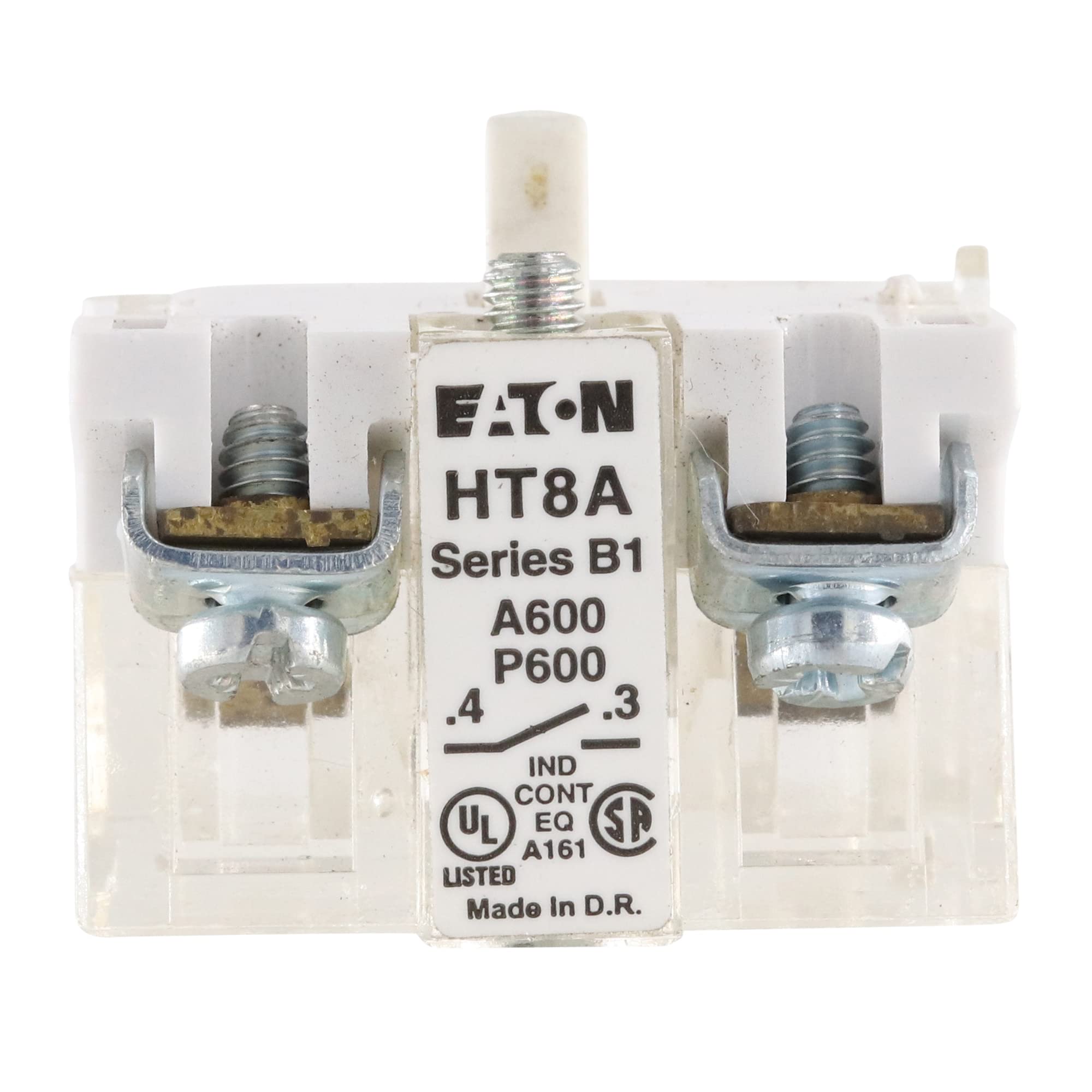
Figure 1: Front view of the CUTLER HAMMER HT8A Magnetic Circuit Breaker. This image displays the transparent housing, terminal screws for wiring connections, and visible internal components. The model number 'HT8A' is clearly marked on the label.

Figure 2: Side view of the CUTLER HAMMER HT8A Magnetic Circuit Breaker. This perspective highlights the terminal screws and the white reset button/lever located on the side of the transparent housing.
4. Setup and Installation
Installation of the HT8A circuit breaker should only be performed by a qualified electrician in accordance with all applicable electrical codes and standards.
4.1 Pre-Installation Checks
- Verify that the HT8A's ratings (voltage, current) match the requirements of your electrical panel and the circuit it will protect.
- Ensure the main power to the electrical panel is OFF and locked out before beginning any work.
- Inspect the circuit breaker for any signs of physical damage. Do not install a damaged unit.
4.2 Installation Steps
- With the main power OFF, locate the appropriate slot in your electrical panel for the new circuit breaker.
- Carefully align the HT8A circuit breaker with the bus bar and mounting clips in the panel.
- Press firmly until the breaker is securely seated and makes full contact with the bus bar.
- Connect the circuit wire(s) to the appropriate terminal screw(s) on the breaker. Ensure the wire is stripped to the correct length and the screw is tightened to the manufacturer's specified torque (refer to panel documentation for torque specifications).
- Verify all connections are secure and there are no loose wires.
- Close the electrical panel cover.
- Restore power to the main service panel.
5. Operating Instructions
The HT8A circuit breaker operates automatically to protect your electrical circuits. Under normal conditions, the breaker will remain in the ON position, allowing current to flow.
5.1 Turning ON/OFF
- To turn a circuit ON, push the breaker's lever or button to the ON position.
- To turn a circuit OFF, push the breaker's lever or button to the OFF position.
5.2 Resetting a Tripped Breaker
If an overload or short circuit occurs, the HT8A circuit breaker will automatically trip to the OFF position (or an intermediate TRIP position, depending on the design) to protect the circuit. To reset a tripped breaker:
- Identify the Cause: Before resetting, try to determine what caused the breaker to trip (e.g., too many appliances on one circuit, a faulty appliance). Unplug or turn off any devices on the affected circuit.
- Fully OFF: If the breaker is in an intermediate TRIP position, push the lever or button firmly to the full OFF position first.
- Reset to ON: Then, push the lever or button firmly to the ON position.
- If the breaker immediately trips again, do not attempt to reset it repeatedly. This indicates a persistent electrical problem that requires professional attention.
6. Maintenance
The CUTLER HAMMER HT8A magnetic circuit breaker is designed for minimal maintenance. Regular inspections are recommended to ensure continued safe operation.
- Visual Inspection: Periodically inspect the breaker for any signs of physical damage, discoloration, or loose connections.
- Cleanliness: Ensure the area around the circuit breaker within the electrical panel is free from dust, debris, and moisture.
- Professional Check: Consider having a qualified electrician inspect your electrical panel and circuit breakers every few years, especially if you experience frequent tripping or other electrical issues.
Do not attempt to open or repair the circuit breaker yourself. There are no user-serviceable parts inside.
7. Troubleshooting
This section addresses common issues you might encounter with your circuit breaker.
7.1 Breaker Trips Frequently
- Overload: The most common cause. Too many devices are drawing power from the circuit. Unplug some devices and try resetting the breaker.
- Short Circuit: A direct connection between live and neutral/ground wires. This is a serious issue. Disconnect all devices from the circuit. If the breaker still trips, contact a qualified electrician immediately.
- Ground Fault: Current leaking to the ground. Similar to a short circuit, requires professional diagnosis.
- Faulty Appliance: A defective appliance connected to the circuit could be causing the trip. Unplug appliances one by one to identify the culprit.
- Defective Breaker: In rare cases, the breaker itself might be faulty. If all other causes are ruled out, a qualified electrician can test and replace the breaker.
7.2 Breaker Does Not Reset
- Ensure you are pushing the lever/button firmly to the full OFF position before attempting to push it to ON.
- If there is a persistent fault (overload, short, ground fault) on the circuit, the breaker will not stay in the ON position. Address the underlying electrical issue.
- If the breaker is physically stuck or damaged, it needs to be replaced by a qualified electrician.
For any persistent or complex electrical issues, always consult a qualified and licensed electrician.
8. Specifications
| Attribute | Value |
|---|---|
| Manufacturer | Eaton Cutler-Hammer |
| Part Number | HT8A |
| Item Model Number | CHHT8A |
| Product Dimensions | 5 x 10 x 8 inches |
| Item Weight | 1.6 ounces |
| Color | Black |
| Finish | Black |
| Power Source | Wired Electric |
| Item Package Quantity | 1 |
| Number Of Pieces | 1 |
| Measurement System | Metric |
| Batteries Included? | No |
| Batteries Required? | No |
| Date First Available | January 1, 2016 |
9. Warranty and Support
The CUTLER HAMMER HT8A Magnetic Circuit Breaker comes with a 1-year manufacturer's warranty from the date of purchase. This warranty covers defects in materials and workmanship under normal use.
For warranty claims, technical support, or further assistance, please contact Eaton Cutler-Hammer customer service directly. Keep your proof of purchase for warranty validation.
Please note that the warranty may be voided if the product is improperly installed, misused, or modified without authorization.