
Introduction
This manual provides detailed instructions for the setup, operation, maintenance, and troubleshooting of your Nortel Meridian M2616D Telephone with Display. Please read this guide thoroughly to ensure proper use and to maximize the functionality of your device.
Product Overview
The Nortel Meridian M2616D is a corded telephone designed for office environments, featuring a display and handsfree capabilities. It is equipped with programmable buttons for enhanced efficiency.
Key Features:
- 16 programmable buttons
- Handsfree operation
- Integrated display
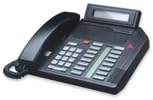
Image of the Nortel Meridian M2616D telephone, showing its black casing, keypad, 16 programmable buttons, and adjustable display.
Setup
Follow these steps to set up your Nortel Meridian M2616D telephone:
- Unpack the Telephone: Carefully remove all components from the packaging, including the telephone base, handset, coiled handset cord, line cord, and any documentation.
- Connect the Handset: Plug one end of the coiled handset cord into the handset and the other end into the designated port on the telephone base (usually marked with a handset icon).
- Connect the Line Cord: Plug one end of the line cord into the LINE port on the telephone base and the other end into a standard telephone wall jack.
- Power Connection (if applicable): If your model requires external power, connect the power adapter to the telephone base and then to a power outlet.
- Initial Check: Lift the handset or press the handsfree button to ensure you hear a dial tone. The display should also illuminate and show basic information.
Operating Instructions
Making a Call:
- Lift the handset or press the Handsfree button.
- Listen for a dial tone.
- Dial the desired telephone number using the keypad.
- To end the call, replace the handset or press the Handsfree button again.
Receiving a Call:
- When the telephone rings, lift the handset or press the Handsfree button to answer.
- To end the call, replace the handset or press the Handsfree button.
Using Programmable Buttons:
Your M2616D telephone features 16 programmable buttons. These buttons can be configured for speed dial, line appearances, or feature access codes. Consult your system administrator for specific programming instructions relevant to your office system.
Display Functions:
The integrated display provides information such as caller ID (if subscribed and available), call duration, and menu options. Navigate through menu options using the buttons adjacent to the display, if present, or specific function keys as indicated by your system.
Maintenance
Proper care ensures the longevity and optimal performance of your telephone.
Cleaning:
- Disconnect the telephone from the wall jack before cleaning.
- Use a soft, damp cloth to wipe the exterior surfaces.
- Do not use abrasive cleaners, waxes, or solvents, as these can damage the finish.
- Avoid spraying liquids directly onto the telephone.
General Care:
- Keep the telephone away from direct sunlight, heat sources, and excessive moisture.
- Avoid dropping the telephone or subjecting it to strong impacts.
- Ensure cords are not tangled or pinched to prevent damage.
Troubleshooting
If you encounter issues with your Nortel Meridian M2616D, refer to the following common problems and solutions:
- No Dial Tone:
- Check that all cords (handset and line cord) are securely connected.
- Test the wall jack with another working telephone to rule out a line issue.
- If using an external power adapter, ensure it is properly connected and receiving power.
- Display Not Working:
- Verify the telephone has power (if applicable).
- Ensure the telephone is properly connected to the phone line.
- Cannot Make/Receive Calls:
- Confirm there is a dial tone.
- Check if the line is busy or if there are any service interruptions from your provider.
- Ensure the correct number is being dialed.
- Handsfree Not Working:
- Press the Handsfree button firmly.
- Check the volume settings.
If the problem persists after trying these solutions, contact your system administrator or technical support.
Specifications
| Feature | Specification |
|---|---|
| Brand | Nortel |
| Model | M2616D |
| Telephone Type | Corded |
| Dialer Type | Single Keypad |
| Multiline Operation | Multi-Line Operation |
| Item Weight | 2 pounds |
| Package Dimensions | 11.8 x 11.4 x 5 inches |
| Color | Black |
| Date First Available | February 6, 2012 |
Warranty and Support
The Nortel Meridian M2616D Telephone comes with an industry-leading 3-year warranty, providing assurance for your investment. For warranty claims or technical support, please refer to the contact information provided by your vendor or system administrator. Keep your purchase receipt as proof of purchase.