
Introduction
The Micromax X266 is a feature phone designed for ease of use and multimedia enjoyment. Its slim and sleek design offers a comfortable grip, while its modular body and rounded edges contribute to its stylish appearance. This device is equipped with a built-in Yamaha audio amplifier and dual speakers for an enhanced audio experience, including a stereo FM radio. It supports dual SIM cards, allowing for flexible network usage, and offers expandable memory up to 8GB. The integrated Opera Mini web browser provides basic internet access.
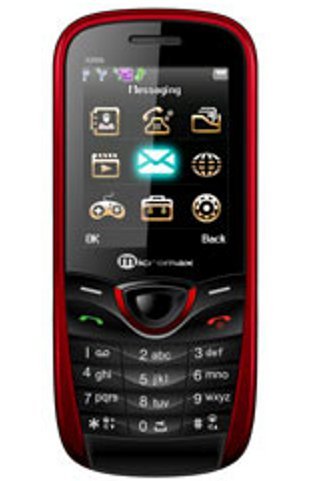
Image: Front view of the Micromax X266 mobile phone, showcasing its red and black design, display screen with application icons, and the physical keypad below.
Setup
What's in the Box
Upon unboxing your Micromax X266, please ensure all the following items are present:
- Mobile phone
- Battery
- Transceiver
- Standard Charger
- Handsfree Kit
- Data Cable
- User Guide
- Warranty Card
- Service Guide
Battery Installation and Charging
- Gently remove the back cover of the phone.
- Align the battery contacts with the terminals inside the battery compartment and insert the battery.
- Replace the back cover until it clicks into place.
- Connect the standard charger to the phone's charging port.
- Plug the charger into a power outlet. Allow the phone to charge fully before first use.
SIM Card and Memory Card Installation
- With the back cover and battery removed, locate the SIM card slots. The Micromax X266 supports dual SIM cards.
- Insert your SIM card(s) into the designated slot(s) with the gold contacts facing down.
- If using a memory card (up to 8GB), insert it into the microSD card slot.
- Reinsert the battery and replace the back cover.
Operating Instructions
Basic Phone Functions
- Power On/Off: Press and hold the Power/End Call key.
- Making Calls: Enter the phone number using the keypad and press the Call key (green button).
- Answering Calls: Press the Call key when the phone rings.
- Sending SMS: Navigate to 'Messaging', select 'Write message', compose your text, and send.
- Dual SIM Management: Access SIM settings from the main menu to manage call and message preferences for each SIM.
Multimedia Features
- Camera: Access the 1.3MP primary camera from the main menu. Use it to capture photos and record videos.
- FM Radio: Plug in the handsfree kit (which acts as an antenna) and navigate to the FM Radio application to listen to stereo radio broadcasts.
- Video Player: Use the built-in video player to watch supported video formats stored on your phone or memory card.
- Music Player: Play audio files stored on your device. The Yamaha audio amplifier and dual speakers enhance the sound quality.
Connectivity
- Bluetooth: Enable Bluetooth from the settings menu to connect with compatible devices such as headsets or for file transfer.
- Opera Mini Browser: Access the internet through the pre-installed Opera Mini web browser. Note that data charges may apply based on your network provider.
Maintenance
- Cleaning: Use a soft, dry cloth to clean the phone's exterior. Avoid using liquid cleaners or abrasive materials.
- Battery Care: To prolong battery life, avoid exposing the phone to extreme temperatures. Do not overcharge the battery.
- Storage: Store the phone in a cool, dry place away from direct sunlight and moisture when not in use for extended periods.
- Software Updates: Check the manufacturer's website or service centers for any available software updates to ensure optimal performance.
Troubleshooting
| Problem | Possible Solution |
|---|---|
| Phone does not power on | Ensure the battery is correctly installed and fully charged. Try charging the phone for at least 30 minutes. |
| No network signal | Check if SIM card(s) are properly inserted. Move to an area with better network coverage. Contact your service provider if the issue persists. |
| Cannot make/receive calls | Verify network signal strength. Check if call barring or flight mode is enabled. Ensure sufficient balance on your SIM card. |
| Battery drains quickly | Reduce screen brightness. Close unused applications. Limit background data usage. Consider replacing the battery if it's old. |
| Memory full | Delete unnecessary files, messages, or applications. Transfer media to a computer or install a larger memory card (up to 8GB). |
Specifications
| Feature | Detail |
|---|---|
| Model Number | X266 |
| Product Dimensions | 11.6 x 1.1 x 5 cm |
| Item Weight | 95 g |
| Display Technology | LCD |
| Screen Size | 2.2 Inches |
| Resolution | 176 x 220 pixels |
| Primary Camera | 1.3MP with video capture |
| Memory Expandable Up To | 8GB |
| SIM Support | Dual SIM (GSM + GSM) |
| Wireless Communication | Bluetooth |
| Connectivity Technologies | (900/1800 MHz), GSM |
| Special Features | Dual SIM, FM Radio, Video Player |
| Battery Capacity | 1100mAH |
| Talk-time (2G) | 6 hours (360 Minutes) |
| Standby Time (2G) | 120 hours |
| Form Factor | Bar |
Warranty Information
The Micromax X266 comes with a 1-year manufacturer warranty for the device itself, valid from the date of purchase. In-box accessories, including the battery, are covered by a 6-month manufacturer warranty from the date of purchase. Please retain your purchase receipt and warranty card for any warranty claims.
Support
For further assistance, technical support, or service inquiries regarding your Micromax X266, please visit the official Micromax website or contact their customer service. You can find more information and support resources on the Micromax Brand Store on Amazon or the manufacturer's official support channels.