
Introduction
The Eton American Red Cross FRX2 is a versatile, multi-powered emergency weather radio designed to keep you informed and connected during emergencies. It features AM/FM and NOAA weather band reception, multiple charging options including solar and hand turbine, an LED flashlight, and a USB port for charging small devices. This manual provides detailed instructions for the proper setup, operation, and maintenance of your FRX2 radio.

Figure 1: Eton American Red Cross FRX2 Emergency Weather Radio
Safety Information
- Do not expose the unit to extreme temperatures, direct sunlight for prolonged periods, or high humidity.
- Keep the unit away from water and other liquids.
- Do not attempt to disassemble or modify the radio. This will void the warranty and may cause damage or injury.
- Use only the specified charging methods (USB, solar, hand crank).
- Ensure the hand turbine crank is fully retracted when not in use to prevent damage.
- Dispose of batteries according to local regulations.
Product Overview
Familiarize yourself with the various components and controls of your FRX2 radio.
Front Panel

Figure 2: Front Panel Controls
- Tuning Dial: Used to select AM, FM, or Weather Band frequencies.
- Volume Control: Adjusts the audio output level.
- Band Selector: Switches between AM, FM, and Weather Band (WB) modes.
- LED Indicator: Shows charging status and alert status.
Side and Back Panels

Figure 3: Side Panel with Solar Panel
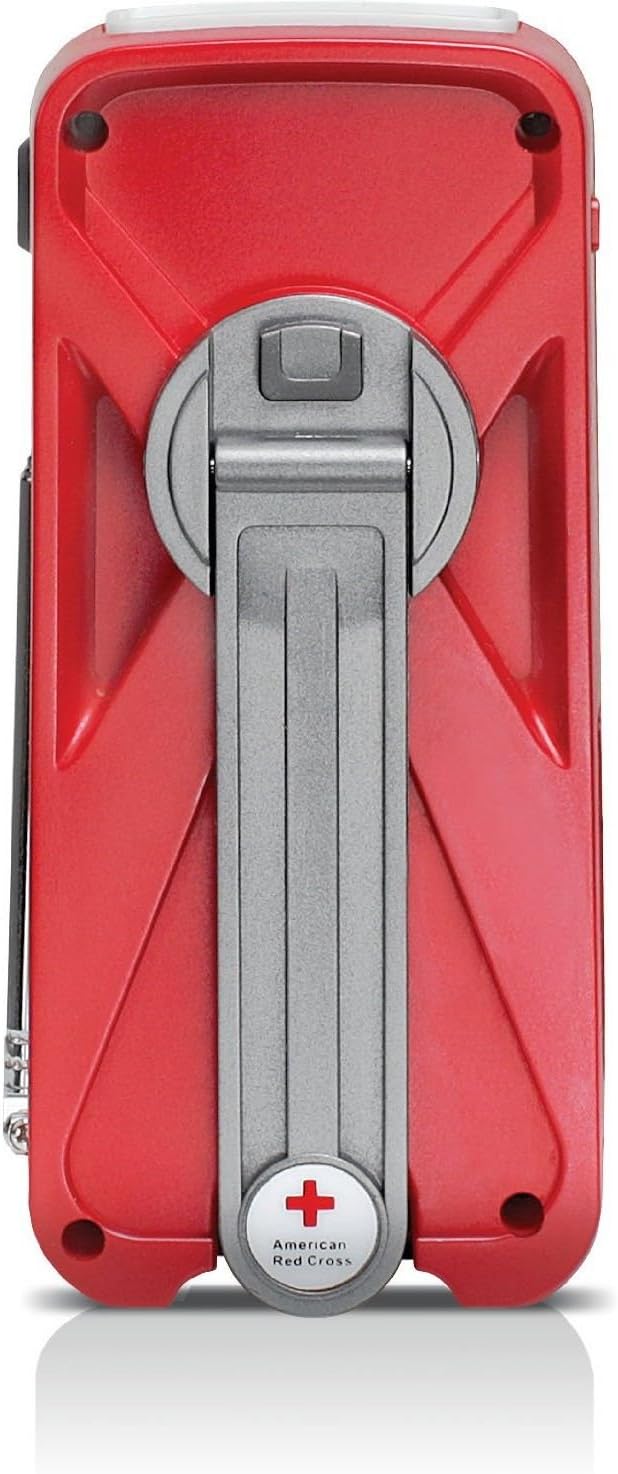
Figure 4: Back Panel with Hand Turbine Crank
- Solar Panel: Located on the top/side for solar charging.
- Hand Turbine Crank: Fold-out crank on the back for manual power generation.
- Telescopic Antenna: Extendable antenna for improved radio reception.
- Flashlight: Integrated LED flashlight.
Ports and Connectors
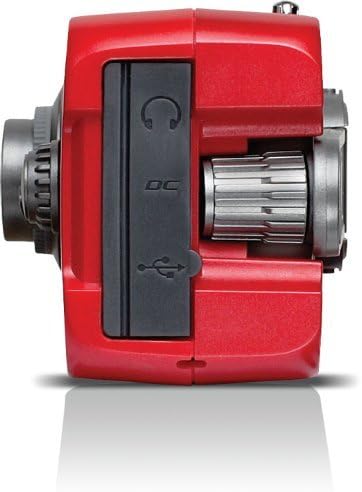
Figure 5: Top Panel Ports
- Mini-USB DC Input: For charging the internal battery via an AC adapter (not included) or computer USB port.
- USB Output: For charging external devices like smartphones.
- Headphone Jack: For private listening.
Setup
Initial Charging
Before first use, fully charge the internal battery using one of the following methods:
- USB Charging: Connect the supplied USB cable to the radio's Mini-USB DC input and to a powered USB port (e.g., computer, USB wall adapter). The charging indicator LED will illuminate.
- Solar Charging: Place the radio with the solar panel facing direct sunlight. The solar panel charges the internal battery. This method is slower and best for maintaining charge or trickle charging.
- Hand Turbine Charging: Unfold the hand turbine crank and rotate it clockwise or counter-clockwise for 1-2 minutes. This provides power for immediate use or a quick boost to the internal battery.
Battery Information
The FRX2 is powered by a built-in 1000mAh rechargeable internal battery. This battery is designed for long-term use and is not user-replaceable. For optimal performance, ensure the battery is regularly charged.
Operating Instructions
Power On/Off
Rotate the Volume Control knob clockwise to turn the radio on. Rotate it counter-clockwise until it clicks to turn the radio off.
Radio Tuning (AM/FM/Weather Band)
- Extend the telescopic antenna for optimal reception.
- Use the Band Selector switch to choose between AM, FM, or WB (Weather Band).
- Rotate the Tuning Dial to find your desired station. The tuning indicator LED will light up when a strong signal is received.
- Adjust the Volume Control to a comfortable listening level.
NOAA Weather Alert Function
In WB mode, the radio can receive NOAA weather alerts. When an alert is broadcast, the radio will automatically switch from standby to the alert broadcast. Ensure the radio is in WB mode to receive these alerts.
Flashlight Operation
Press the flashlight button to cycle through different modes: On, SOS (flashing), and Off. The flashlight provides illumination during power outages or in dark environments.
Smartphone Charging (Dump Charge)
The FRX2 can provide a 'dump charge' to small USB-powered devices like smartphones. This means it will transfer its stored battery power to the connected device. It is not designed for a full charge but can provide enough power for emergency communication.

Figure 6: Charging a Smartphone
- Ensure the FRX2's internal battery has sufficient charge.
- Connect your smartphone's USB charging cable to the FRX2's USB output port.
- The radio will begin transferring power to your device.
Maintenance
- Cleaning: Wipe the radio with a soft, damp cloth. Do not use abrasive cleaners or solvents.
- Storage: Store the radio in a cool, dry place when not in use. For long-term storage, ensure the internal battery is charged every 3-6 months to maintain its lifespan.
- Antenna: Handle the telescopic antenna with care to prevent bending or breakage. Retract it when not in use.
Troubleshooting
| Problem | Possible Cause | Solution |
|---|---|---|
| No power/Radio not turning on | Internal battery is depleted. | Charge the radio using USB, solar, or hand turbine. |
| Poor radio reception | Antenna not extended, weak signal, or interference. | Fully extend the telescopic antenna. Try repositioning the radio. |
| Smartphone not charging | Radio battery too low, incorrect cable, or device incompatibility. | Ensure radio is sufficiently charged. Use the correct USB cable. Note that the FRX2 provides a 'dump charge' and may not fully charge all devices. |
| Hand crank is stiff or not charging | Mechanism obstruction or internal issue. | Ensure the crank moves freely. If issues persist, contact customer support. |
Specifications
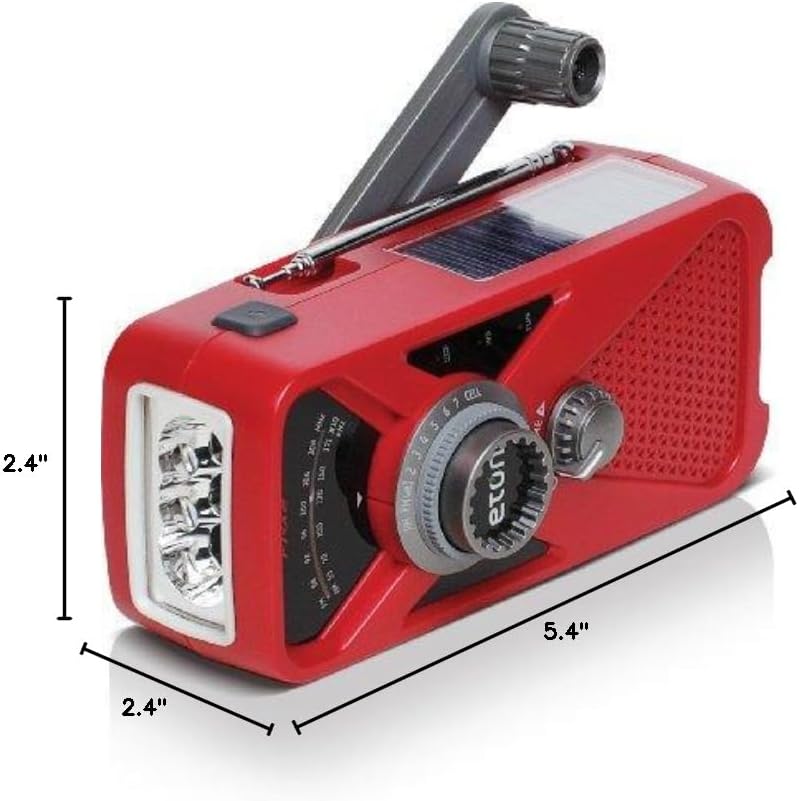
Figure 7: Product Dimensions
- Model: ARCFRX2WXR
- Dimensions (L x W x H): 5.4" x 2.4" x 2.4"
- Weight: 0.56 lbs
- Radio Bands: AM, FM, NOAA Weather Band
- Power Sources: Internal Rechargeable Battery (1000mAh), Solar Panel, Hand Turbine, Mini-USB DC Input
- Output: USB (for charging external devices)
- Features: LED Flashlight, Headphone Jack
Warranty Information
Eton products are designed for reliability and performance. For specific warranty details, please refer to the warranty card included with your product or visit the official Eton website. Keep your proof of purchase for warranty claims.
Support
If you have any questions or require assistance with your Eton American Red Cross FRX2 radio, please contact Eton Customer Support:
- Website: www.etoncorp.com
- Email: Refer to website for contact form or email address.
- Phone: Refer to website for current support phone numbers.


