Introduction
This manual provides detailed instructions for the installation, operation, and maintenance of the Hubbell PGZ-HTR Emergency Light. This emergency light is designed for outdoor wet-location installations, featuring a durable die-cast aluminum housing and a 10W LED light source. It is equipped with self-diagnostic circuitry to meet NFPA 70 and 101 standards, ensuring reliable performance in emergency situations.
The PGZ-HTR model offers 360 lumens of cool white light, operating at 120-277 VAC. Its robust design includes a heater for operation in temperatures ranging from -30 to 50 degrees Celsius, making it suitable for various outdoor environments. Please read this manual thoroughly before installation and use to ensure proper function and safety.
Safety Information
Always follow basic safety precautions when installing, operating, or maintaining this product to reduce the risk of fire, electric shock, or injury to persons.
- Disconnect Power: Always disconnect power at the circuit breaker or fuse box before installation or servicing.
- Qualified Personnel: Installation and wiring must be performed by a qualified electrician in accordance with all national and local electrical codes.
- Grounding: Ensure the fixture is properly grounded to prevent electric shock.
- Wet Location Rated: This fixture is UL 924 listed for wet locations. Ensure all connections are sealed to maintain water resistance.
- Temperature Range: Operate within the specified temperature range (-30°C to 50°C with heater, 0°C to 50°C without heater).
- Do Not Modify: Do not alter or modify the fixture. Any modifications may void the warranty and create safety hazards.
- Inspect for Damage: Before installation, inspect the fixture for any shipping damage. Do not install if damaged.
Package Contents
Verify that all components are present before beginning installation:
- Hubbell PGZ-HTR Emergency Light fixture (1 unit)
- Mounting hardware (screws, anchors)
- Installation template (if included)
- This instruction manual
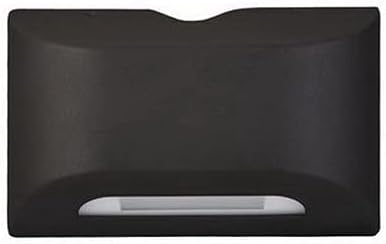
Figure 1: Front view of the Hubbell PGZ-HTR Emergency Light. This image shows the compact, rectangular bronze housing with the light source visible at the bottom. The overall dimensions are approximately 3.19 x 11 x 7 inches.
Setup and Installation
The Hubbell PGZ-HTR Emergency Light is designed for surface mount installation. Ensure the mounting surface is structurally sound and capable of supporting the fixture's weight (approximately 6.9 pounds).
Tools Required:
- Phillips head screwdriver
- Drill with appropriate drill bits
- Wire strippers
- Voltage tester
- Pencil and measuring tape
Installation Steps:
- Power Disconnection: Turn off power to the installation area at the circuit breaker or fuse box. Verify power is off using a voltage tester.
- Mounting Location: Select a suitable outdoor location for surface mounting. Mark the drilling points using the fixture or an installation template.
- Drilling: Drill pilot holes at the marked locations. Insert wall anchors if necessary.
- Wiring:
- Connect the incoming AC power wires to the fixture's wiring.
- Connect the black wire from the fixture to the hot (L1) wire from the power supply.
- Connect the white wire from the fixture to the neutral (N) wire from the power supply.
- Connect the green or bare copper wire from the fixture to the ground wire from the power supply.
- Ensure all wire connections are secure using appropriate wire nuts or connectors.
- Mounting the Fixture: Secure the fixture to the mounting surface using the provided screws. Ensure the fixture is flush and stable.
- Gasketing: Verify that all gasketing is properly seated to maintain the wet-location rating.
- Power Restoration: Restore power at the circuit breaker.
- Initial Test: Perform an initial test as described in the "Operating" section.
Operating Instructions
The Hubbell PGZ-HTR Emergency Light is designed for automatic operation. Upon restoration of AC power, the unit will enter charging mode. In the event of a power outage, the light will automatically illuminate.
Self-Diagnostic Circuitry:
This model features Spectron self-test circuitry, which provides both programmed and user-initiated testing programs to meet NFPA 70 and 101 standards. The unit performs automatic self-tests to ensure readiness.
Manual Test:
To perform a manual test:
- Locate the test button on the fixture (if present, typically a small push-button).
- Press and hold the test button for approximately 5 seconds. The emergency light should illuminate, simulating a power outage.
- Release the button. The light should turn off, and the unit should return to charging mode.
- If the light does not illuminate or remains on after releasing the button, refer to the Troubleshooting section.
Remote Control (if applicable):
Some models may support remote control for testing or other functions. Refer to specific remote control instructions if your model includes this feature. The control method is listed as "Remote" in specifications.
Maintenance
Regular maintenance ensures the longevity and proper functioning of your emergency light.
- Cleaning: Periodically clean the exterior of the fixture with a soft, damp cloth. Do not use abrasive cleaners or solvents. Ensure power is disconnected before cleaning.
- Visual Inspection: Annually inspect the fixture for any signs of physical damage, corrosion, or loose connections.
- Battery Check: While the unit has self-diagnostic circuitry, it is recommended to perform a manual test monthly to confirm battery functionality.
- NFPA Compliance: Follow NFPA 101 (Life Safety Code) and NFPA 70 (National Electrical Code) requirements for emergency lighting testing and maintenance. This typically includes a 30-second test monthly and a 90-minute annual test.
Troubleshooting
If your Hubbell PGZ-HTR Emergency Light is not functioning as expected, refer to the following common issues and solutions:
| Problem | Possible Cause | Solution |
|---|---|---|
| Light does not illuminate during power outage. | No AC power to unit; Battery not charged; Faulty battery; LED failure. | Check circuit breaker. Ensure unit is connected to constant unswitched power. Allow 24 hours for initial battery charge. If problem persists, contact qualified service personnel. |
| Light remains on constantly. | AC power not present; Test button stuck; Internal fault. | Check AC power supply. Ensure test button is not depressed. Disconnect power for 1 minute and reconnect. If problem persists, contact qualified service personnel. |
| Light dims quickly or does not last 90 minutes during test. | Battery not fully charged; Battery at end of life. | Allow 24 hours for battery to fully charge. If unit is old, battery may need replacement. Contact qualified service personnel for battery replacement. |
| Indicator light (if present) is off or flashing. | Indicates fault detected by self-diagnostic system. | Refer to the unit's specific indicator light codes (if provided on unit). This typically indicates a battery or charger fault. Contact qualified service personnel. |
For issues not listed above, or if solutions do not resolve the problem, please contact a qualified electrician or Hubbell customer support.
Specifications
Detailed technical specifications for the Hubbell PGZ-HTR Emergency Light:
| Feature | Specification |
|---|---|
| Model Name | PGZ-HTR |
| Brand | Hubbell |
| Light Source Type | LED |
| Wattage | 10 watts |
| Brightness | 360 lumens |
| Lumens per Watt | 36 |
| Color Temperature | 6350K (Cool White) |
| CRI | 75 |
| Voltage | 120-277 VAC |
| Dimensions (L x W x H) | 11 in. x 3.19 in. x 7 in. |
| Housing Material | Die-cast Aluminum |
| Finish | Bronze |
| Operating Temperature Range | -30°C to 50°C (with heater) |
| Rated Average Life | 50,000 hours |
| Installation Type | Surface Mount |
| Indoor/Outdoor Usage | Outdoor (Wet Location Rated) |
| Certifications | UL 924 Listed for Wet Locations, Meets NFPA 70 and 101 standards |
| Item Weight | 6.9 Pounds |
Warranty Information
Hubbell products are manufactured to the highest quality standards. This product is covered by a limited warranty against defects in materials and workmanship. The specific warranty period and terms may vary. Please refer to the official Hubbell website or contact customer support for detailed warranty information applicable to your region and product model.
Note: Any unauthorized repair or modification to the product will void the warranty.
Customer Support
For technical assistance, troubleshooting, or to inquire about replacement parts, please contact Hubbell customer support:
- Website: Visit the official Hubbell website for FAQs, product documentation, and contact forms. www.hubbell.com
- Phone: Refer to the Hubbell website for regional customer service phone numbers.
- Email: Use the contact form on the Hubbell website for email inquiries.
When contacting support, please have your product model number (PGZ-HTR) and purchase date available.


