
Introduction
Thank you for choosing the YONGNUO MC-36b C3 Camera Timer Remote Control. This device is designed to provide precise control over your camera's shutter, enabling advanced photographic techniques such as long exposures, interval shooting, and continuous shooting. Please read this manual thoroughly before use to ensure proper operation and to maximize the potential of your remote control.
Package Contents
Verify that all items are present in your package:
- 1x YONGNUO MC-36b C3 Timer Remote Controller
- 1x Instruction Manual
- 2x AAA 1.5V LR03 Alkaline Batteries
Product Overview
The YONGNUO MC-36b C3 features a large LCD screen for clear display of settings and a user-friendly button layout for easy programming. The remote is equipped with a two-stage shutter release button for focusing and capturing images.
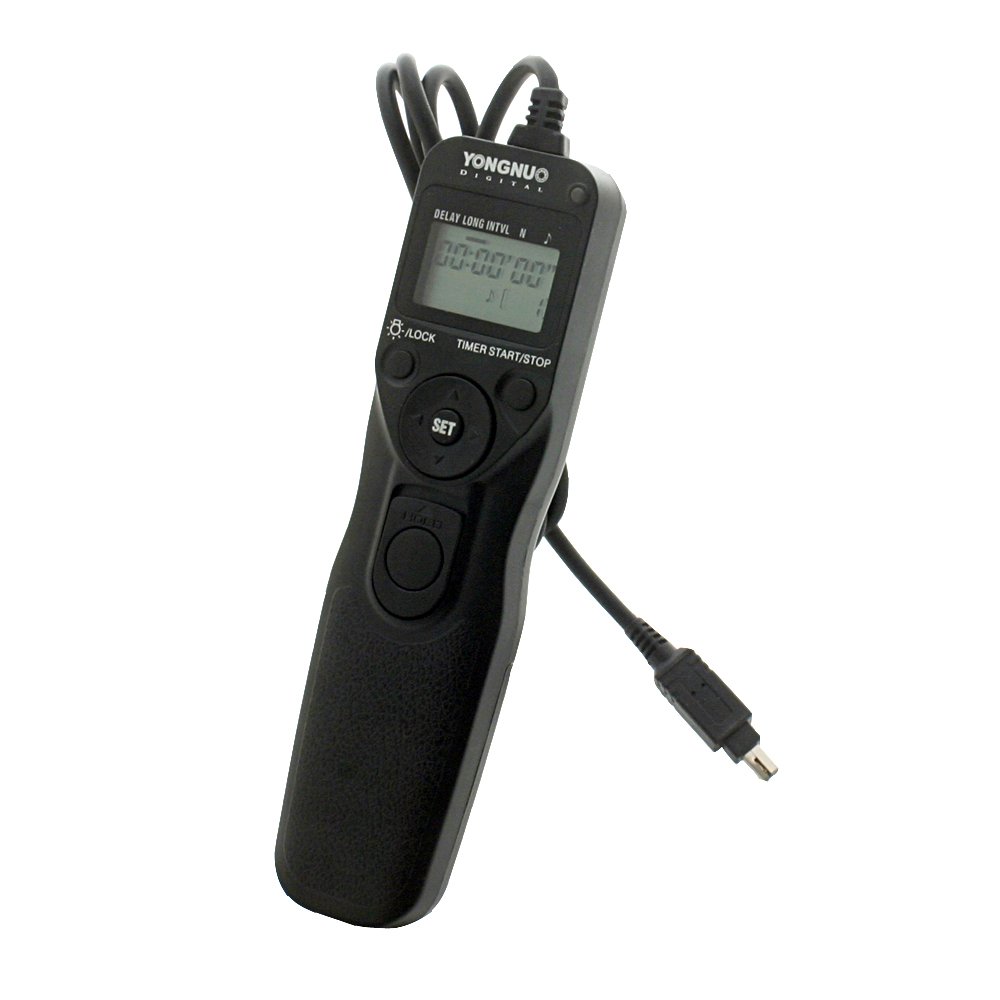
Image: YONGNUO MC-36b C3 Camera Timer Remote Control. This image displays the remote control unit, highlighting its LCD screen, control buttons, and the attached camera connection cable.
Key Components:
- LCD Panel: Displays current settings and timer status. Can be illuminated for low-light conditions.
- Shutter Release Button: Two-stage button for autofocus (half-press) and shutter activation (full-press).
- Function Buttons: Used for setting DELAY, EXPOSURE, INTERVAL, and N (number of shots).
- Set/Start/Stop Button: Confirms settings and starts/stops the timer sequence.
- Directional Buttons: Used to navigate menus and adjust values.
- Camera Connection Port: Connects the remote to your camera via the provided cord.
Battery Installation
The remote control requires two AAA 1.5V LR03 alkaline batteries for operation.
- Locate the battery compartment cover on the back of the remote control.
- Slide the cover open in the direction indicated by the arrow.
- Insert two AAA batteries, ensuring the correct polarity (+/-) as marked inside the compartment.
- Close the battery compartment cover securely.
Note: Battery life is approximately two months with typical usage. Use of the LCD illuminator will reduce battery life.
Connecting to Camera
The MC-36b C3 is compatible with Canon EOS cameras requiring a C3 type remote connection (e.g., 1D, 1Ds, 10D, 20D, 30D, 40D, 50D, 5D, 6D, 7D series).
- Ensure your camera is turned off before connecting the remote.
- Locate the remote control terminal on your camera. This is typically a small port on the side or front of the camera body.
- Connect the remote control cord's plug firmly into the camera's remote control terminal.
- Turn on your camera. The remote control is now ready for use.
Operating Modes
The remote control offers both basic shutter release functionality and advanced timer programming.
Basic Shutter Release
To use the remote as a simple shutter release:
- Half-Press: Press the shutter release button halfway down to activate your camera's autofocus system.
- Full-Press: Press the shutter release button completely down to trigger the camera's shutter and take a photo.
Timer Programming
The MC-36b C3 allows you to program a sequence of shots with specific delays, exposure times, and intervals. The LCD panel can be illuminated for easier viewing in dark environments.
Programming Steps:
- Power On: Ensure the remote is powered on and connected to the camera.
- Select Mode: Use the mode button (if present, or cycle through settings using directional buttons) to access the timer programming interface.
- Set DELAY: This is the time before the first exposure. Set from 0 seconds to 99 hours, 59 minutes, 59 seconds in one-second increments. Use directional buttons to adjust values and the Set button to confirm.
- Set EXPOSURE (LONG): This is the duration the shutter remains open for each shot. Set from 0 seconds to 99 hours, 59 minutes, 59 seconds in one-second increments. For bulb mode, set exposure to '00:00:00' and use the camera's bulb setting.
- Set INTERVAL: This is the time between the end of one exposure and the start of the next. Set from 1 second to 99 hours, 59 minutes, 59 seconds in one-second increments.
- Set N (Number of Shots): This is the total number of photos to be taken. Set from 1 to 399. For unlimited shots, set to '--'.
- Start Sequence: Once all settings are configured, press the 'Start' button (often combined with 'Set') to begin the programmed sequence. The LCD will display the remaining time or shot count.
- Stop Sequence: To stop an ongoing sequence, press the 'Stop' button (often combined with 'Set').
Maintenance
Proper care will ensure the longevity and reliable performance of your remote control.
- Cleaning: Use a soft, dry cloth to clean the remote control. Do not use abrasive cleaners or solvents.
- Storage: Store the remote in a cool, dry place away from direct sunlight and extreme temperatures.
- Battery Care: Remove batteries if the remote will not be used for an extended period to prevent leakage.
- Avoid Impact: Protect the remote from drops and strong impacts.
Troubleshooting
If you encounter issues with your MC-36b C3, refer to the following common problems and solutions:
- Remote not responding:
- Check battery installation and ensure batteries are not depleted. Replace if necessary.
- Ensure the remote cord is securely connected to both the remote and the camera.
- Verify the camera is powered on and in a compatible shooting mode.
- LCD not displaying:
- Check batteries.
- Ensure the remote is powered on.
- Camera not triggering:
- Confirm the remote cord is fully inserted into the camera's remote terminal.
- Check camera settings to ensure it's ready to receive a remote signal.
- Test the basic shutter release function to isolate the issue.
Specifications
| Model | YONGNUO MC-36b C3 |
| Exposure Time | 0s to 99hrs 59min 59s (in 1-second increments) |
| Interval Time | 1s to 99hrs 59min 59s (in 1-second increments) |
| Number of Shots (N) | 1 to 399, or unlimited (--) |
| Power Source | 2x AAA 1.5V LR03 alkaline batteries |
| Battery Life | Approx. 2 months (continuous shooting with specific settings; reduced with illuminator use) |
| Dimensions (approx.) | 155 x 40 x 18 mm (6.1 x 1.6 x 0.7 in), excluding projections |
| Weight (approx.) | 169g (0.37 lbs) |
| Cord Length (approx.) | 90cm (35 inches) |
| Compatible Cameras | Canon EOS 1D, 1Ds, 1DS Mark II, 1DS Mark III, 1D Mark II, 1D Mark III, 1D Mark IV, 10D, 20D, 30D, 40D, 50D, 1DX, 5D, 5D Mark II, 5D Mark III, 6D, 7D, etc. |
Warranty and Support
For warranty information or technical support, please refer to the documentation provided with your purchase or contact your retailer. You may also visit the official YONGNUO website for further assistance.