
Perimeter Technologies 785544
Invisible Fence R21 Replacement Collar User Manual
Model: 785544 | Brand: Perimeter Technologies
Introduction
This manual provides essential information for the proper use, setup, and maintenance of your Invisible Fence R21 Replacement Collar. Please read this manual thoroughly before operating the device to ensure optimal performance and safety for your pet.
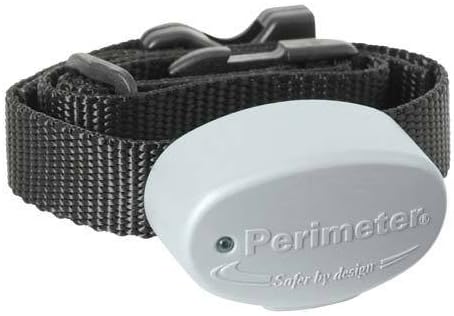
The Invisible Fence R21 Replacement Collar, designed for compatibility with specific Invisible Fence 700 Series systems.
Compatibility
The Invisible Fence R21 Replacement Collar is designed to work with specific Invisible Fence Brand Inground Fences. Please verify your system's compatibility before use.
- Compatible Systems (700 Series Only): ICT-700, ICT-725, ICT-750, ICT-775, ICT-150, ICT-250, ICT-100, ICT-75, ICT-50, AT-950 Indoor Transmitter, CT-4000.
- NOT Compatible Systems: Invisible Fence 800 Series Systems or later (including Titanium Series), Boundaries Plus Fence, Shields Indoor Avoidance Transmitters.

A comparison table detailing features and compatibility between Perimeter Technologies and Invisible Fence R21 collars.
Setup
1. Frequency Selection
Most Invisible Fence Brand Underground Fence Systems operate on a 7K frequency. It is crucial to check your transmitter to confirm the correct frequency setting for your system.
- Locate your Invisible Fence system's transmitter.
- Carefully remove the cover of the transmitter.
- Look for a black toggle switch inside. This switch will indicate whether your system is programmed to 7K or 10K.
- Ensure your new collar is set to match the transmitter's frequency.

A visual guide to identifying the frequency selection switch (7K or 10K) on your Invisible Fence transmitter's circuit board.
2. Battery Installation
The collar is powered by a 6V battery. Use either an eXtreme Dog Fence 6V Battery or a Perimeter Technologies 6V Battery.
- Open the battery compartment on the collar receiver.
- Insert the 6V battery, ensuring correct polarity.
- Securely close the battery compartment.
3. Fitting the Collar
Proper fit is essential for the collar's effectiveness and your pet's comfort. The collar should be snug enough for the contact points to touch the skin, but not so tight as to cause discomfort.
- The collar accommodates dogs weighing between 8 and 120 pounds.
- Ensure the contact points are positioned correctly on your dog's neck.
- The collar includes a set of metal-infused rubber contact covers to prevent neck irritation. Use these if your dog experiences discomfort.

Illustrations highlighting the collar's safety, comfort, suitable weight range (8-120 lbs), and lightweight design (1.1 ounces).
Operating Instructions
Once properly set up and fitted, the collar will interact with your Invisible Fence system to provide boundary awareness for your pet.
Waterproof Design
The collar is designed to be highly durable and waterproof, allowing your pet to engage in water activities without affecting the collar's functionality.
- The collar is submersible up to 10 feet deep.
- Water exposure will not impact the collar's function or correction strength.

Visual representation of the collar's 100% waterproof capability, suitable for swimming and wet environments.
Maintenance
Battery Replacement
Regularly check the collar's battery status. Replace the 6V battery as needed to ensure continuous operation.
- A low battery indicator light (if present on your specific model) will signal when replacement is due.
- Always use compatible 6V batteries (eXtreme Dog Fence or Perimeter Technologies).
Cleaning
Keep the collar and contact points clean to maintain proper function and hygiene.
- Wipe the collar and receiver with a damp cloth.
- Ensure contact points are free of dirt or debris.
Troubleshooting
If you encounter issues with your Invisible Fence R21 Replacement Collar, consider the following common solutions:
- Collar Not Responding: Check battery level and replace if necessary. Ensure the collar's frequency setting matches your transmitter. Verify the collar is within the active boundary area.
- Inconsistent Operation: Check for proper collar fit and ensure contact points are making good contact with your pet's skin. Inspect the boundary wire for breaks or damage.
- Pet Discomfort: Ensure the collar is not too tight. Utilize the provided rubber contact covers to prevent irritation.
For further assistance, refer to your Invisible Fence system's main manual or contact customer support.
Specifications
| Feature | Detail |
|---|---|
| Model Number | 785544 |
| Item Weight | 5.2 ounces |
| Package Dimensions | 5.71 x 3.43 x 2.13 inches |
| Batteries | 2 Lithium Ion batteries required (included) |
| Compatibility | Invisible Fence 700 Series systems (7K or 10K frequency) |
| Water Resistance | Submersible up to 10 feet deep |
| Manufacture Location | U.S.A. with imported parts |
Manufacturer Information
Perimeter Technologies is a leader in self-installed pet fence products, known for user-friendly systems and state-of-the-art technology.

Perimeter Technologies, an American company, is committed to producing quality pet containment solutions.
Support
For additional support, product inquiries, or warranty information, please visit the official Perimeter Technologies website or contact their customer service.
Note: This product is from a small business brand. Your support is appreciated.