
Introduction
Welcome to the Omron HEM-6200 Wrist Blood Pressure Monitor user manual. This device is designed to provide accurate and reliable blood pressure measurements at home. Please read this manual thoroughly before use to ensure correct operation and to maximize the lifespan of your monitor.
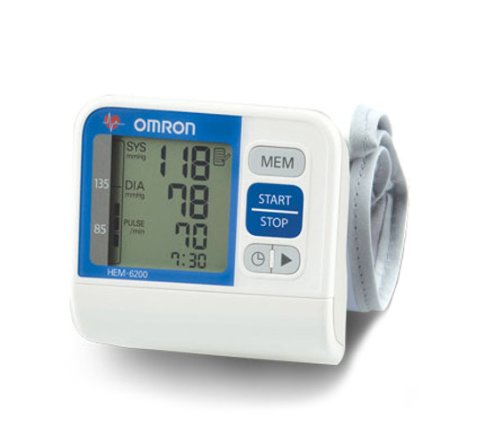
Image of the Omron HEM-6200 Wrist Blood Pressure Monitor, showing the main unit with its digital display and the attached wrist cuff.
Important Safety Information
Always consult your physician for diagnosis and treatment. Self-diagnosis and treatment based on measurement results can be dangerous. Do not use this device on infants or individuals who cannot express their consent. Keep out of reach of children. Do not use this device for any purpose other than measuring blood pressure. Avoid using the device in a moving vehicle or airplane. Do not use the device with other medical electrical (ME) equipment simultaneously.
Package Contents
The Omron HEM-6200 package includes:
- Main unit
- Storage case
- Instruction manual
- 4 AA batteries
Setup
Battery Installation
- Open the battery compartment cover on the back of the main unit.
- Insert four AA batteries according to the polarity markings (+/-).
- Close the battery compartment cover securely.
Cuff Placement
- Sit in a comfortable position with your arm resting on a flat surface.
- Wrap the wrist cuff around your left wrist, ensuring the monitor is positioned correctly on the inside of your wrist, approximately 1-2 cm from your palm. The positioning sensor will guide you.
- Ensure the cuff is snug but not overly tight, allowing one finger to fit between the cuff and your wrist.
Operating Instructions
Taking a Measurement
- Ensure you have rested for at least 5 minutes before taking a measurement.
- Press the START/STOP button. The cuff will begin to inflate automatically.
- Remain still and silent during the measurement.
- The measurement results (systolic, diastolic, and pulse rate) will be displayed on the LCD screen.
Understanding Readings
The monitor displays systolic pressure (upper number), diastolic pressure (lower number), and pulse rate. It also features a hypertension detection mechanism, a body movement indicator, and an irregular heartbeat detector. Consult your doctor if you frequently observe high readings, irregular heartbeats, or significant body movement during measurements.
Memory Function
The Omron HEM-6200 can store up to 60 sets of measurements with date and time. To view past readings, press the MEMORY button. Each press will cycle through the stored measurements from most recent to oldest.
Maintenance
Cleaning
Wipe the main unit and cuff with a soft, dry cloth. If necessary, use a cloth dampened with water and a mild soap, then wipe dry. Do not use abrasive cleaners or immerse the device in water.
Storage
Store the monitor in its protective storage case when not in use. Keep it in a clean, dry place away from direct sunlight, extreme temperatures, and humidity.
Troubleshooting
- If the device does not power on, check the battery installation and replace batteries if necessary.
- If readings appear inconsistent, ensure correct cuff placement and follow all operating instructions.
- For persistent issues, contact Omron customer support.
Specifications
- Model: HEM-6200
- Measurement Method: Oscillometric method
- Measurement Range: Pressure: 0 to 299 mmHg; Pulse: 40 to 180 beats/min
- Accuracy: Pressure: ±3 mmHg; Pulse: ±5% of reading
- Memory: 60 measurements with date and time
- Power Source: 4 AA batteries
- Dimensions: Approximately 7 x 7.1 x 4.1 cm
- Weight: Approximately 117 g (excluding batteries)
- Special Features: Body movement detection, Irregular heartbeat detection, Hypertension indicator
Warranty and Support
The Omron HEM-6200 Wrist Blood Pressure Monitor comes with a 2-year manufacturer's warranty from the date of purchase. For warranty claims or technical support, please refer to the contact information provided in the warranty card or visit the official Omron website.


