
1. Introduction
This manual provides essential information for the safe and effective use of your HealthSmart Gateway Rollator Walker. Please read all instructions carefully before assembly and use. Keep this manual for future reference.

Image: The HealthSmart Gateway Rollator Walker, fully assembled, featuring a comfortable seat, backrest, and a removable storage bag.
2. Safety Information
Always ensure the rollator is fully open and locked before use. Engage the brakes when sitting or standing. Do not exceed the maximum weight capacity of 300 pounds. Regularly inspect all parts for wear and tear.
3. Setup and Assembly
The HealthSmart Gateway Rollator Walker is designed for easy assembly with no tools required. Follow these steps to prepare your rollator for use:
- Unfolding the Rollator: Carefully remove the rollator from its packaging. Unfold the frame until it clicks into place, ensuring all locking mechanisms are secure.
- Attaching the Storage Bag: The removable storage bag can be attached to the frame beneath the seat.
- Adjusting Handle Height: The handles are adjustable from 31 to 36 inches in 1-inch increments. Press the adjustment buttons on the handle tubes and slide the handles to your desired height. Ensure both handles are at the same height and securely locked in place before use.
- Brake Check: Before first use, test the bicycle-style loop-lock handbrakes to ensure they are functioning properly. Squeeze the levers to engage the brakes and push them down to lock the wheels for parking.

Image: A close-up view of the folding mechanism, highlighting the knob used to secure the rear wheel arms during assembly or folding.
Video: This video demonstrates the features and ease of use of the HealthSmart Gateway Rollator Walker, including its folding mechanism, adjustable handles, and integrated seat.
4. Operating Instructions
The Gateway Rollator is designed for enhanced mobility and convenience.
- Walking: Push the rollator forward, maintaining a comfortable distance. Keep your body upright and centered between the handles.
- Using the Brakes: Squeeze the handbrake levers to slow down or stop. To lock the brakes for parking or sitting, push the levers down until they click into the locked position. Pull the levers up to release the brakes.
- Using the Seat: Ensure the rollator is on a flat, stable surface and the brakes are locked before sitting. The padded seat and backrest provide comfort during breaks.
- Folding for Storage/Transport: To fold the rollator, lift the strap on the seat. This will allow the frame to collapse. For a more compact fold, you may need to adjust the rear wheel arms by loosening the star-shaped knobs and rotating them inward.
- Storage Bag: The removable storage bag is ideal for carrying personal items. Do not overload the bag.

Image: An elderly man comfortably seated on the rollator's padded seat, demonstrating its use as a temporary resting spot.

Image: A woman effortlessly placing the compactly folded rollator into the trunk of a car, highlighting its portability.
5. Maintenance
Regular maintenance ensures the longevity and safe operation of your rollator.
- Cleaning: Wipe down the frame with a damp cloth and mild detergent. Do not use abrasive cleaners.
- Brakes: Periodically check the brake cables and levers for proper function and adjustment. If brakes feel loose or do not engage effectively, consult a qualified technician.
- Wheels: Inspect the wheels for wear and ensure they rotate freely. Remove any debris that may accumulate around the axles.
- Fasteners: Ensure all screws, bolts, and knobs are tight and secure.
6. Troubleshooting
If you encounter any issues with your rollator, refer to the following common problems and solutions:
- Difficulty Folding: Ensure the seat strap is fully lifted and any locking knobs for the rear wheels are loosened. Check for obstructions.
- Brakes Not Engaging: Check if the brake cables are properly routed and not frayed. The brake levers may need adjustment. Do not use the rollator if brakes are not fully functional.
- Unstable Movement: Ensure all frame components are securely locked in place and handle heights are evenly adjusted. Check wheels for damage or debris.
For issues not resolved by these steps, please contact HealthSmart customer support.
7. Specifications
| Feature | Detail |
|---|---|
| Adjustable Handle Height | 31 to 36 inches |
| Width Between Handles | 18 inches |
| Seat Height from Floor | 21 inches |
| Seat Size | 18 by 10 inches |
| Folded Dimensions | 25 x 16.5 x 11.25 inches |
| Weight Capacity | Up to 300 pounds |
| Item Weight | 16 Pounds |
| Material | Aluminum |
| Wheel Size (Front) | 8 inches |
| Wheel Size (Rear) | 7 inches |
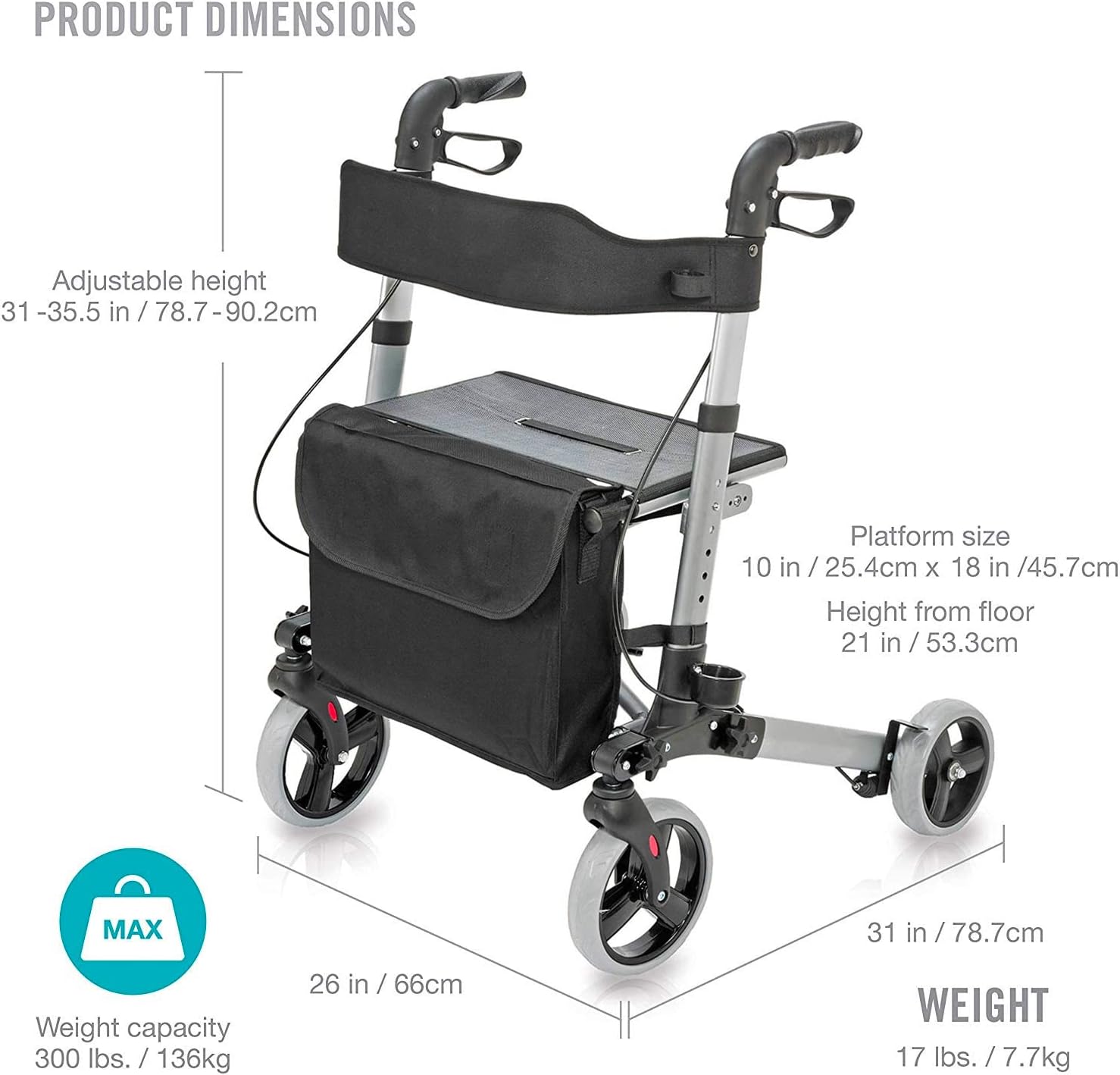
Image: A detailed diagram illustrating the key dimensions of the rollator, such as adjustable handle height, seat dimensions, and overall weight capacity.
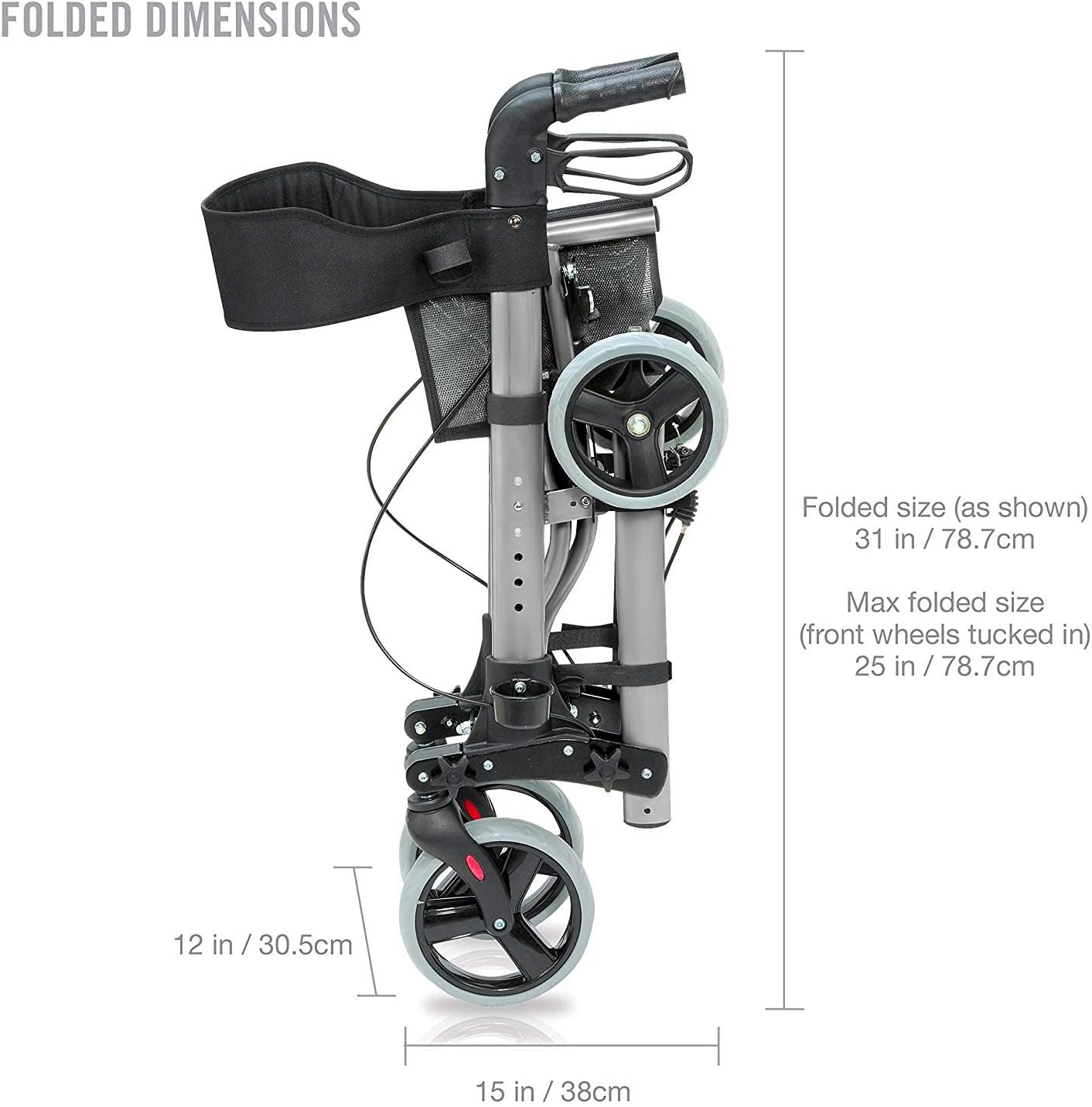
Image: A diagram showing the compact folded dimensions of the rollator, useful for storage and transport planning.
8. Warranty Information
For specific warranty details regarding your HealthSmart Gateway Rollator Walker, please refer to the documentation included with your purchase or visit the official HealthSmart website. Warranty terms typically cover manufacturing defects for a specified period from the date of purchase.
9. Customer Support
If you have any questions, require assistance with assembly, operation, or troubleshooting, please contact HealthSmart customer support. Contact information can typically be found on the product packaging or the official HealthSmart website.

