
Power Acoustik PD-622NB
POWER ACOUSTIK PD-622NB Inteq Double DIN Multimedia Indash Source
Model: PD-622NB
Introduction
The Power Acoustik PD-622NB is a 2-DIN Inteq Multimedia Source Unit designed for in-dash installation in vehicles. It features a 6.5-inch TFT HD flip-up screen and offers a wide range of media playback options, including audio, video, and picture files from various sources. This unit is equipped with Bluetooth connectivity for hands-free calling and audio streaming, and is ready for GPS navigation with an optional module. Its comprehensive features provide an enhanced in-car entertainment and communication experience.
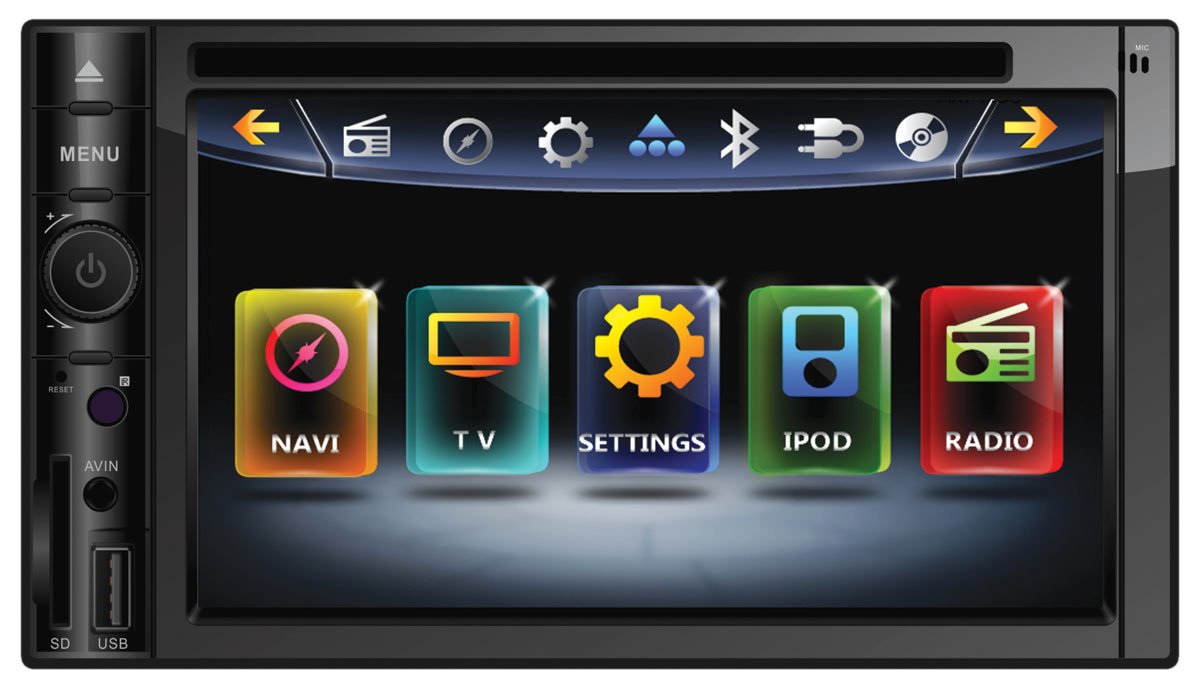
Figure 1: Front view of the Power Acoustik PD-622NB multimedia receiver, showing the 6.5-inch screen with its main menu interface and control buttons on the left side.
Key Features
- 6.5-Inch TFT HD Flip-Up Screen: Provides clear visual display for media and navigation.
- Versatile Media Playback: Supports audio, video, and picture files from CD, DVD, 32GB SD card, or USB flash drive. Compatible formats include MP3, WAV, FLAC (audio), MP4, DivX, MKV, FLV, MOV (video), and JPG (pictures).
- Bluetooth V2.1 with Enhanced Data Rate: Enables high-quality hands-free calling and wireless MP3 audio playback, with phone book and call log transfer capabilities for most smartphones.
- AM/FM Receiver: Features 18 FM station memory and 12 AM station memory for easy access to favorite radio stations.
- Navigation Ready: Compatible with NAVIBOX-2 (sold separately) for turn-by-turn GPS navigation with 12 million USA & Canada Points of Interest.
- iPod/iPhone Integration: Offers Apple certified control and charging of iPod or iPhone via Inteq's touch screen (requires IC-3, sold separately).
- Motorized Telescoping & Angle Adjustment: Allows for optimal viewing angles.
- Detachable Theft Deterrent Front Panel: Enhances security.
- Rear View Camera Input: Includes a trigger for automatic display when reversing.
- Axxess Steering Wheel Module Compatibility: Allows integration with existing steering wheel controls.
- High Power Output: 52W x 4 MOSFET speaker outputs for robust audio.
- High Resolution Display: 800x480 widescreen resolution with 400 NIT LED backlight brightness.
Setup and Installation
Installation of the PD-622NB unit should ideally be performed by a qualified professional to ensure proper wiring and functionality. This unit is designed for a double-DIN chassis size. Before beginning installation, ensure the vehicle's battery is disconnected to prevent electrical shorts.
Basic Wiring Connections:
- Power (Yellow): Connect to constant 12V power supply.
- Accessory (Red): Connect to switched 12V accessory power.
- Ground (Black): Connect securely to vehicle chassis ground.
- Speaker Outputs: Connect to vehicle speakers (Front Left, Front Right, Rear Left, Rear Right). Ensure correct polarity.
- Antenna: Connect the vehicle's antenna cable.
- Parking Brake Wire: Connect to the parking brake circuit as required for video playback safety features.
- Reverse Gear Trigger: Connect to the vehicle's reverse light circuit for automatic rear camera display.
Refer to the detailed wiring diagram provided in the packaging for specific connections and color codes. After installation, reconnect the battery and perform an initial power-on test.
Operating Instructions
General Operation:
- Power On/Off: Press the power button (usually integrated with the volume knob) to turn the unit on or off.
- Volume Control: Rotate the volume knob to adjust the audio level.
- Menu Navigation: Use the touch screen or physical menu button to access the main menu and navigate through options. The main screen displays icons for NAVI, TV, SETTINGS, IPOD, and RADIO.
- Screen Adjustment: The motorized screen allows for telescoping and angle adjustments for optimal viewing.
Media Playback:
- CD/DVD: Insert a disc into the slot. The unit will automatically detect and begin playback.
- USB/SD Card: Insert a USB flash drive into the USB port or an SD card into the SD slot. Select the corresponding source from the menu to browse and play files.
- Supported Formats: The unit plays MP3, WAV, FLAC audio files; MP4, DivX, MKV, FLV, MOV video files; and JPG picture files.
- AUX A/V Input: Connect personal media devices to the AUX A/V input for audio and video playback.
Bluetooth Operation:
- Pairing: Enable Bluetooth on your smartphone. On the PD-622NB, navigate to the Bluetooth settings menu and search for available devices. Select your phone from the list and confirm the pairing code.
- Hands-Free Calling: Once paired, you can make and receive calls directly through the unit. Phone book contacts and recent call logs can be transferred.
- Audio Streaming: Stream music wirelessly from your smartphone to the unit.
Radio Operation:
- Tuning: Select the Radio source. Use the touch screen controls to scan for stations or manually tune to a frequency.
- Station Memory: Save up to 18 FM and 12 AM stations for quick recall.
Navigation (with NAVIBOX-2, sold separately):
- Once the NAVIBOX-2 is connected, select the NAVI icon from the main menu to access the navigation system.
- Follow the on-screen prompts to set destinations, view maps, and receive turn-by-turn directions.
iPod Integration (with IC-3, sold separately):
- Connect your iPod or iPhone using the IC-3 cable.
- Select the IPOD icon to control playback, browse playlists, artists, albums, and genres directly from the unit's touch screen.
Maintenance
- Screen Cleaning: Use a soft, lint-free cloth to gently wipe the screen. For stubborn smudges, slightly dampen the cloth with water or a screen-safe cleaner. Avoid abrasive materials or harsh chemicals.
- General Cleaning: Keep the unit free from dust and debris. Use a soft, dry cloth to wipe the exterior.
- Disc Care: Handle CDs and DVDs by their edges. Store them in their cases to prevent scratches. Clean discs with a soft, dry cloth wiping from the center outwards.
- Detachable Panel: If applicable, regularly clean the contacts on the detachable front panel and the main unit with a cotton swab lightly moistened with rubbing alcohol.
Troubleshooting
If you encounter issues with your PD-622NB unit, refer to the following common troubleshooting steps. For more complex problems, contact customer support or a qualified technician.
| Problem | Possible Cause | Solution |
|---|---|---|
| No Power | Blown fuse; incorrect wiring; loose connection. | Check vehicle's fuse box and unit's fuse. Verify all power and ground connections are secure. |
| No Sound | Volume too low; mute activated; speaker wiring issue; incorrect source selected. | Increase volume. Check if mute is on. Verify speaker connections. Ensure correct audio source is selected. |
| Bluetooth Pairing Failure | Device not in pairing mode; unit not discoverable; interference. | Ensure both devices are in pairing mode. Restart both devices. Move closer to the unit. Clear previous Bluetooth connections. |
| Disc Playback Issues | Dirty or scratched disc; incompatible disc format. | Clean the disc. Try a different disc. Ensure the disc format is supported by the unit. |
| Screen Not Responding | Temporary software glitch; physical damage. | Perform a soft reset (refer to manual for reset button location, often a small pinhole). If issue persists, contact support. |
Specifications
| Feature | Detail |
|---|---|
| Model Number | PD-622NB |
| Chassis Size | Double-DIN |
| Display Type | TFT-LCD Back Lit |
| Display Resolution | 800x480 |
| Backlight Brightness | 400 NIT LED |
| Output Wattage | 52 Watts x 4 (MOSFET) |
| Bluetooth Version | V2.1 with Enhanced Data Rate |
| Supported Audio Formats | MP3, WAV, FLAC |
| Supported Video Formats | MP4, DivX, MKV, FLV, MOV |
| Supported Picture Formats | JPG |
| Memory Card Slot | SD Card (up to 32GB) |
| USB Input | Yes (for flash drives) |
| Auxiliary Input | A/V Input |
| Rear View Camera Input | Yes (with trigger) |
| Product Dimensions | 29.85 x 16.51 x 23.5 cm; 2.72 kg |
| Item Weight | 6 Pounds (approx. 2.72 kg) |
| Manufacturer | Epsilon Electronics Inc. |
| ASIN | B0072LFBRC |
| UPC | 709483040632, 709483043688 |
Warranty and Support
For information regarding the product warranty, please refer to the warranty card included with your purchase or visit the official Power Acoustik website. Warranty terms and conditions may vary by region and retailer.
If you require technical assistance, troubleshooting beyond this manual, or have questions about your Power Acoustik PD-622NB unit, please contact Power Acoustik customer support. Contact details can typically be found on the manufacturer's website or in the product packaging.
When contacting support, please have your product model number (PD-622NB) and purchase information readily available.