
1. Introduction
The Pyle PWMA890UI is a versatile, portable PA and mobile entertainment system designed for various audio applications. This unit features an 8-inch subwoofer and 3-inch tweeter, delivering 500 watts of peak power. It includes an integrated iPhone/iPod dock, FM radio, USB/SD card readers, and multiple inputs for microphones and instruments. With its built-in rechargeable battery, telescoping handle, and caster wheels, the PWMA890UI offers convenience and portability for both indoor and outdoor use. This manual provides essential information for safe operation, setup, and maintenance of your device.
2. Safety Instructions
- Read all instructions carefully before operating the unit.
- Keep the unit away from water or moisture to prevent electric shock.
- Do not attempt to open or repair the unit yourself. Refer all servicing to qualified personnel.
- Ensure proper ventilation; do not block any ventilation openings.
- Use only the power adapter supplied with the unit.
- Protect the power cord from being walked on or pinched.
- Unplug the unit during lightning storms or when unused for long periods.
- Avoid exposing the unit to extreme temperatures or direct sunlight.
3. Package Contents
Verify that all items are present in the package:
- Portable PA Speaker System (PWMA890UI)
- Wireless Handheld Microphone
- Battery Terminal Alligator Clamp Cables
- RCA Connection Cable
- Beltpack Transmitter
- Headset Microphone
- Remote Control
- Power Cable
4. Product Features
- Powerful Audio Output: 500 Watt Peak Power with an 8-inch Subwoofer and 3-inch Tweeter.
- Integrated iPhone/iPod Dock: Charges your device while playing music.
- Multiple Audio Sources: FM Radio, USB/SD Card Readers, and Aux (3.5mm) input.
- Microphone & Instrument Inputs: Two 1/4-inch microphone inputs and one 1/4-inch guitar/instrument input, each with independent volume control.
- Wireless Microphones: Includes a wireless handheld microphone, beltpack transmitter, and headset microphone.
- Rechargeable Battery: Built-in 7AH/12V battery for portable operation up to 5 hours.
- Portability: Features a telescoping handle and caster wheels for easy transport.
- Audio Controls: Bass, Treble, and Echo adjustments.
- Digital LCD Display: For easy navigation and status indication.
- Speaker Stand Mount: 35mm mounting hole for optional speaker stand use.
5. Controls and Connections
Familiarize yourself with the control panel and connection ports of your PWMA890UI system.
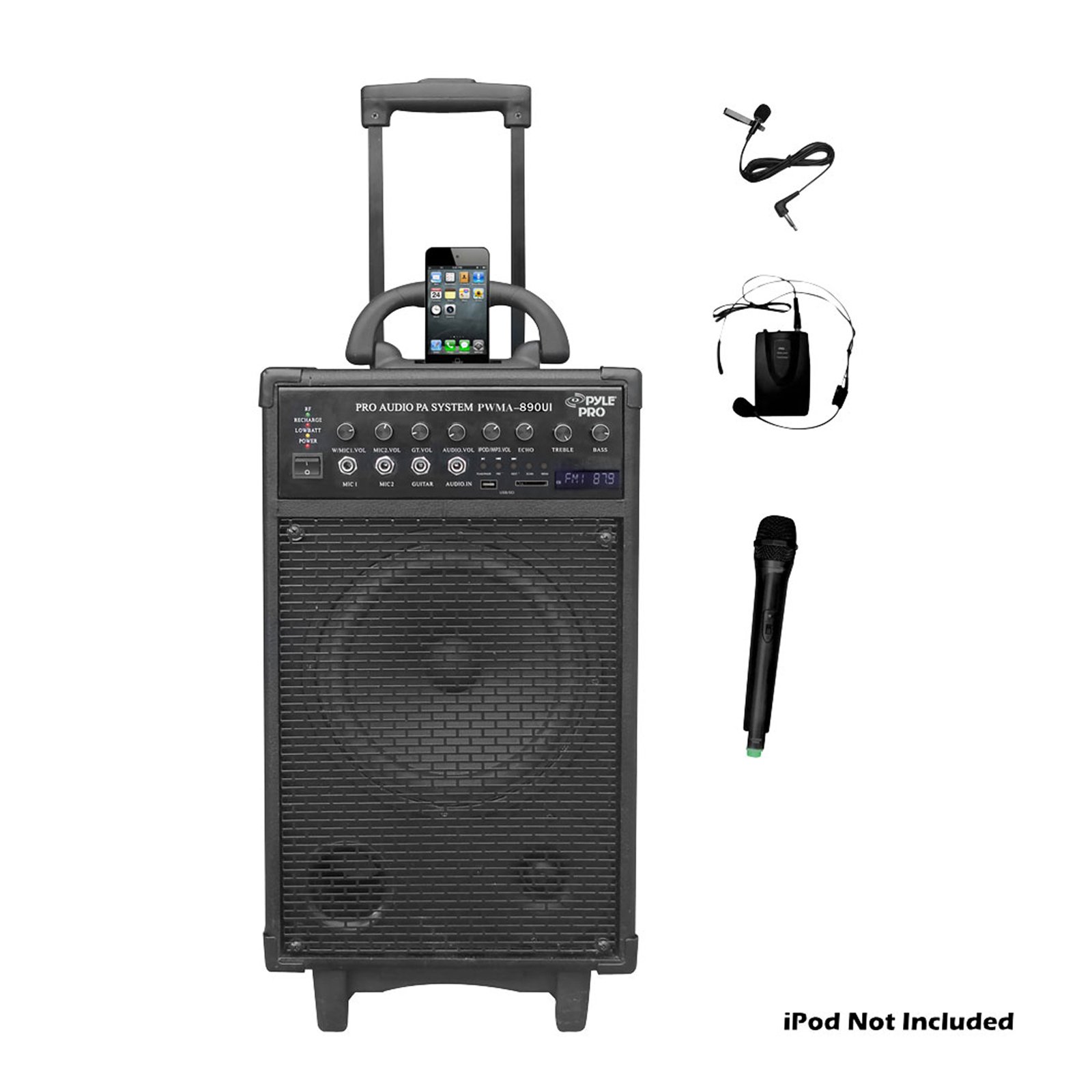
Figure 1: Front view of the Pyle PWMA890UI Portable PA Loudspeaker System, showing the main speaker grille, control panel with various knobs and buttons, LCD display, iPhone/iPod dock, and input ports.
- iPod/iPhone Dock: For connecting and charging compatible Apple devices.
- Digital LCD Display: Shows current mode, track information, and FM frequency.
- USB/SD Card Slots: For playing MP3/WMA audio files from USB drives or SD cards.
- Mode Button: Switches between input sources (iPod, USB/SD, FM, Aux).
- Play/Pause, Next/Previous Track Buttons: Media playback controls.
- Master Volume Knob: Adjusts the overall system volume.
- Bass/Treble Knobs: Adjusts low and high frequency response.
- Echo Knob: Controls the echo effect for microphones.
- Mic 1/Mic 2 Volume Knobs: Independent volume control for microphone inputs.
- Guitar/Instrument Volume Knob: Volume control for the instrument input.
- 1/4-inch Microphone Inputs (MIC1, MIC2): For wired microphones or wireless receiver output.
- 1/4-inch Guitar/Instrument Input: For connecting a guitar or other musical instrument.
- Aux (3.5mm) Retractable Cable: For connecting external audio devices.
- Stereo RCA (L/R) Output Jacks: For connecting to another amplifier or recording device.
- Power Switch: Turns the unit ON or OFF.
- AC Power Input: For connecting the power cable to an electrical outlet.
- 12V DC Input: For external 12V power source (e.g., car battery via alligator clamp cables).
6. Setup
6.1 Initial Charging
Before first use, fully charge the internal rechargeable battery.
- Ensure the unit's power switch is in the OFF position.
- Connect the supplied power cable to the AC Power Input on the unit and then to a standard electrical outlet (110V or 220V, switchable).
- Allow the unit to charge for approximately 8-10 hours for a full charge. The charging indicator light will typically change color or turn off when fully charged.
6.2 Powering On/Off
- To power on the unit, switch the Power Switch to the ON position.
- To power off, switch the Power Switch to the OFF position.
6.3 External 12V DC Power
The unit can also be powered or charged via an external 12V DC source using the provided alligator clamp cables.
- Connect the red clamp to the positive (+) terminal of a 12V battery and the black clamp to the negative (-) terminal.
- Connect the other end of the cable to the 12V DC Input on the PWMA890UI.
7. Operating Instructions
7.1 Using the iPod/iPhone Dock
- Carefully place your compatible iPod or iPhone onto the 30-pin dock connector.
- Press the MODE button until "iPod" or "Dock" is displayed on the LCD.
- Play music from your device. Use the Master Volume knob on the PWMA890UI to adjust the output level.
- Your device will charge while docked and the PWMA890UI is powered on.
7.2 USB/SD Card Playback
- Insert a USB flash drive or SD card into the respective slot. The unit supports MP3 and WMA audio files.
- Press the MODE button until "USB" or "SD" is displayed. The unit should automatically begin playing.
- Use the Play/Pause, Next/Previous Track buttons to control playback.
- Adjust volume with the Master Volume knob.
7.3 FM Radio Operation
- Press the MODE button until "FM" is displayed on the LCD.
- Press and hold the Play/Pause button to initiate an automatic scan for available FM stations. The unit will save found stations.
- Use the Next/Previous Track buttons to navigate through saved stations.
- Adjust volume with the Master Volume knob.
7.4 Microphone Usage (Wired & Wireless)
- Wired Microphones: Connect a wired microphone to either the MIC1 or MIC2 1/4-inch input. Adjust its volume using the corresponding Mic Volume knob.
- Wireless Handheld Microphone: Insert batteries into the wireless handheld microphone. Turn it on. The unit should automatically detect it. Adjust its volume using the Mic Volume knob.
- Headset Microphone with Beltpack: Connect the headset microphone to the beltpack transmitter. Insert batteries into the beltpack and turn it on. The unit should automatically detect it. Adjust its volume using the Mic Volume knob.
- Use the ECHO knob to add an echo effect to the microphone audio.
7.5 Guitar/Instrument Input
- Connect your guitar or other instrument to the 1/4-inch Guitar/Instrument Input.
- Adjust the volume using the Guitar/Instrument Volume knob.
7.6 Aux Input
- Pull out the retractable 3.5mm Aux cable.
- Connect the cable to the headphone jack or line-out of your external audio device.
- Press the MODE button until "AUX" is displayed.
- Control playback from your external device and adjust volume using the Master Volume knob on the PWMA890UI.
7.7 Tone Control
- Use the BASS and TREBLE knobs to fine-tune the audio output to your preference.
8. Maintenance
- Cleaning: Use a soft, dry cloth to clean the exterior of the unit. Do not use liquid cleaners or abrasive chemicals.
- Battery Care: To prolong battery life, fully charge the unit before storing it for extended periods. Recharge every 3-6 months if not in use.
- Storage: Store the unit in a cool, dry place away from direct sunlight and extreme temperatures.
9. Troubleshooting
| Problem | Possible Cause | Solution |
|---|---|---|
| No power | Unit not plugged in; Power switch off; Battery depleted. | Ensure power cable is securely connected and plugged into a live outlet. Turn power switch ON. Charge the battery. |
| No sound from speaker | Master Volume too low; Incorrect input mode selected; Source device not playing or volume low. | Increase Master Volume. Press MODE button to select correct input. Check source device playback and volume. |
| Microphone not working | Mic volume knob low; Microphone not connected properly; Wireless mic off or batteries dead. | Increase corresponding Mic Volume knob. Ensure wired mic is fully inserted. Turn on wireless mic and check/replace batteries. |
| Poor FM reception | Weak signal; Interference. | Relocate the unit to an area with better reception. Extend any external antenna if available. |
| Distorted sound | Volume too high (clipping); Bass/Treble settings too extreme; Source audio quality poor. | Reduce Master Volume. Adjust Bass/Treble knobs to a neutral position. Check source audio. |
10. Specifications
- MAX Power: 500 Watt Peak Power
- RMS Power: 250 Watt
- Sound System: 8-inch Subwoofer + 3-inch Tweeter
- Wireless Operation Range: 100+ ft.
- Sensitivity (1W/1M): 94dB
- Frequency Response: 35Hz-20kHz
- Total Harmonic Distortion (T.H.D.): 1.0%
- Transmitter Frequency: 170-216MHz
- Power: 110/220V, Switchable
- Battery: 7AH/12V Rechargeable
- Dimensions (L x W x H): 13.4 x 14.1 x 24.75 inches
- Item Weight: 16 ounces
- Connectivity Technology: Wireless
- Compatible Devices: Guitar, Headset, Smartphone
- Audio Input: Aux input jack, RCA
11. Warranty and Support
This Pyle product comes with a 90-day warranty from the date of purchase. This warranty covers manufacturing defects and workmanship under normal use. It does not cover damage caused by misuse, accident, unauthorized modification, or improper installation.
For technical support, warranty claims, or further assistance, please visit the official Pyle website or contact their customer service department.
Pyle Official Store: PyleUSA on Amazon