
Yamaha ISX-800BL
Yamaha Desktop Audio ISX-800
User Manual
Introduction
This manual provides essential information for the safe and effective use of your Yamaha Desktop Audio ISX-800 system. Please read this manual thoroughly before using the unit to ensure proper operation and to prevent damage. Keep this manual in a safe place for future reference.
The Yamaha ISX-800 is a sophisticated desktop audio system designed to integrate seamlessly into your living space while delivering high-fidelity sound. It features a sleek design, versatile placement options, and multiple audio input sources.
Setup
1. Unpacking and Component Check
Carefully remove all components from the packaging. Ensure all items listed below are present:
- ISX-800 Main Unit
- Stand Assembly (Base and Pole)
- Remote Control
- Power Cord
- FM Antenna
- User Manual (this document)
Retain the original packaging for future transport or storage.
2. Assembling the Stand
The ISX-800 can be used with its included stand for freestanding placement. It is recommended to have two people for assembly due to the unit's weight.
- Attach the pole to the base using the provided screws.
- Carefully align the main unit with the top of the pole and secure it with the designated fasteners.
- Ensure all connections are tight and the unit is stable before proceeding.

Figure 1: Yamaha ISX-800 assembled with its stand.
3. Placement Options
The ISX-800's minimal design allows for flexible placement. It can be positioned right against a wall due to its slim profile and half-moon shaped stand.

Figure 2: Yamaha ISX-800 placed against a wall, demonstrating its slim design.
For wall mounting, an optional bracket (AT-800) is required and sold separately. Refer to the AT-800 manual for wall mounting instructions.
4. Connecting Power and Antennas
Connect the supplied power cord to the AC IN terminal on the rear of the unit, then plug it into a wall outlet. Connect the FM antenna to the FM ANT terminal for radio reception.

Figure 3: Rear panel of the ISX-800, highlighting power and antenna connections.
Operating Instructions
1. Power On/Off
Press the POWER button on the unit or the remote control to turn the unit on or off.
2. Source Selection
Press the corresponding source button on the remote control (e.g., iPod, CD, USB, AUX, RADIO) to switch between input sources.
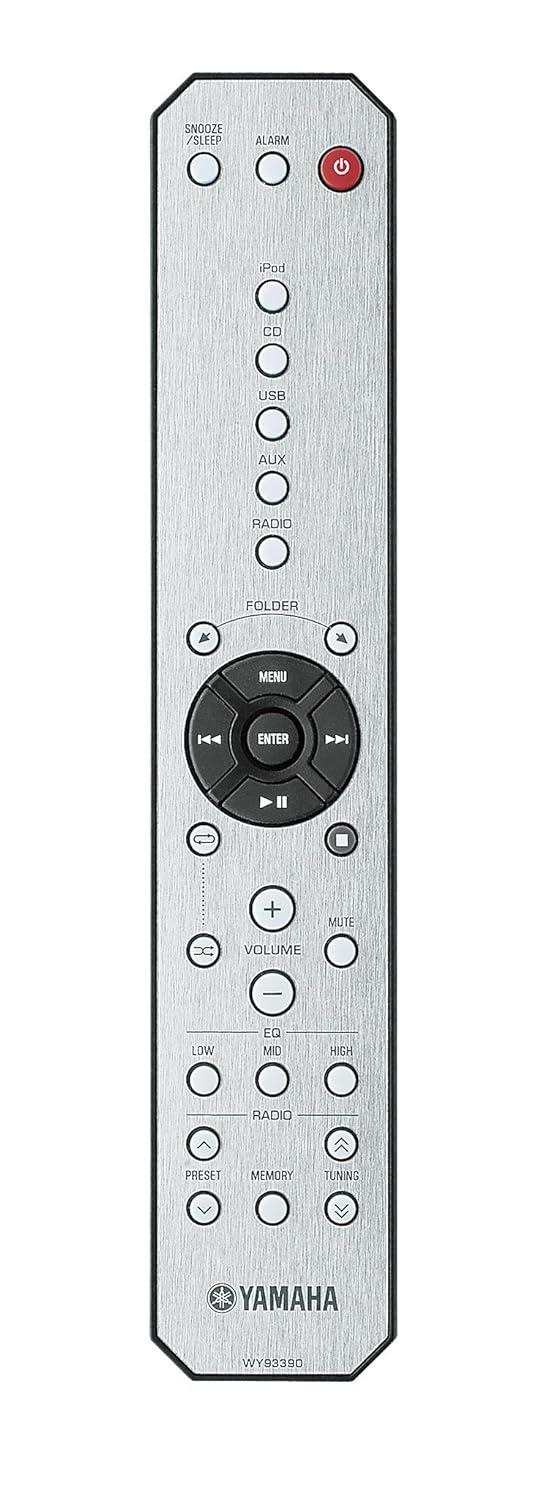
Figure 4: The remote control for the Yamaha ISX-800, showing source selection buttons.
3. Volume Control
Use the VOLUME + or VOLUME - buttons on the unit or remote control to adjust the sound level. Press MUTE to temporarily silence the audio.

Figure 5: Top control panel of the ISX-800, including volume controls and the iPod dock.
4. iPod/iPhone Playback
Place your compatible iPod or iPhone into the dock connector on the top of the unit. Select the iPod source. Playback can be controlled via the remote control or the connected device.
5. CD Playback
Insert a CD into the disc slot. Select the CD source. Use the playback controls (Play/Pause, Skip, Stop) on the remote control.
6. Radio Operation
Select the RADIO source. Use the TUNING buttons to find desired stations. Press MEMORY to save a station as a preset, and PRESET to recall saved stations.
7. Equalizer Adjustment
The ISX-800 features a three-band equalizer. Use the LOW, MID, and HIGH buttons on the remote control to adjust the bass, midrange, and treble frequencies to your preference.
8. Alarm and Timer Functions
The unit includes alarm and sleep timer functions. Refer to the detailed instructions in the full manual for setting these features. Use the ALARM and SNOOZE/SLEEP buttons on the remote control.
Maintenance
Cleaning the Unit
To maintain the appearance of your ISX-800, regularly wipe the surfaces with a soft, dry cloth. For stubborn dirt, slightly dampen the cloth with water or a mild, non-abrasive cleaner. Avoid using harsh chemicals, solvents, or abrasive materials, as these can damage the finish.
Ensure the unit is unplugged from the power outlet before cleaning. Do not spray cleaning liquids directly onto the unit.
Troubleshooting
If you experience issues with your ISX-800, please consult the following table before contacting service personnel.
| Problem | Possible Cause | Solution |
|---|---|---|
| No power | Power cord not securely connected. | Check power cord connection to the unit and wall outlet. |
| No sound | Volume is too low or muted. Incorrect source selected. | Increase volume. Press MUTE. Select the correct input source. |
| iPod/iPhone not recognized | Device not properly seated in the dock. Device not compatible. | Ensure device is firmly seated. Check compatibility list in full manual. |
| Poor radio reception | Antenna not connected or poorly positioned. Interference. | Connect FM antenna. Adjust antenna position. Move unit away from other electronic devices. |
Specifications
| Feature | Detail |
|---|---|
| Model Name | ISX 800 |
| Speaker Type | Computer (Desktop Audio System) |
| Special Features | Bluetooth Connectivity, Unique Design, HiFi Audio Quality |
| Compatible Devices | Desktop, iPod/iPhone (via dock), USB devices, Auxiliary input |
| Controller Type | Remote Control, Touch controls on unit |
| Surround Sound Channel Configuration | 2 channel (Stereo) |
| Colour | Black |
| Item Weight | 12.02 kg |
| Wireless Communication Technology | Bluetooth |
| Speaker Size | 9 Centimetres (approx. 3.5 inches) |
| Power Source | AC |
| Tweeter Diameter | 1 Inches |
| Audio Driver Type | Dynamic Driver |
| Connectivity Protocol | Bluetooth |
| Number of USB Ports | 1 (USB 2.0) |
| Product Dimensions (LxWxH) | 20.07 x 40.89 x 40.89 cm |
| Timer Function | Yes |
| Material | Metal |
Warranty and Support
Your Yamaha ISX-800 is covered by a limited warranty. Please refer to the warranty card included with your product for specific terms and conditions, including warranty period and coverage details. Keep your purchase receipt as proof of purchase.
For technical support, service, or inquiries regarding your product, please visit the official Yamaha support website or contact your local authorized Yamaha service center. Contact information can typically be found on the Yamaha website or in the warranty documentation.
Online resources may include:
- Frequently Asked Questions (FAQs)
- Software/Firmware Updates
- Additional Documentation
Related Documents - ISX-800BL
 |
Manuel d'utilisation Yamaha MSP3A : Système d'enceintes amplifiées Manuel d'utilisation complet pour le système d'enceintes amplifiées Yamaha MSP3A. Découvrez les caractéristiques, les précautions d'usage, le dépannage, les spécifications techniques et les instructions de montage. |
 |
Yamaha CS-800 Video Conference System Quick Start Guide Essential setup instructions for the Yamaha CS-800 Video Conference System, covering connections, battery insertion, and remote control pairing. Includes multilingual content. |
 |
Yamaha Non-Serviceable Product Exchange Policy and Request Form Learn about the Yamaha Non-Serviceable Product Exchange program. Find instructions for returning defective remote controls, speakers, soundbars, and other audio equipment, and access the product exchange request form. |
 |
Yamaha Loopfactory: SU200, AN200, DX200 - Music Production Gear Overview Discover the Yamaha Loopfactory series, featuring the versatile SU200 phrase sampler and the powerful AN200 analog physical modeling and DX200 FM synthesizers. Explore features for music production, DJ sets, and live performance, including sequencing, effects, and realtime control. |
 |
Yamaha TSX-N237/TSX-N237D MusicCast 200 Quick Manual A quick guide to the Yamaha TSX-N237 and TSX-N237D, a versatile desktop audio system designed to enhance your listening experience with features like CD playback, Bluetooth, Internet radio, network audio, wireless charging, and app control. |
 |
Yamaha Snowmobile Diagnostic Tool Installation Guide and User Manual Comprehensive installation guide and user manual for the Yamaha Snowmobile Diagnostic Tool (Y.S.D.T.). Learn how to install the software, connect to vehicles, diagnose issues, update ECUs, and access service information for Yamaha snowmobiles. |
Ask a question about this manual
Ask about setup, troubleshooting, compatibility, parts, safety, or missing instructions. Manuals+ will review the question and use this page’s manual context to help answer it.