
Hanna Instruments HI-98127-HANNA INSTRUMENTS
HANNA Instruments HI98127 pHep4 pH-Temperature Tester User Manual
Model: HI-98127-HANNA INSTRUMENTS
Introduction
This user manual provides detailed instructions for the proper use, maintenance, and troubleshooting of the HANNA Instruments HI98127 pHep4 pH-Temperature Tester. This waterproof device is designed for accurate pH and temperature measurements in various water applications, offering a 0.1 pH resolution.
Please read this manual thoroughly before operating the instrument to ensure optimal performance and longevity.
Safety Information
Always handle the pH electrode with care. Do not touch the glass bulb as this can affect readings. Store the electrode properly to prevent drying. Keep the device away from extreme temperatures and direct sunlight. Ensure the battery compartment is sealed correctly to maintain waterproofing.
Product Overview

Figure 1: Front view of the HI98127 pHep4 pH-Temperature Tester, showing the display and control buttons.

Figure 2: The HI98127 pHep4 pH-Temperature Tester being held alongside a buffer solution sachet, illustrating its compact size and the typical calibration accessories.
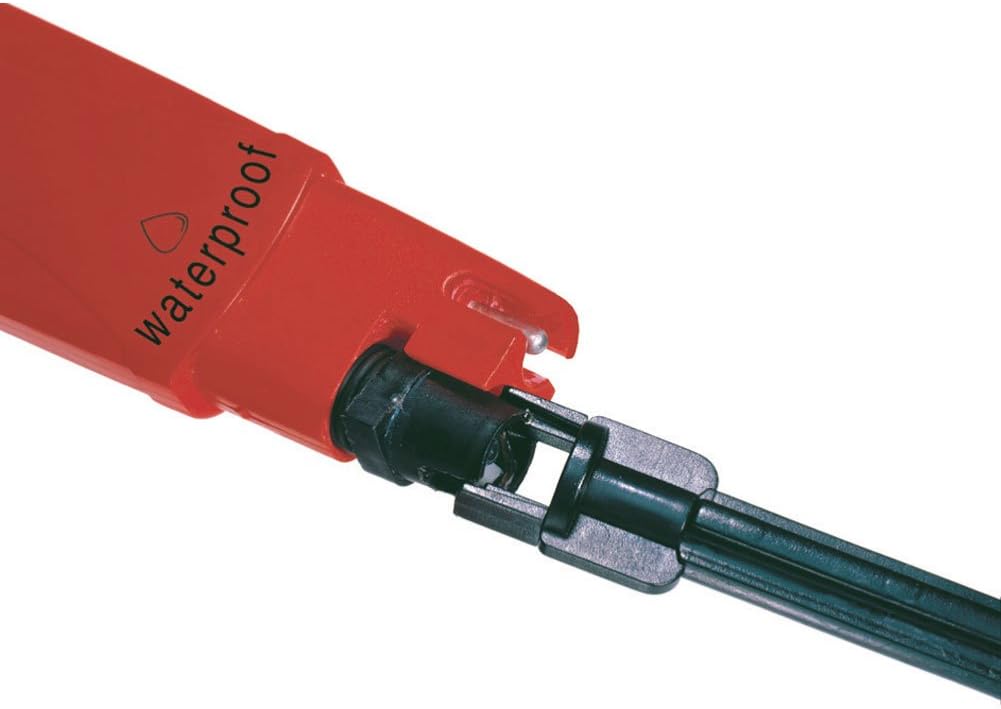
Figure 3: Close-up view of the pH electrode and temperature sensor at the bottom of the HI98127 pHep4 pH-Temperature Tester, highlighting the waterproof design.

Figure 4: Two HI98127 pHep4 pH-Temperature Testers shown in a natural environment, demonstrating their suitability for field use and waterproof capabilities.
Setup
1. Battery Installation
The HI98127 requires two AAA batteries. To install, unscrew the battery cap located at the top of the device. Insert the batteries according to the polarity indicators. Replace the cap securely to maintain the waterproof seal.
2. Initial Electrode Conditioning
Before first use, or after prolonged storage, condition the pH electrode by soaking it in Hanna Instruments HI70300 storage solution for at least 30 minutes. This ensures optimal response and accuracy.
Operating Instructions
1. Power On/Off
Press the ON/OFF button to turn the meter on or off.
2. pH Measurement
- Remove the protective cap from the electrode.
- Immerse the electrode tip into the sample to be tested. Ensure the liquid level is above the reference junction.
- Stir gently and wait for the reading to stabilize. The display will show the pH value and temperature.
- For best accuracy, allow the temperature reading to stabilize before noting the pH value.
3. Temperature Measurement
The HI98127 automatically displays the temperature of the sample along with the pH reading. The temperature unit can be switched between Celsius (°C) and Fahrenheit (°F) by pressing the °C/°F button.
4. Calibration
Regular calibration is crucial for accurate pH measurements. It is recommended to calibrate the meter at least once a week, or more frequently if high accuracy is required or after measuring strong acids/bases.
- Prepare fresh pH 7.01 and pH 4.01 (or pH 10.01) buffer solutions.
- Turn on the meter and immerse the electrode in the pH 7.01 buffer solution.
- Press and hold the CAL button until "CAL" appears on the display. The meter will automatically recognize the buffer.
- Once the first point is calibrated, rinse the electrode with distilled water and immerse it in the second buffer solution (pH 4.01 or pH 10.01).
- The meter will automatically complete the two-point calibration. "OK" will be displayed when calibration is successful.
Maintenance
1. Electrode Cleaning
After each use, rinse the electrode thoroughly with distilled or deionized water to prevent sample contamination and buildup. If the electrode becomes dirty or readings are erratic, clean it using Hanna Instruments HI7061 cleaning solution.
2. Electrode Storage
Always store the electrode with its protective cap filled with Hanna Instruments HI70300 storage solution. Never store the electrode dry or in distilled water, as this will dehydrate the glass bulb and shorten electrode life.
3. Battery Replacement
When the battery indicator shows low power, replace the batteries promptly to ensure accurate readings and proper operation. Refer to the "Battery Installation" section under Setup for instructions.
Troubleshooting
| Problem | Possible Cause | Solution |
|---|---|---|
| Erratic or Unstable Readings | Dirty electrode; Air bubbles on electrode; Electrode not conditioned; Low battery. | Clean electrode; Gently tap electrode to remove bubbles; Condition electrode in storage solution; Replace batteries. |
| "Err" Message During Calibration | Incorrect buffer solution; Contaminated buffer; Electrode damaged. | Ensure correct buffer is used; Use fresh buffer solutions; Inspect electrode for damage, replace if necessary. |
| Slow Response Time | Dehydrated electrode; Dirty electrode; Old electrode. | Soak electrode in storage solution; Clean electrode; Consider replacing electrode if it's old. |
| No Display/Meter Not Turning On | Dead batteries; Incorrect battery installation. | Replace batteries; Check battery polarity. |
Specifications
| Parameter | Value |
|---|---|
| Model Number | HI-98127-HANNA INSTRUMENTS |
| pH Resolution | 0.1 pH |
| Waterproof Rating | Yes |
| Manufacturer | Hanna Instruments Inc. |
| Item Weight | 0.32 ounces |
| Product Dimensions | 6.42 x 1.57 x 1.02 inches |
| Batteries Required | 2 AAA batteries |
| UPC | 793573622310 |
Warranty and Support
For warranty information and technical support, please contact Hanna Instruments directly. Details can typically be found on the manufacturer's official website or through the retailer where the product was purchased.
Visit the Hanna Instruments Store for more products and support resources.
Related Documents - HI-98127-HANNA INSTRUMENTS
 |
Hanna Instruments HI98127 & HI98128 Waterproof pH Testers - Instruction Manual Comprehensive instruction manual for Hanna Instruments HI98127 and HI98128 waterproof pH testers, covering setup, calibration, measurement, maintenance, and specifications. |
 |
Hanna HI 98127 & HI 98128 Waterproof pH Tester Instruction Manual This instruction manual provides detailed information on the operation, calibration, maintenance, and specifications for the Hanna Instruments HI 98127 and HI 98128 waterproof pH testers. Learn how to use these devices for accurate pH and temperature measurements. |
 |
Hanna HI9810382 HALO2 Wireless pH Tester for Bread & Dough Instruction Manual Comprehensive instruction manual for the Hanna HI9810382 HALO2 wireless pH tester, designed for bread and dough. Covers specifications, setup, calibration, maintenance, error messages, accessories, and certifications. |
 |
Manual de Instrucciones Hanna HI98330 Tester de Nutrientes GroLine® CE/TDS Manual de instrucciones detallado para el Tester de Nutrientes Hanna HI98330 GroLine® CE/TDS. Cubre especificaciones, operación, mantenimiento, limpieza y garantía para aplicaciones hidropónicas y agrícolas. |
 |
Hanna HI9810362 HALO2 Wireless pH Tester for Meat Instruction Manual Instruction manual for the Hanna HI9810362 HALO2 Wireless pH Tester for Meat. This guide provides detailed information on specifications, operation, calibration, maintenance, and troubleshooting for accurate pH measurements in meat processing. |
 |
Hanna HI9810412 HALO2 Wireless pH Tester Instruction Manual Instruction manual for the Hanna HI9810412 HALO2 Wireless pH Tester for Lab, covering specifications, operation, calibration, maintenance, and troubleshooting. |
Ask a question about this manual
Ask about setup, troubleshooting, compatibility, parts, safety, or missing instructions. Manuals+ will review the question and use this page’s manual context to help answer it.