1. Introduction
Thank you for choosing the Ground Zero GZIA 4115HPX 4-Channel Car Audio Amplifier. This amplifier is designed to deliver high-quality audio performance for your vehicle's sound system. This manual provides essential information for the proper installation, operation, and maintenance of your amplifier. Please read this manual thoroughly before attempting installation or operation to ensure optimal performance and safety.
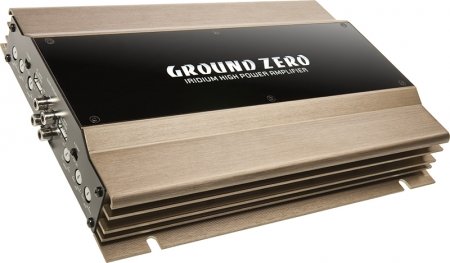
Figure 1: Ground Zero GZIA 4115HPX 4-Channel Car Audio Amplifier. This image displays the external casing of the amplifier, highlighting its compact design and heat sink fins.
2. Safety Instructions
Important Safety Information: Improper installation or use can lead to serious injury, damage to the amplifier, or damage to your vehicle.
- Always disconnect the vehicle's battery negative terminal before starting any electrical work.
- Ensure all wiring is properly routed and secured to prevent pinching, chafing, or short circuits.
- Use appropriate gauge wiring for power, ground, and speaker connections as recommended by the manufacturer.
- Install a fuse or circuit breaker on the main power wire as close to the battery as possible.
- Avoid mounting the amplifier in locations exposed to direct sunlight, excessive heat, moisture, or dust.
- Do not operate the amplifier if it is damaged or malfunctioning. Seek professional assistance.
- Keep the amplifier's ventilation areas clear to prevent overheating.
3. Setup and Installation
Proper installation is crucial for the performance and longevity of your amplifier. If you are unsure about any part of the installation process, consult a professional car audio installer.
3.1 Unpacking
Carefully remove the amplifier from its packaging. Inspect the unit for any signs of damage that may have occurred during shipping. Retain the packaging for future transport or service needs.
3.2 Mounting
The GZIA 4115HPX amplifier is designed for surface mount installation. Choose a mounting location that is:
- Secure and stable, preventing vibration.
- Well-ventilated to allow for proper heat dissipation.
- Protected from moisture and direct sunlight.
- Accessible for wiring and adjustments.
Use the provided mounting screws to secure the amplifier to a solid surface in your vehicle. Ensure no existing wiring, fuel lines, or brake lines are damaged during drilling.
3.3 Wiring Connections
Refer to the connection diagrams below for proper wiring. All connections should be tight and secure to prevent signal loss or electrical issues.
3.3.1 Power and Ground Wiring
- Power (B+): Connect a suitable gauge power cable directly from the positive terminal of the vehicle's battery to the amplifier's B+ terminal. Install an inline fuse (not included) within 18 inches (45 cm) of the battery.
- Ground (GND): Connect a suitable gauge ground cable from the amplifier's GND terminal to a clean, unpainted metal surface of the vehicle's chassis. Ensure a good electrical connection. The ground cable should be as short as possible.
- Remote (REM): Connect a remote turn-on wire from your head unit's remote output to the amplifier's REM terminal. This wire turns the amplifier on and off with your head unit.
3.3.2 Speaker Wiring
The GZIA 4115HPX is a 4-channel amplifier. Connect your speakers to the corresponding speaker output terminals (CH1, CH2, CH3, CH4). Ensure correct polarity (+ to + and - to -) for each speaker.
- For stereo operation, connect one speaker per channel.
- For bridged operation (e.g., for a subwoofer), refer to the specific bridging instructions on the amplifier or in a detailed wiring diagram.
3.3.3 RCA Input Connections
Connect RCA cables from your head unit's pre-amp outputs to the amplifier's RCA input jacks (INPUT CH1/2, INPUT CH3/4).

Figure 2: Internal view of the Ground Zero GZIA 4115HPX amplifier's circuit board. This image shows the internal components, including capacitors, resistors, and the transformer, which are responsible for audio processing and power delivery.

Figure 3: Detailed internal view of the Ground Zero GZIA 4115HPX amplifier. This image provides a closer look at the power supply section and output stage components, indicating the amplifier's robust construction.
3.4 Initial Adjustments
Before powering on, ensure all connections are correct and secure.
- Gain Control: Set the gain controls (LEVEL) on the amplifier to their minimum position.
- Crossover Settings: If your amplifier has built-in crossovers (HPF/LPF), set them according to your speaker type. For full-range speakers, you might use the HPF (High Pass Filter) to protect them from low frequencies. For subwoofers, use the LPF (Low Pass Filter).
4. Operating the Amplifier
Once installed, the amplifier will turn on automatically with your head unit via the remote wire.
4.1 Setting Gain Levels
The gain control is not a volume knob; it matches the output voltage of your head unit to the input sensitivity of the amplifier.
- Turn your head unit volume to about 75-80% of its maximum.
- Slowly increase the amplifier's gain control until you hear slight distortion, then back it off slightly until the sound is clear.
- Repeat for all channels if independent gain controls are present.
4.2 Adjusting Crossovers and Bass Boost
- High Pass Filter (HPF): Used for full-range speakers to block low frequencies that they cannot reproduce effectively. Adjust to protect speakers and improve clarity.
- Low Pass Filter (LPF): Used for subwoofers to allow only low frequencies to pass through. Adjust to blend with your main speakers.
- Bass Boost: Use sparingly. Excessive bass boost can lead to distortion and potential damage to speakers or the amplifier. Adjust to enhance low-frequency response as desired, but avoid overdriving the system.
5. Maintenance
The Ground Zero GZIA 4115HPX amplifier requires minimal maintenance.
- Cleaning: Periodically wipe the exterior of the amplifier with a soft, dry cloth to remove dust. Do not use harsh chemicals or abrasive cleaners.
- Ventilation: Ensure that the amplifier's heat sink fins and surrounding area remain free of obstructions to allow for proper airflow and cooling.
- Connection Check: Occasionally check all power, ground, remote, and speaker connections to ensure they remain tight and free of corrosion.
6. Troubleshooting
If you experience issues with your amplifier, consult the following troubleshooting guide before contacting support.
| Problem | Possible Cause | Solution |
|---|---|---|
| Amplifier does not turn on (no power indicator). |
|
|
| No sound from speakers. |
|
|
| Distorted or poor sound quality. |
|
|
| Amplifier overheats (protection light on). |
|
|
7. Specifications
The following are the technical specifications for the Ground Zero GZIA 4115HPX 4-Channel Car Audio Amplifier:
| Feature | Detail |
|---|---|
| Model Number | GZIA 4115HPX |
| Number of Channels | 4 |
| Output Channel Quantity | 4 |
| Voltage | 14.4 Volts |
| Wattage (Max) | 500 Watts |
| Mounting Type | Surface Mount |
| Item Weight | 2 kg 900 g |
| Package Dimensions | 43.4 x 25 x 7.9 cm |
| ASIN | B006VTSQ8C |
8. Warranty Information
Ground Zero products are designed and manufactured to the highest quality standards. For detailed warranty terms and conditions, please refer to the warranty card included with your product or visit the official Ground Zero website. Keep your proof of purchase for any warranty claims.
9. Customer Support
If you require further assistance or have questions not covered in this manual, please contact Ground Zero customer support or your authorized dealer. Contact information can typically be found on the official Ground Zero website.


