
STL Deutschland GmbH IPD-1003
Lenco iPD-1003 Docking Station User Manual
Model: IPD-1003
Introduction
Thank you for purchasing the Lenco iPD-1003 Docking Station. This device is designed to provide high-quality audio playback and charging for your Apple iPod, iPhone, and iPad devices. Featuring a 6.1 channel system with 3D sound technology, it enhances your audio experience. Please read this manual carefully before using the product to ensure proper operation and to maximize its lifespan.
Safety Information
- Do not expose the unit to rain or moisture to prevent fire or electric shock.
- Ensure proper ventilation around the unit. Do not block ventilation openings.
- Place the unit on a stable, flat surface.
- Do not place objects filled with liquids, such as vases, on the unit.
- Disconnect the power plug from the wall outlet if the unit is not used for a long period.
- Only use attachments/accessories specified by the manufacturer.
- Refer all servicing to qualified service personnel.
Package Contents
Please check that all items are present and in good condition:
- Lenco iPD-1003 Docking Station
- Remote Control
- Power Adapter
- User Manual
Product Overview
Familiarize yourself with the components of your Lenco iPD-1003 docking station.
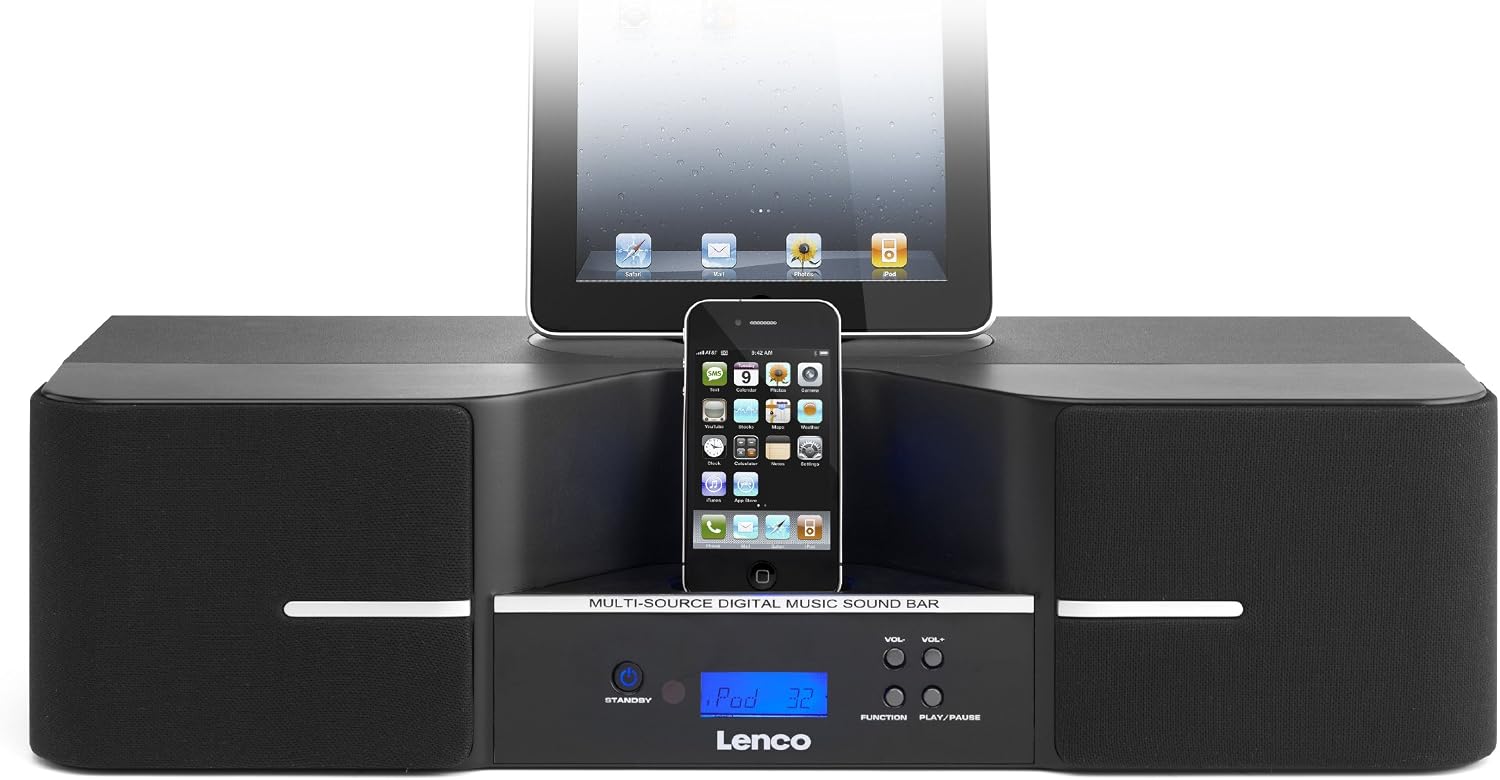
Figure 1: Front view of the Lenco iPD-1003 docking station, showing the main unit with an iPad and iPhone connected to their respective docks. The front panel features a blue backlit LCD screen and control buttons.

Figure 2: Angled view of the Lenco iPD-1003, highlighting the sleek design and the iPhone docked in the front connector. The side speakers are visible.

Figure 3: Rear panel of the Lenco iPD-1003, displaying the power switch, power input, composite video output, and two sets of AUX input jacks (AUX 1 and AUX 2).

Figure 4: Close-up view of the iPad docking connector, showing the 30-pin connector and the 'OPEN' button to release the dock.

Figure 5: The remote control for the Lenco iPD-1003, featuring buttons for standby, AUX in, line in, coaxial in, video on/off, iPod/iPhone/iPad control, volume, bass, treble, and mute functions.
Setup
1. Power Connection
- Connect the power adapter to the "POWER INPUT" jack on the rear of the docking station.
- Plug the other end of the power adapter into a suitable wall outlet.
- Flip the "ON/OFF" switch on the rear panel to the "ON" position. The unit will enter standby mode.
2. Device Docking
- For iPad: Press the "OPEN" button near the iPad dock to reveal the connector. Carefully align your iPad with the 30-pin connector and gently push down until it is securely seated.
- For iPhone/iPod: Carefully align your iPhone or iPod with the 30-pin connector in the front dock and gently push down until it is securely seated.
- Ensure your device is properly seated to prevent damage and ensure charging/playback.
3. External Audio Connection (Optional)
You can connect external audio devices using the AUX inputs:
- Connect an audio cable (not included) from the audio output of your external device (e.g., MP3 player, TV) to the "AUX 1" or "AUX 2" input jacks on the rear panel.
4. Video Output Connection (Optional)
If your docked Apple device supports video output and you wish to display video on an external screen:
- Connect a composite video cable (not included) from the "VIDEO OUT" jack on the rear panel to the video input of your TV or monitor.
Operating Instructions
1. Power On/Off
- Press the STANDBY button on the front panel or remote control to turn the unit on or off (standby mode).
2. Source Selection
- Press the FUNCTION button on the front panel or the corresponding source button (e.g., iPod, iPhone, iPad, AUX IN, LINE IN, COAXIAL IN) on the remote control to select the desired audio source.
3. Volume Control
- Use the VOL+ and VOL- buttons on the front panel or remote control to adjust the volume.
- Press the MUTE button on the remote control to temporarily silence the audio. Press again to restore sound.
4. Playback Control (for Docked Devices)
- Use the PLAY/PAUSE button on the front panel or remote control to start or pause playback.
- Use the SKIP FORWARD (Next Track) and SKIP BACKWARD (Previous Track) buttons on the remote control to navigate between tracks.
- The REP (Repeat) and RAN (Random) buttons on the remote control control playback modes for docked devices.
5. Tone Control
- Use the BASS+/BASS- and TREBLE+/TREBLE- buttons on the remote control to adjust the bass and treble levels.
6. 3D Sound
The iPD-1003 features Sonic Emotion 3D sound technology for an immersive audio experience. This feature is automatically active when playing audio through the unit.
7. Sleep Function
- Press the SLEEP button on the remote control to set a sleep timer. Repeated presses will cycle through available sleep times (e.g., 15, 30, 60, 90 minutes, OFF).
Maintenance
- Cleaning: Use a soft, dry cloth to clean the exterior of the unit. Do not use abrasive cleaners or solvents.
- Dust: Regularly dust the unit, especially around ventilation openings, to prevent overheating.
- Storage: If storing the unit for an extended period, disconnect it from power and store it in a cool, dry place.
Troubleshooting
| Problem | Possible Cause | Solution |
|---|---|---|
| No power | Power cable not connected; Power switch off; Wall outlet faulty. | Ensure power cable is securely connected. Check if the rear power switch is ON. Try a different wall outlet. |
| No sound | Volume too low; Mute function active; Incorrect source selected; Device not properly docked/connected. | Increase volume. Deactivate Mute. Select correct input source. Re-dock/reconnect your device or AUX cable. |
| Remote control not working | Batteries depleted; Obstruction between remote and unit; Remote not pointed at sensor. | Replace remote control batteries (1 CR2 battery required). Remove any obstructions. Point remote directly at the unit's IR sensor. |
| Device not charging/authenticating | Device not properly seated; Incompatible device model. | Ensure your Apple device is firmly seated in the dock. This unit is designed for older Apple devices with 30-pin connectors (iPod, iPhone, iPad models compatible with 30-pin). Newer devices with Lightning connectors are not directly compatible without an adapter (not included). |
| Poor audio quality | Source audio quality is low; Cables are loose or damaged; Interference. | Try a different audio source. Check all cable connections. Move unit away from other electronic devices that may cause interference. |
Specifications
| Feature | Detail |
|---|---|
| Model | IPD-1003 |
| Brand | Lenco (Manufactured by STL Deutschland GmbH) |
| Compatible Devices | iPad, iPhone, iPod (30-pin connector models) |
| Audio Output Mode | Mono (with 3D sound processing) |
| Surround Sound Configuration | 6.1 Channel |
| Output Power (RMS) | 6 x 10 W + 1 x 20 W (Total 80W Max) |
| Special Features | Apple iOS docking, 3D Sound (Sonic Emotion), Remote Control, Wired Connectivity, LCD screen with blue backlight |
| Connectivity | AUX Input (2 ports), Composite Video Output, USB (for charging/data passthrough, not primary audio) |
| Power Source | AC (Mains powered) |
| Remote Control Batteries | 1 x CR2 (included) |
| Product Dimensions (L x W x H) | 54.5 x 19.6 x 14 cm (approx. 19.6 x 54.5 x 14 cm) |
| Item Weight | 1.2 kg (1200 Grams) |
Warranty and Support
For warranty information and technical support, please refer to the warranty card included in your package or visit the official Lenco website. Keep your proof of purchase for any warranty claims.
For further assistance, you may contact the manufacturer, STL Deutschland GmbH, or your local retailer.
Ask a question about this manual
Ask about setup, troubleshooting, compatibility, parts, safety, or missing instructions. Manuals+ will review the question and use this page’s manual context to help answer it.