Introduction
This manual provides comprehensive instructions for the proper setup, operation, and maintenance of your Health o meter Professional Digital Scale, Model B006RNPYOG. Please read this manual thoroughly before using the scale to ensure accurate measurements and safe operation. Keep this manual for future reference.
Setup
Unpacking
- Carefully remove all components from the packaging.
- Inspect the scale for any signs of damage. If damaged, do not use and contact customer support.
- Retain packaging materials for potential future transport or storage.
Assembly
The Health o meter Professional Digital Scale typically requires minimal assembly. Follow these steps:
- Attach the Column: Securely connect the vertical column to the base platform. Ensure it clicks into place or is fastened with provided screws.
- Connect the Display Unit: Attach the display unit to the top of the column. Ensure all cables are properly connected and secured.
- Power Connection: Connect the power adapter to the scale and plug it into a suitable electrical outlet. Alternatively, install batteries if your model supports battery operation (refer to battery compartment for type and orientation).
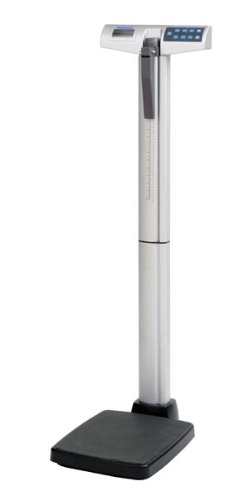
Figure 1: Health o meter Professional Digital Scale, showing the base, column, and display unit.
Operating Instructions
Powering On/Off
- To Power On: Press the ON/OFF button. The display will illuminate and perform a self-test.
- To Power Off: Press and hold the ON/OFF button until the display turns off, or the scale may automatically power off after a period of inactivity.
Taking a Measurement
- Ensure the scale is on a firm, flat surface.
- Press the ON/OFF button to turn on the scale.
- Wait for the display to show "0.0" or "0.00" and the "READY" indicator.
- Step onto the center of the scale platform barefoot and stand still.
- The display will show your weight. Wait for the reading to stabilize.
- Step off the scale. The reading may hold briefly or return to zero.
Unit Selection (if applicable)
If your scale supports multiple units (e.g., pounds, kilograms), locate the UNIT button. Press this button to toggle between available measurement units.
Tare Function (if applicable)
The Tare function allows you to weigh an item while subtracting the weight of a container. Place the empty container on the scale, press the TARE button, then place the item inside the container. The display will show the net weight of the item.
Maintenance
Cleaning
- Wipe the scale surface with a soft, damp cloth.
- Do not use abrasive cleaners or immerse the scale in water.
- Ensure the scale is dry before storage or next use.
Storage
Store the scale in a cool, dry place away from direct sunlight and extreme temperatures.
Battery Replacement (if applicable)
If the display shows a low battery indicator, replace the batteries according to the instructions in the battery compartment. Ensure correct polarity.
Troubleshooting
| Problem | Possible Cause | Solution |
|---|---|---|
| Scale does not turn on | No power, dead batteries, loose connection | Check power adapter connection, replace batteries, ensure all cables are secure. |
| Inaccurate readings | Uneven surface, scale not calibrated, movement during weighing | Place scale on a firm, flat surface. Ensure scale is stable before stepping on. Refer to calibration section if available (not detailed in this manual). |
| "LO" or "BAT" on display | Low battery power | Replace batteries. |
| "ERR" on display | Overload, internal error | Ensure weight does not exceed maximum capacity. Turn scale off and on again. If error persists, contact customer support. |
Specifications
- Model: B006RNPYOG
- Brand: Health o meter
- Type: Professional Digital Scale
- Item Weight: 0.96 ounces (Note: This weight may refer to packaging or a component, not the full scale unit.)
- Manufacturer: Health-O-Meter Professional
- First Available: March 6, 2013
Warranty and Support
For warranty information, technical support, or service inquiries, please refer to the official Health o meter website or contact their customer service department. Keep your purchase receipt as proof of purchase.
Manufacturer: Health-O-Meter Professional
Website: www.healthometermedical.com


