
1. Introduction
This manual provides essential information for the safe and effective use of your TRUE Fitness Performance 300 Treadmill. Please read this manual thoroughly before assembly, operation, or maintenance to ensure proper function and to prevent injury. Keep this manual for future reference.
2. Safety Information
WARNING: To reduce the risk of serious injury, read all important precautions and instructions in this manual before using the treadmill.
- Consult a physician before beginning any exercise program.
- Keep children and pets away from the treadmill at all times.
- Always wear appropriate athletic footwear and clothing during use.
- Use the safety key/clip feature. In case of emergency, the treadmill will stop if the safety key is disengaged.
- Do not operate the treadmill if it has a damaged power cord or plug, or if it is not working properly.
- Ensure the treadmill is placed on a stable, level surface with adequate clearance around it.
3. Product Overview
The TRUE Fitness Performance 300 Treadmill (Model PS300) is designed for home fitness, offering a robust and comfortable workout experience. It features an easy-to-read LCD screen for monitoring progress and an orthopedic belt engineered to reduce impact on joints and knees.
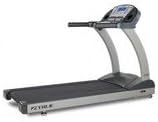
Image 3.1: The TRUE Fitness Performance 300 Treadmill, showcasing its console and running deck.
Key components include the console with quick keys for speed and incline adjustments, a durable frame, and a spacious running deck.
4. Setup
4.1 Assembly
Assembly of the TRUE Fitness Performance 300 Treadmill is required. Refer to the separate assembly guide provided with your purchase for detailed, step-by-step instructions. Ensure all components are securely fastened before proceeding.
4.2 Placement
Place the treadmill on a firm, level surface. The treadmill dimensions are approximately 79 x 31.5 x 55.9 inches (Length x Width x Height). Allow at least 2 feet of clearance on the sides and 6 feet at the rear for safe operation and access.
4.3 Power Connection
Connect the treadmill to a dedicated, grounded electrical outlet. The treadmill operates on 300 Watts of input power. Do not use extension cords or adapters.
5. Operating Instructions
5.1 Console Overview
The LCD console displays workout data such as time, speed, distance, incline, and calories burned. It features quick keys for direct speed and incline selection, as well as program selection buttons.
5.2 Starting a Workout
- Step onto the treadmill belt, facing the console.
- Attach the safety key clip to your clothing.
- Press the START button to begin a manual workout, or select a pre-programmed workout.
- Adjust speed (0.5 to 12 MPH) and incline using the console controls or quick keys.
5.3 Using Programs
The Performance 300 Treadmill includes various challenging programs. To select a program, press the 'Program' button and navigate through the options. Follow the on-screen prompts to set your workout parameters. Note that some programs may have fixed speed and incline profiles.
5.4 Heart Rate Cruise Control
This feature allows you to set a target heart rate, maximum speed, and maximum incline. The treadmill will adjust its settings to help you maintain your target heart rate. Ensure proper contact with heart rate sensors or use a compatible chest strap for accurate readings. If the treadmill loses heart rate data, the workout may end.
5.5 Stopping a Workout
Press the STOP button to pause or end your workout. To immediately stop the treadmill in an emergency, pull the safety key from the console.
6. Maintenance
Regular maintenance ensures the longevity and optimal performance of your treadmill.
6.1 Lubrication
The running deck requires self-lubrication approximately every three months, depending on usage. Refer to the specific lubrication instructions in your assembly guide or contact customer support for the correct lubricant and procedure.
6.2 Cleaning
Wipe down the console and other surfaces with a damp cloth after each use. Avoid using abrasive cleaners or solvents. Regularly vacuum underneath the treadmill to prevent dust and debris buildup.
6.3 Belt Adjustment
Periodically check the running belt for proper tension and alignment. If the belt slips or drifts to one side, consult the assembly guide for instructions on how to adjust it. Incorrect belt tension can affect performance and belt lifespan.
7. Troubleshooting
This section addresses common issues you might encounter with your treadmill.
- Treadmill does not power on: Ensure the power cord is securely plugged into a functional outlet and the treadmill's power switch is in the 'ON' position. Check the circuit breaker.
- Running belt slips or hesitates: The running belt may require tension adjustment or lubrication. Refer to Section 6.3 and 6.1.
- Console display is inaccurate (e.g., slow timer): While some minor variations may occur, significant inaccuracies could indicate a sensor issue. Ensure all connections are secure.
- Unusual noises during operation: Stop the treadmill immediately. Inspect for loose parts or foreign objects. If the noise persists, discontinue use and contact customer support.
- Heart Rate Cruise Control not functioning: Ensure proper contact with heart rate sensors. Clean sensors if necessary.
For issues not listed here or if troubleshooting steps do not resolve the problem, please contact customer support.
8. Specifications
| Feature | Specification |
|---|---|
| Brand | True Decor |
| Model | PS300 (Performance 300) |
| Item Weight | 307 pounds (139.71 Kilograms) |
| Product Dimensions | 79 x 31.5 x 55.9 inches |
| Maximum Speed | 12 Miles per Hour |
| Minimum Speed | 0.5 Miles per Hour |
| Maximum Weight Recommendation | 350 Pounds |
| Deck Length | 55 Inches |
| Frame Material | Alloy Steel |
| Display Type | LCD |
| Input Power | 300 Watts |
| Assembly Required | Yes |
| Special Feature | Portable |
9. Warranty and Support
The TRUE Fitness Performance 300 Treadmill typically includes a 10-year warranty on parts for the treadmill itself. The console, however, usually carries a separate warranty, often for 3 years. Please refer to your specific warranty documentation for complete details regarding coverage and terms.
For technical assistance, parts, or warranty claims, please contact True Decor customer support. Have your model number (PS300) and purchase date available when contacting support.