
1. Introduction
This manual provides instructions for the safe and effective use of the Allen Tel AT680 Multi-Function Crimping Tool. This tool is designed for crimping RJ-11 and RJ-45 modular plugs onto appropriate cables, facilitating network and telephone wiring tasks.
2. Safety Information
- Always wear appropriate personal protective equipment, such as safety glasses, when using this tool.
- Keep hands and fingers clear of moving parts during operation to prevent injury.
- Do not use the tool for purposes other than its intended use (crimping RJ-11 and RJ-45 modular plugs).
- Ensure the tool is clean and in good working condition before each use.
- Store the tool in a dry, secure place, out of reach of children and unauthorized users.
3. Product Overview
The Allen Tel AT680 is a robust multi-function crimping tool engineered for reliable performance. It features a precision ratchet mechanism that ensures consistent, high-quality crimps with each use. Constructed from durable carbon steel, the tool is designed for longevity and features an ergonomic grip for comfortable operation.
Key Features:
- Crimping tool with ratchet mechanism for consistent results.
- Multiple functions for various modular plug types (RJ-11, RJ-45).
- Constructed of high-quality carbon steel for durability.
- Ergonomic grip for comfortable and efficient use.
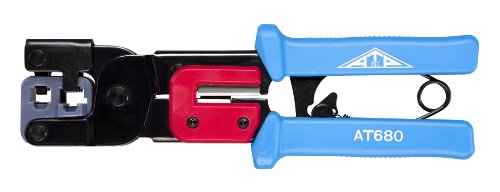
Figure 1: Allen Tel AT680 Multi-Function Crimping Tool. This image displays the tool's blue and silver/grey carbon steel construction and ergonomic handle, highlighting its design for crimping modular plugs.
4. Setup
The Allen Tel AT680 Crimping Tool requires no assembly and is ready for immediate use directly out of its packaging. Prior to initial use, and before each subsequent use, ensure the tool is clean and free of any debris or foreign objects that could impede its function or damage connectors.
5. Operating Instructions
Follow these steps to properly crimp RJ-11 or RJ-45 modular plugs using your AT680 tool:
- Prepare the Cable: Carefully strip the outer jacket of the cable (e.g., Cat5e, Cat6 for RJ-45; telephone cable for RJ-11) to expose the individual wires. Ensure that you do not cut or damage the inner conductors. The stripped length should be appropriate for the modular plug, typically about 1/2 to 3/4 inch (1.2 to 1.9 cm).
- Arrange Wires: Untwist and arrange the individual wires according to the desired wiring standard (e.g., T568A or T568B for RJ-45, or standard telephone wiring for RJ-11). Trim the wires evenly so they are flush with each other.
- Insert Wires into Plug: Carefully insert the arranged wires into the modular plug, ensuring each wire reaches the end of its respective channel. Verify that the cable jacket is seated inside the plug's strain relief area.
- Position Plug in Tool: Place the modular plug into the appropriate crimping die on the AT680 tool. The tool has designated slots for RJ-11 (6-position) and RJ-45 (8-position) plugs. Ensure the plug is fully seated in the correct slot.
- Crimp the Plug: Squeeze the handles of the crimping tool firmly and steadily until the ratchet mechanism completes its cycle and releases. This action pushes the contacts into the wires and secures the plug, simultaneously engaging the strain relief.
- Inspect the Crimp: Remove the crimped plug from the tool and visually inspect it. Verify that all wires are properly seated, the contacts are fully crimped into the wires, and the cable jacket is securely held by the strain relief.
6. Maintenance
- Cleaning: After each use, wipe the tool clean with a dry, lint-free cloth to remove any dust, debris, or cable jacket remnants.
- Lubrication: Periodically apply a light, non-conductive lubricant to the pivot points and the ratchet mechanism to ensure smooth operation and prevent wear.
- Storage: Store the tool in a dry environment to prevent rust and corrosion. Keep it in a protective case or drawer to avoid damage.
- Inspection: Regularly inspect the crimping dies for wear or damage. Damaged dies can lead to poor crimps.
7. Troubleshooting
- Issue: Inconsistent Crimps or Loose Connections
Solution: Ensure the cable wires are properly aligned, untwisted, and fully inserted into the modular plug before crimping. Verify that the correct crimping die is used for the specific plug type (RJ-11 or RJ-45). Make sure the ratchet mechanism completes its full cycle. - Issue: Wires Not Making Electrical Contact
Solution: Check if the wires are trimmed evenly and pushed all the way to the front of the modular plug, ensuring they make contact with the metal pins. Confirm the crimping action was fully completed by the ratchet mechanism. - Issue: Tool Jams or is Stiff to Operate
Solution: Do not force the tool. Inspect for any foreign objects or damaged components within the mechanism. If the ratchet mechanism or pivot points are stiff, apply a light lubricant as per the maintenance instructions. - Issue: Cable Jacket Not Secured by Strain Relief
Solution: Ensure the cable jacket extends far enough into the modular plug to be gripped by the strain relief tab when crimped. Adjust the stripping length if necessary.
8. Specifications
| Specification | Detail |
|---|---|
| Brand | Allen Tel Products |
| Model Number | AT680 |
| Handle Material | Carbon Steel |
| Grip Type | Ergonomic |
| Item Weight | 16 ounces (1 pound) |
| Usage | Network Wiring (RJ-11, RJ-45) |
| Color | Blue and Silver/Grey |
9. Warranty Information
The Allen Tel AT680 Multi-Function Crimping Tool comes with a standard 1-year warranty from Allen Tel Products. This warranty covers defects in materials and workmanship under normal use. For specific terms, conditions, or to initiate a warranty claim, please refer to the official Allen Tel Products website or contact their customer support directly.
10. Support and Contact Information
For technical assistance, replacement parts, or further inquiries regarding your Allen Tel AT680 Crimping Tool, please contact Allen Tel Products customer support. Up-to-date contact information and additional resources can be found on the official Allen Tel Products website.