
Invensys 275-3124-00
Invensys 275-3124-00 Eaton Mears Thermostat User Manual
Model: 275-3124-00
Brand: Invensys
Product Overview
The Invensys 275-3124-00 Eaton Mears Thermostat is a single-pole, single-throw (SPST) temperature control device designed for various heating applications. It features a 1/4-inch diameter, 36-inch long sensing bulb and is rated for 25 Amperes. This thermostat is engineered for reliable temperature regulation within its specified range.

Figure 1: The Invensys 275-3124-00 Thermostat, showing the main control unit and the coiled capillary tube with its sensing bulb.
Safety Information
- Always disconnect power to the appliance or system before installing, servicing, or removing the thermostat.
- Installation should be performed by a qualified technician in accordance with all local and national electrical codes.
- Ensure proper wiring connections to prevent electrical shock or damage to the thermostat and connected equipment.
- Do not exceed the specified electrical ratings (25A).
- Keep the sensing bulb clean and free from obstructions for accurate temperature readings.
Setup and Installation
Proper installation is crucial for the accurate and safe operation of your Invensys thermostat. If you are unsure about any step, consult a qualified electrician or HVAC professional.
- Power Disconnection: Before beginning any installation, ensure that the main power supply to the appliance or system where the thermostat will be installed is completely disconnected at the circuit breaker or fuse box. Verify with a voltage tester.
- Mounting the Thermostat:
Mount the thermostat control unit in a suitable location, typically within the control panel or enclosure of the appliance. Use appropriate screws or mounting hardware to secure it firmly. Ensure there is adequate space for wiring and adjustment.
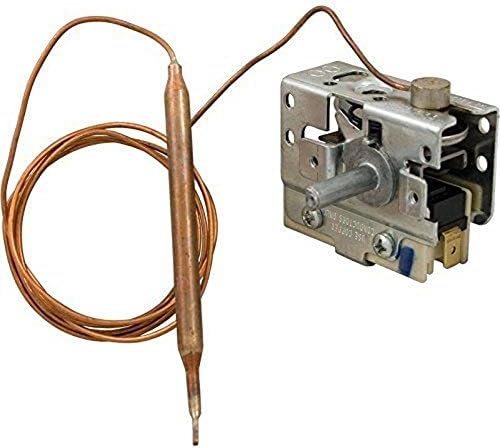
Figure 2: Detail of the thermostat's control unit, highlighting mounting points and electrical connections.
- Sensing Bulb Placement:
Carefully route the 36-inch capillary tube and position the 1/4-inch sensing bulb in the area where temperature regulation is required. The bulb must be in direct contact with the medium or air whose temperature is to be controlled. Avoid kinking or sharply bending the capillary tube.
- Wiring Connections:
Connect the electrical wires to the thermostat terminals. This is an SPST (Single-Pole, Single-Throw) thermostat, meaning it acts as a simple on/off switch for the heating element or control circuit. Refer to the wiring diagram of your specific appliance for correct connections. Ensure all connections are secure and insulated.
- Input Power: Connect the incoming power line to one of the thermostat's terminals.
- Output to Load: Connect the wire leading to the heating element or controlled device to the other thermostat terminal.
- Final Checks: Double-check all wiring and mounting. Ensure no wires are pinched or exposed.
- Restore Power: Once installation is complete and verified, restore power to the system.
Operating Instructions
The Invensys 275-3124-00 thermostat operates by sensing the temperature at its bulb and activating or deactivating a connected circuit to maintain a desired temperature.
- Setting the Temperature: Locate the adjustment dial or screw on the thermostat control unit. Rotate this control to set the desired temperature. The operating range for this thermostat is typically 60 to 104 degrees Fahrenheit (approximately 15 to 40 degrees Celsius).
- Temperature Sensing: The thermostat will monitor the temperature via its sensing bulb. When the temperature at the bulb falls below the set point, the thermostat will close its internal switch, allowing power to flow to the connected heating element or device.
- Temperature Regulation: Once the temperature at the sensing bulb reaches or exceeds the set point, the thermostat will open its internal switch, interrupting power to the connected device, thereby turning off the heating. This cycle repeats to maintain the set temperature.
- Initial Adjustment: It may require a few adjustments to the dial to achieve the precise desired temperature setpoint for your specific application. Allow time for the system to stabilize after each adjustment.
Maintenance
The Invensys 275-3124-00 thermostat is designed for minimal maintenance. However, periodic checks can ensure optimal performance and longevity.
- Cleaning: Ensure the sensing bulb and the area around it are kept clean and free from dust, debris, or insulation that could impede accurate temperature sensing.
- Visual Inspection: Periodically inspect the thermostat and its wiring for any signs of damage, corrosion, or loose connections. Address any issues promptly.
- Capillary Tube Integrity: Check the capillary tube for any kinks, punctures, or damage that could affect its function.
- Power Disconnection: Always disconnect power before performing any cleaning or inspection that requires touching the thermostat's internal components or wiring.
Troubleshooting
If your Invensys 275-3124-00 thermostat is not functioning as expected, consider the following common issues and solutions:
| Problem | Possible Cause | Solution |
|---|---|---|
| Thermostat not turning on/off appliance. |
|
|
| Inaccurate temperature control. |
|
|
| Thermostat appears physically damaged. | Physical impact or wear. | Replace the thermostat. |
If troubleshooting steps do not resolve the issue, it is recommended to contact a qualified service technician.
Specifications
| Brand | Invensys |
| Model Number | 275-3124-00 |
| Type | SPST (Single-Pole, Single-Throw) Thermostat |
| Sensing Bulb Diameter | 1/4 inch |
| Capillary Tube Length | 36 inches |
| Electrical Rating | 25 Amperes |
| Temperature Range | 60 to 104 Degrees Fahrenheit |
| Item Weight | 4.2 ounces |
| Product Dimensions | 4 x 3 x 2 inches (Control Unit) |
| Shape | Rectangular (Control Unit) |
Warranty and Support
For warranty information or technical support regarding your Invensys 275-3124-00 Eaton Mears Thermostat, please contact the manufacturer or your authorized dealer. Keep your purchase receipt as proof of purchase.
Manufacturer: Invensys