
Timbertech TBSLF02
TIMBERTECH® Drywall Sander TBSLF02 - Instruction Manual
Model: TBSLF02 | Brand: Timbertech
Introduction
This manual provides essential information for the safe and efficient operation, maintenance, and troubleshooting of your TIMBERTECH® Drywall Sander, Model TBSLF02. Please read these instructions carefully before use and keep them for future reference.
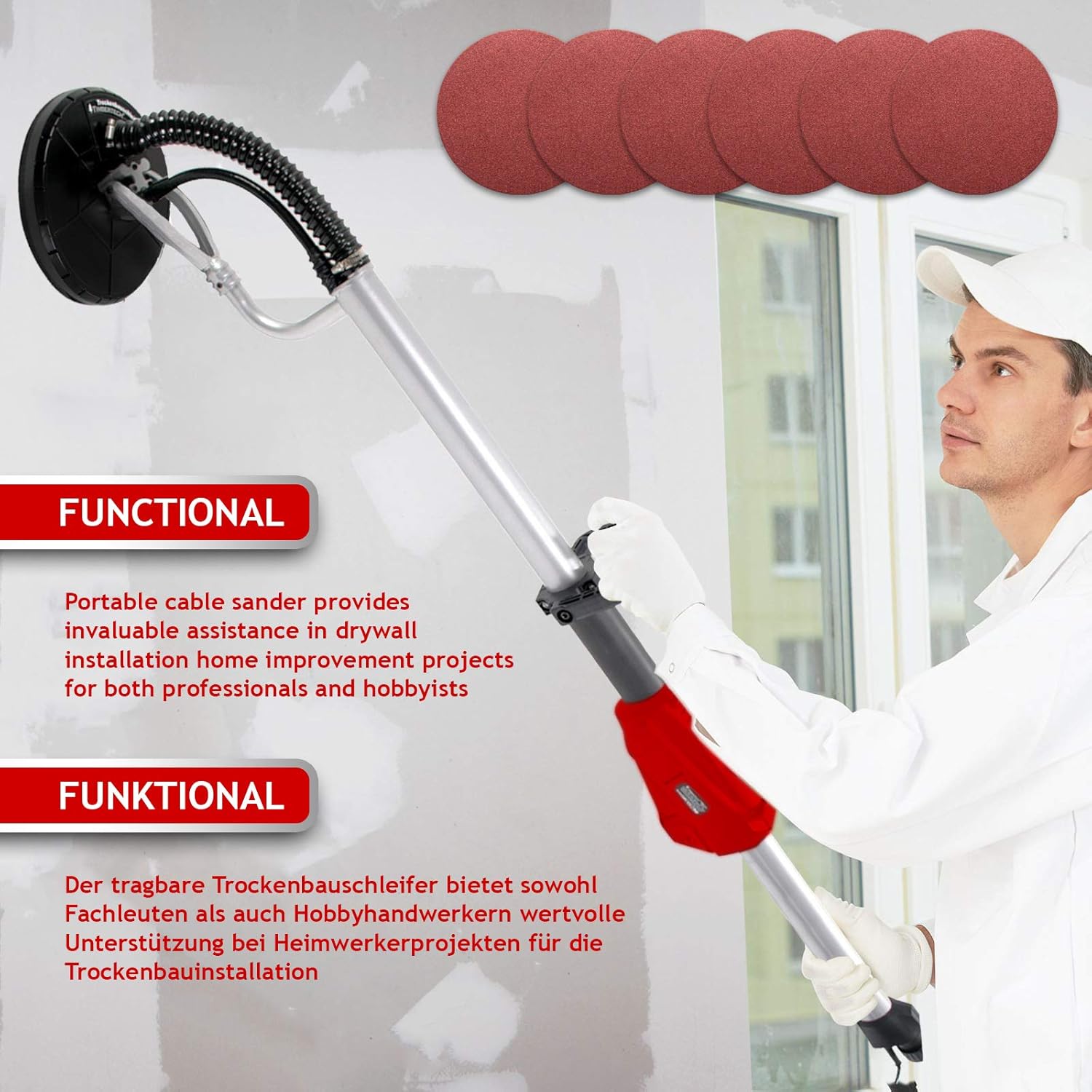
Image: TIMBERTECH® Drywall Sander in operation, demonstrating its use for sanding walls and ceilings.
General Safety Information
Always observe basic safety precautions to reduce the risk of fire, electric shock, and personal injury. This includes, but is not limited to:
- Wear appropriate personal protective equipment (PPE) such as safety glasses, dust mask, hearing protection, and gloves.
- Ensure the work area is well-lit and free from obstructions.
- Keep children and bystanders away from the operating area.
- Do not operate power tools in explosive atmospheres, such as in the presence of flammable liquids, gases, or dust.
- Always disconnect the power plug from the power source before making any adjustments, changing accessories, or storing the tool.
- Do not overreach. Maintain proper footing and balance at all times.
- Use the correct tool for your application. Do not force the tool.
Product Overview and Components
The TIMBERTECH® Drywall Sander is designed for efficient sanding of walls and ceilings. Key features include:
- Powerful Motor: 710 W motor for effective sanding.
- Adjustable Speed: 6 speed levels (1000-2100 RPM) for various applications.
- Large Sanding Disc: Ø 220 mm disc for broad coverage.
- Flexible Head: Sanding head mounted on 2 joints for improved mobility and access to difficult areas.
- Integrated Dust Extraction: Designed for connection to a vacuum cleaner to minimize dust.
- Ergonomic Handle: Well-balanced design for comfortable use.

Image: Full view of the TIMBERTECH® Drywall Sander, highlighting its overall design and key components.
Included Components:
- 1 x TIMBERTECH® Wall and Ceiling Sander (Model TBSLF02)
- 1 x Suction Hose (approx. 1-4 m)
- 1 x Allen Key
- 1 x Screwdriver
- 6 x Abrasive Discs (P80, P100, P120, P150, P180, P240)
- 1 x Instruction Manual

Image: The set of six abrasive discs (P80, P100, P120, P150, P180, P240) included with the sander.
Setup
- Assembly:
The sander may require minor assembly. Refer to the included instruction manual for specific steps on attaching the handle and other components using the provided Allen key and screwdriver.
- Attaching Abrasive Disc:
Ensure the sander is unplugged. Align the chosen abrasive disc (e.g., P80 for rough sanding, P240 for fine finishing) with the sanding pad. The discs attach via a hook-and-loop system. Press firmly to secure.
- Connecting Dust Extraction:
Connect the suction hose to the dust extraction port on the sander. Connect the other end of the hose to a suitable vacuum cleaner. This is crucial for dust management during operation.

Image: Illustration of the integrated vacuum system, showing how dust is collected from the sanding head.
- Power Connection:
Plug the power cable into a standard 230V electrical outlet. Ensure the cable is positioned to avoid tripping hazards and is not in the path of the sanding disc.
Operating Instructions
- Power On/Off:
Locate the ON/OFF switch on the handle. Press to turn the sander on or off.
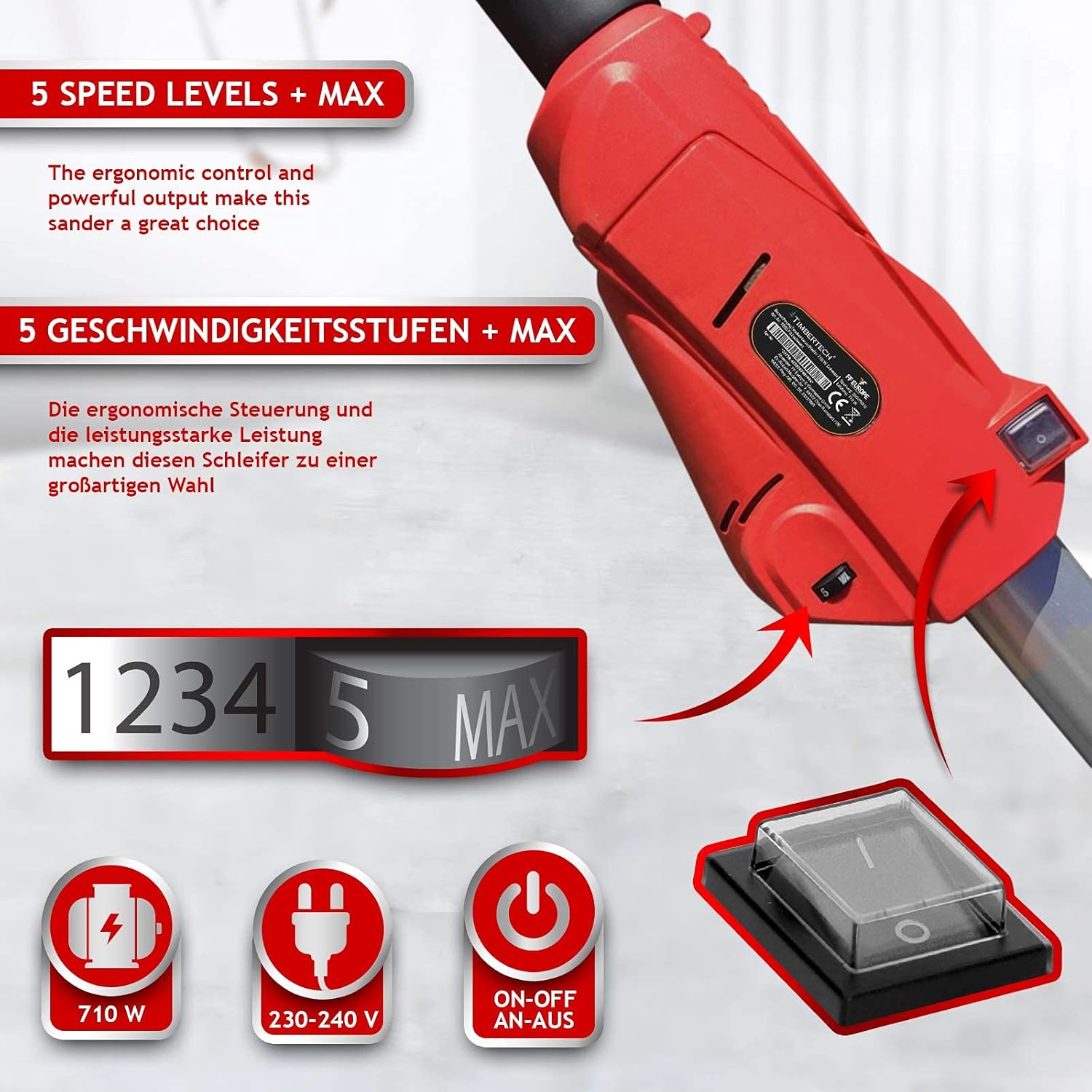
Image: Detail of the sander's control panel, showing the 6-speed selector and the ON/OFF switch.
- Adjusting Speed:
Use the speed control dial to select the desired RPM (1000-2100 RPM). Lower speeds are suitable for delicate work or softer materials, while higher speeds are for aggressive material removal.
- Sanding Technique:
Hold the sander firmly with both hands using the main handle and the ergonomic auxiliary handle. Apply light, even pressure to the surface. Move the sander in smooth, overlapping passes. Avoid pressing too hard, as this can reduce efficiency and damage the surface or the tool.

Image: Close-up of the ergonomic handle, designed for comfortable and balanced operation.
- Utilizing the Flexible Head:
The sanding head's two-joint design allows it to pivot and adapt to different angles, making it easier to sand uneven surfaces, corners, and ceilings without changing your body position excessively.

Image: Diagram illustrating the rotatable sanding head with its two joints, providing enhanced mobility.
Maintenance
Regular maintenance ensures the longevity and optimal performance of your sander.
- Cleaning: After each use, disconnect the power and clean the tool. Wipe down the exterior with a damp cloth. Use compressed air to clear dust from vents and the sanding head.
- Dust Bag/Vacuum Filter: Regularly empty the dust bag or vacuum cleaner connected to the dust extraction system. Clean or replace filters as recommended by the vacuum manufacturer.
- Abrasive Discs: Replace worn or clogged abrasive discs promptly to maintain sanding efficiency and prevent damage to the sanding pad.
- Carbon Brushes: The motor is equipped with carbon brushes. Periodically inspect them for wear. If they are worn down, replace them to prevent damage to the motor. Refer to the detailed manual for replacement instructions.
- Storage: Store the sander in a clean, dry place, out of reach of children.

Image: Close-up view of the carbon brushes, essential components for motor protection and longevity.
Troubleshooting
| Problem | Possible Cause | Solution |
|---|---|---|
| Sander does not start. | No power supply; faulty switch; worn carbon brushes. | Check power connection. Ensure switch is ON. Inspect and replace carbon brushes if necessary. |
| Reduced sanding performance. | Worn or clogged abrasive disc; excessive pressure; motor issue. | Replace abrasive disc. Apply lighter, even pressure. If problem persists, consult service. |
| Excessive dust during operation. | Vacuum cleaner not connected or full; clogged hose; damaged dust skirt. | Ensure vacuum is connected and operating. Empty vacuum bag/filter. Clear hose. Check dust skirt for damage. |
| Unusual noise or vibration. | Loose components; damaged disc; internal motor issue. | Check for loose parts. Replace damaged disc. Discontinue use and seek professional service if noise persists. |
Technical Specifications
| Model Number | TBSLF02 |
| Brand | Timbertech |
| Power | 710 W |
| Voltage | 230 V |
| No-Load Speed | 1000-2100 RPM (6 adjustable speeds) |
| Sanding Disc Diameter | Ø 220 mm |
| Abrasive Disc Grits Included | P80, P100, P120, P150, P180, P240 |
| Suction Hose Length | Approx. 1 - 4 m |
| Power Cable Length | Approx. 4 m |
| Weight | Approx. 4.8 kg (5 kg listed in specifications) |
| Material | Aluminum, PVC, Copper |
Warranty and Support
For warranty information, technical support, or spare parts, please contact your retailer or the manufacturer directly. Keep your proof of purchase for any warranty claims.
Manufacturer: FF Europe
For further assistance, please refer to the contact details provided with your purchase documentation or visit the official Timbertech website.
Ask a question about this manual
Ask about setup, troubleshooting, compatibility, parts, safety, or missing instructions. Manuals+ will review the question and use this page’s manual context to help answer it.