
Tama TAMTW100
Tama TW100 Tension Watch User Manual
Model: TAMTW100
Introduction
The Tama TW100 Tension Watch is a precision instrument designed to simplify and accelerate the drum tuning process. By accurately measuring the actual tension of the drum head, it allows drummers to achieve consistent and repeatable tunings, making head changes and sound adjustments significantly easier. This manual provides comprehensive instructions for the proper use and care of your TW100 Tension Watch.
Product Overview
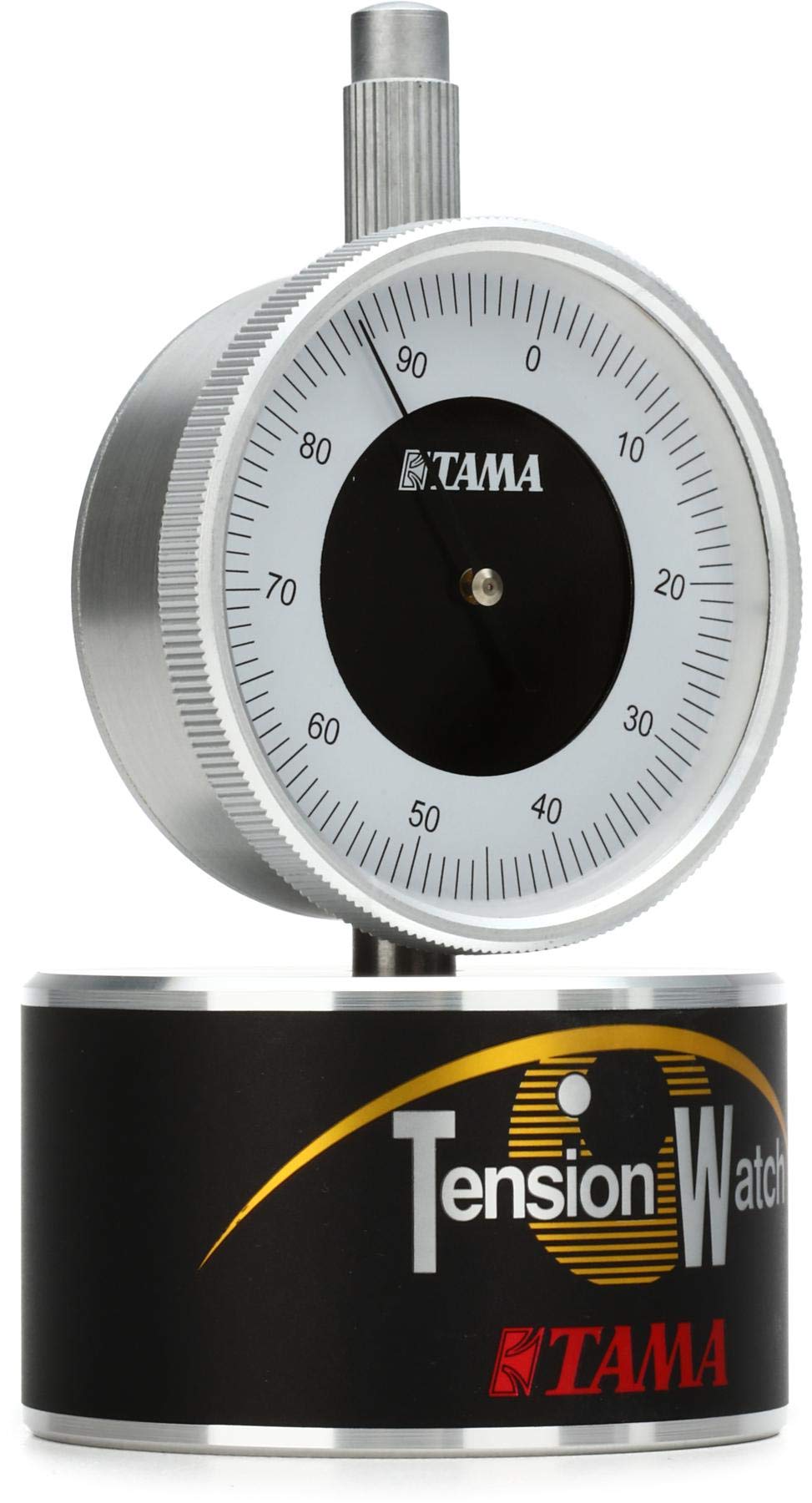
Figure 1: The Tama TW100 Tension Watch. This image displays the device from a front-facing perspective, highlighting its circular dial with numerical markings and the TAMA logo, mounted on a black base with "Tension Watch" branding.
The TW100 Tension Watch features an easy-to-read dial face that provides precise tension measurements. Its robust design ensures durability and consistent performance. This device is an essential tool for any drummer looking to achieve professional and consistent drum sounds.
Key Features:
- Easy-to-read dial face for clear tension readings.
- Simplifies and speeds up the drum tuning process.
- Enables easy duplication of tunings after head changes.
- Measures actual drum head tension for accuracy.
Included Components
Your Tama TW100 Tension Watch package includes:
- 1 x Tama TW100 Tension Watch unit
- Other standard Tama parts (as packaged by manufacturer)
Setup
Before using your Tama TW100 Tension Watch, ensure your drum is placed on a stable surface. The device is designed for direct placement on the drum head.
- Unpack the Device: Carefully remove the Tension Watch from its packaging.
- Inspect for Damage: Check the unit for any visible damage that may have occurred during shipping. If damaged, contact your retailer or Tama support immediately.
- Prepare the Drum Head: Ensure the drum head is clean and free of debris where the Tension Watch will be placed.
Operating Instructions
The Tama TW100 Tension Watch measures the tension of your drum head at specific points, allowing for precise and consistent tuning.
- Placement: Place the Tension Watch directly onto the drum head, ensuring the contact point is flat against the surface. For best results, measure tension at multiple points around the drum head, typically near each tension rod.
- Reading the Dial: The dial will indicate the tension reading. Note this value.
- Adjusting Tension: Adjust the tension rod closest to the measurement point. Tighten the rod to increase tension (higher reading) or loosen it to decrease tension (lower reading).
- Achieving Uniform Tension: Move the Tension Watch around the drum head, measuring and adjusting each section until all points around the drum head show a consistent tension reading. This ensures an even and stable tuning.
- Duplicating Tunings: Once you find a desired tension setting for a particular drum, record the readings. This allows you to easily replicate the tuning in the future, even after changing drum heads.
Tip: For optimal sound, experiment with different tension settings for various drum sizes and types. Consistency across the drum head is key to a clear and resonant tone.
Maintenance
Proper maintenance will extend the life and accuracy of your Tama TW100 Tension Watch.
- Cleaning: Wipe the device with a soft, dry cloth after each use to remove dust and fingerprints. For stubborn marks, a slightly damp cloth can be used, but avoid excessive moisture. Do not use abrasive cleaners or solvents, as these can damage the Acrylonitrile Butadiene Styrene material and the dial face.
- Storage: Store the Tension Watch in a clean, dry place, away from extreme temperatures and direct sunlight. Keep it in its original packaging or a protective case to prevent scratches and impacts.
- Handling: Handle the device with care. Avoid dropping it or subjecting it to strong impacts, as this can affect its calibration and accuracy.
Troubleshooting
If you encounter issues with your Tama TW100 Tension Watch, consider the following common solutions:
- Inconsistent Readings:
- Ensure the drum head is clean and smooth at the measurement point.
- Verify that the Tension Watch is placed flat and stable on the drum head without tilting.
- Check for any physical obstructions or damage to the device's contact point.
- Dial Not Moving/Stuck:
- Gently tap the device to see if the needle frees itself.
- Ensure no foreign objects are lodged in the mechanism.
- If the issue persists, the device may require professional inspection or repair.
For issues not covered here, please refer to the support section or contact Tama customer service.
Specifications
| Specification | Detail |
|---|---|
| Brand | Tama |
| Model Name | TAMTW100 |
| Item Model Number | TAMTW100 |
| Item Weight | 13.6 ounces (0.85 Pounds) |
| Product Dimensions (L x W x H) | 6.15 x 2.95 x 2.95 inches |
| Body Material | Acrylonitrile Butadiene Styrene (Plastic) |
| Color | Black, Silver, White |
| UPC | 606559149285 |
| Manufacturer | Tama |
Warranty Information
Specific warranty terms and conditions for the Tama TW100 Tension Watch are provided by the manufacturer. Please refer to the warranty card included with your product or visit the official Tama website for detailed information regarding warranty coverage, duration, and claims procedures.
Support
For technical assistance, product inquiries, or support, please contact Tama customer service. You can typically find contact information on the official Tama website or through your authorized retailer. When contacting support, please have your product model number (TAMTW100) and any relevant purchase details ready.
Official Tama Website: www.tama.com
Related documentsTAMTW100

Ask a question about this manual
Ask about setup, troubleshooting, compatibility, parts, safety, or missing instructions. Manuals+ will review the question and use this page’s manual context to help answer it.