
Breville BOV450XL
Breville Mini Smart Countertop Oven
Model: BOV450XL
Introduction
The Breville Mini Smart Countertop Oven with Element iQ System is designed for versatile cooking in a compact form factor. This appliance offers multiple cooking functions, precise temperature control, and easy maintenance, making it an ideal addition to any kitchen.

The Breville Mini Smart Oven, highlighting its compact design and multiple cooking functions.
Setup
Unboxing and Placement
- Carefully remove all packaging materials and accessories from the oven.
- Place the oven on a flat, stable, heat-resistant surface. Ensure adequate ventilation around the appliance.
- Dimensions: 13.6 inches (Depth) x 16 inches (Width) x 8.8 inches (Height). Allow sufficient clearance from walls and overhead cabinets to prevent heat damage.

Visual representation of the oven's dimensions for proper placement.
Initial Cleaning
- Before first use, wipe down the exterior with a damp cloth.
- Wash the baking pan, wire rack, and broil rack in warm, soapy water. Rinse thoroughly and dry completely.
- Ensure the crumb tray is properly inserted before operation.
Operating Instructions
Control Panel Overview
The Breville Mini Smart Oven features an intuitive control panel with a function dial, LCD display, and various buttons for precise adjustments.

Detailed view of the control panel and oven interior.
Cooking Functions
Rotate the function dial to select from 8 pre-set cooking functions:
- Toast: For perfectly browned toast.
- Bagel: Toasts the cut side of bagels while gently warming the outside.
- Bake: Ideal for baking cakes, casseroles, and other dishes.
- Broil: For grilling and browning food quickly.
- Pizza: Optimized for cooking pizzas up to 11 inches.
- Roast: For roasting meats and vegetables.
- Cookies: Specifically designed for baking cookies.
- Reheat: For warming up leftovers.
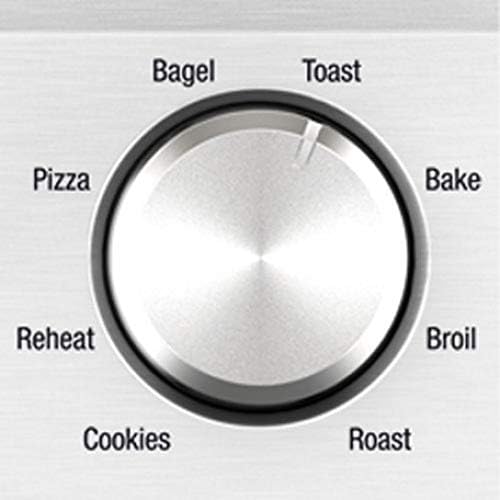
The function dial allows selection of various cooking modes.
Adjusting Settings
Use the dedicated buttons to adjust temperature/darkness and time/slices. The LCD display provides real-time feedback.
- Temperature/Darkness: Adjust the cooking temperature for bake/roast functions or the toast darkness level.
- Time/Slices: Set the cooking duration or the number of toast/bagel slices.
- Frozen Button: Press this button if you are cooking frozen items. The oven will automatically adjust the cooking cycle.
- A Bit More Button: Adds a small amount of extra cooking time if your food isn't quite done.

The LCD display shows current settings, and buttons allow for precise adjustments.
Rack Positions
The oven features 3 rack positions to accommodate various cooking needs:
- Top Position: Ideal for broiling or quick browning.
- Middle Position: Standard position for most baking and toasting.
- Bottom Position: Suitable for roasting larger items or when less top-browning is desired.
Maintenance and Cleaning
Regular cleaning ensures optimal performance and longevity of your Breville Mini Smart Oven.
- Non-Stick Cavity Coating: The interior walls feature a non-stick coating for easy cleaning. Wipe down with a damp cloth after each use once the oven has cooled.
- Pull-Out Crumb Tray: The convenient pull-out crumb tray collects crumbs and drips. Empty and clean regularly to prevent buildup and potential smoking.
- Accessories: Wash the baking pan, wire rack, and broil rack with warm, soapy water. Avoid abrasive cleaners or scouring pads that could damage the non-stick surfaces.

The non-stick interior simplifies cleaning after use.
Troubleshooting
Common concerns and their resolutions:
- Oven Gets Hot: It is normal for the exterior of the oven to become hot during operation. This is inherent to how a toaster oven functions. Always use oven mitts and avoid touching hot surfaces.
- Oven Smokes: If you observe smoke, it is likely steam from food or burning crumbs/grease on the crumb tray. Ensure the crumb tray is clean. If food is burning, adjust cooking time or temperature.
- Door Does Not Stay Open: Some units may experience the door not staying fully open. This can be due to the design or minor alignment issues. Ensure the crumb tray is fully inserted and not obstructing the door mechanism.
- Clicking Sound During Operation: A clicking sound is normal. This is the internal relay turning the heating elements on and off to maintain the set temperature.
- Uneven Toasting: Ensure bread slices are evenly distributed on the rack. Experiment with different darkness settings and rack positions.
- Power Cord Design: The power cord features a finger hole for easy removal from the outlet. Do not use extension cords with this appliance, and ensure it is placed away from walls and flammable materials as per manufacturer guidelines.
Specifications
| Feature | Detail |
|---|---|
| Brand | Breville |
| Model Name | BOV450XL |
| Product Dimensions | 13.6"D x 16"W x 8.8"H |
| Special Feature | Automatic Shut-Off |
| Control Type | Knob Control |
| Door Style | Dropdown Door |
| Included Components | Breville Bov450Xl Mini Smart Oven With Element Iq, Pizza Pan, Baking Pan, Broil Rack |
| Finish Type | Silver |
| Door Material Type | Stainless Steel |
| Power Source | Electric |
| Cable Length | 36 Inches |
| Temperature Range | 50-250 Degrees Celsius |
| Item Weight | 10.7 pounds |
| Country of Origin | China |
Warranty and Support
The Breville BOV450XL Mini Smart Countertop Oven comes with a 1 Year Limited Product Warranty.
For detailed support, troubleshooting, or warranty claims, please refer to the official user manual available for download or contact Breville customer service.
Official User Manual (PDF): Download Here
Ask a question about this manual
Ask about setup, troubleshooting, compatibility, parts, safety, or missing instructions. Manuals+ will review the question and use this page’s manual context to help answer it.