
1. Introduction
This manual provides detailed instructions for the installation, operation, and maintenance of your TFA Dostmann Wind Transmitter, Model 30.3149. This device is designed to wirelessly transmit wind speed and direction data to compatible TFA Nexus (35.1075) and TFA SINUS (35.1095) wireless weather stations. Please read this manual carefully before using the product to ensure correct setup and optimal performance.
2. Product Overview
The TFA Dostmann Wind Transmitter is a robust sensor designed for outdoor use, providing accurate wind data to your weather station. It features a durable plastic construction and is powered by two AA batteries.
Key Features:
- Wireless Transmission: Sends wind speed and direction data wirelessly to your compatible weather station.
- Extended Range: Operates effectively up to 100 meters in open space.
- Compatibility: Specifically designed as a replacement or additional sensor for TFA Nexus (35.1075) and TFA SINUS (35.1095) wireless weather stations.
- Flexible Mounting: Can be hung or placed, suitable for various outdoor mounting locations.
- Battery Operated: Requires 2 x 1.5V AA batteries (included).
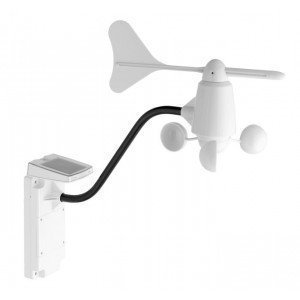
Figure 1: TFA Dostmann Wind Transmitter. This image shows the main unit of the wind transmitter, including its wind cups and wind vane, designed to measure wind speed and direction.
3. Setup
3.1 Unpacking
Carefully remove all components from the packaging. Ensure that the wind transmitter unit and the included batteries are present.
3.2 Battery Installation
- Locate the battery compartment on the wind transmitter unit.
- Open the battery compartment cover.
- Insert two 1.5V AA batteries, ensuring correct polarity (+/-).
- Close the battery compartment cover securely to protect against moisture.
3.3 Mounting the Wind Transmitter
For accurate readings, the wind transmitter should be mounted in an open area, free from obstructions like buildings, trees, or other structures that could interfere with wind flow. It can be mounted on a pole or a suitable bracket.
- Choose a location that allows for unrestricted wind flow from all directions.
- Ensure the mounting is stable and secure to prevent movement in strong winds.
- Mount the unit vertically, ensuring the wind vane can rotate freely.
- The transmitter is designed for outdoor use and is resistant to weather conditions.
3.4 Pairing with Weather Station
After battery installation and mounting, the wind transmitter will automatically begin transmitting data. Refer to your TFA Nexus (35.1075) or TFA SINUS (35.1095) weather station's manual for specific instructions on how to pair and receive data from the wind transmitter. Typically, the weather station will automatically detect and display the wind data once the transmitter is active and within range.
4. Operating
Once successfully paired with your TFA weather station, the wind transmitter operates continuously, sending real-time wind speed and direction data. The data is transmitted wirelessly at regular intervals.
- Wind Speed Measurement: The rotating cups measure the wind speed.
- Wind Direction Measurement: The wind vane indicates the direction from which the wind is blowing.
- Data Display: The received data will be displayed on your compatible TFA Nexus or SINUS weather station. Consult your weather station's manual for details on how to interpret the displayed information.
5. Maintenance
5.1 Cleaning
Periodically check the wind cups and wind vane for any debris (leaves, dirt, insects) that might obstruct their movement. Clean gently with a soft, damp cloth. Do not use abrasive cleaners or solvents.
5.2 Battery Replacement
When the batteries are low, your weather station may indicate a weak signal or display a low battery icon for the wind transmitter. Replace the batteries as described in Section 3.2. Always use fresh 1.5V AA batteries and dispose of old batteries responsibly.
6. Troubleshooting
If you experience issues with your wind transmitter, try the following solutions:
- No Wind Data Displayed:
- Check if the batteries are correctly installed and not depleted. Replace if necessary.
- Ensure the wind transmitter is within the 100m range of your weather station.
- Verify there are no major obstructions (thick walls, large metal objects) between the transmitter and the weather station.
- Re-pair the transmitter with your weather station according to your weather station's manual.
- Inaccurate Readings:
- Check for any physical obstructions (debris, spiderwebs) on the wind cups or vane. Clean if necessary.
- Ensure the transmitter is mounted in an open area, away from turbulence caused by buildings or trees.
- Verify the unit is mounted vertically and securely.
- Intermittent Signal:
- This could indicate low batteries. Replace them.
- Reduce the distance between the transmitter and the weather station if possible.
- Check for sources of radio interference (e.g., other wireless devices, strong electrical fields).
7. Specifications
| Feature | Detail |
|---|---|
| Model Number | 30.3149 |
| Brand | TFA Dostmann |
| Product Dimensions (L x W x H) | 44 x 8.3 x 44.2 cm |
| Weight | 740 g |
| Material | Plastic |
| Power Source | Battery |
| Batteries Required | 2 AA batteries (included) |
| Wireless Technology | 433 MHz, 868 MHz |
| Maximum Range | 100 m (in open space) |
| Measuring Range (Wind Speed) | 0 to 199.9 km/h |
| Recommended Use | Outdoor |
| Sensor Technology | Mechanical |
8. Warranty Information
Specific warranty details for the TFA Dostmann Wind Transmitter (Model 30.3149) were not provided in the product data. Please refer to the warranty information included with your purchase or contact TFA Dostmann directly for details regarding warranty coverage and terms.
9. Support
Contact information for product support was not available in the provided data. For technical assistance, troubleshooting beyond this manual, or spare parts, please visit the official TFA Dostmann website or contact their customer service department. You may also refer to the support resources provided with your TFA Nexus or SINUS weather station.