
1. Introduction
This manual provides detailed instructions for the installation, operation, and maintenance of your Alcatel 4034 Digital System Phone. Please read this manual thoroughly before using the phone to ensure proper functionality and to maximize your user experience. Keep this manual for future reference.
2. Safety Information
Observe the following safety precautions to prevent damage to the phone or injury to yourself:
- Do not expose the phone to water or moisture.
- Avoid placing the phone near heat sources or in direct sunlight.
- Use only the power adapter and cables supplied or approved by Alcatel.
- Do not attempt to open or repair the phone yourself. Refer all servicing to qualified personnel.
- Keep the phone away from strong magnetic fields.
- Clean the phone with a soft, dry cloth. Do not use liquid or aerosol cleaners.
3. Product Overview
The Alcatel 4034 is a robust digital system phone designed for efficient communication. It features an integrated LCD screen and an alpha keyboard for enhanced functionality.
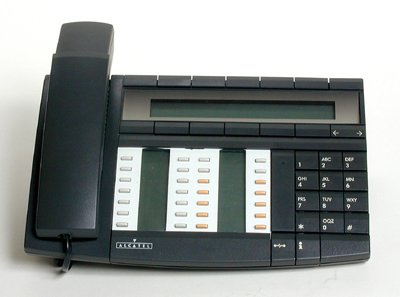
Image of the Alcatel 4034 digital system phone, showing its keypad, display, and handset.
Key Features:
- Integrated LCD Display
- Integrated Alpha Keyboard
- 24 Centrally Manageable Function Keys (18 programmable, 6 fixed)
- Caller ID (Identification d'appels)
- Hands-Free Functionality
- Headset Connection
- Display of Incoming Voice Messages (Liste des messages LED)
- Call Duration Display
- Adjustable Volume and Ringer
- Slot for optional adapters (e.g., 4083, 4084)
4. Setup
Follow these steps to set up your Alcatel 4034 phone:
- Unpack the Phone: Carefully remove all components from the packaging. Ensure you have the phone unit, handset, coiled cord, and any system connection cables.
- Connect the Handset: Plug one end of the coiled cord into the handset and the other end into the designated port on the phone base.
- Connect to the System: Connect the system cable from the phone to the appropriate port on your Alcatel communication system. This phone is designed for use with specific Alcatel systems and may not function as a standalone analog phone.
- Optional Headset Connection: If using a headset, plug it into the dedicated headset port on the phone.
- Power On: The phone typically receives power directly from the communication system. Once connected, the display should illuminate, indicating the phone is powered on.
- Initial Configuration: Your system administrator will typically handle the initial configuration and registration of the phone with the communication system.
5. Operating Instructions
5.1 Making and Receiving Calls
- To Make a Call: Lift the handset or press the Hands-Free button. Dial the desired number using the keypad.
- To Receive a Call: When the phone rings, lift the handset or press the Hands-Free button.
- To End a Call: Replace the handset or press the Hands-Free button again.
5.2 Volume Adjustment
Use the dedicated volume control buttons (usually marked with + and − symbols) to adjust the handset, speaker, or ringer volume during a call or when idle.
5.3 Caller ID
The integrated LCD display shows the caller's number or name (if available in your system directory) for incoming calls. This feature is known as Caller ID (Identification d'appels).
5.4 Programmable Function Keys
The Alcatel 4034 features 18 programmable keys and 6 fixed function keys. Programmable keys can be configured by your system administrator for speed dialing, call forwarding, direct line access, or other system features. Consult your system administrator for specific functions assigned to your keys.
5.5 Hands-Free Operation
Press the Hands-Free button to activate the speakerphone. You can then speak and listen without lifting the handset. Press it again to deactivate.
5.6 Voice Messages
The LED message list and the LCD display will indicate when you have new voice messages. Follow the prompts on the screen or press the designated message access key (if programmed) to retrieve your messages.
5.7 Alpha Keyboard
The integrated alpha keyboard allows for easy entry of names for directory searches, text messages (if supported by your system), or other text-based functions.
5.8 Date and Time Display
The LCD display shows the current date and time. These settings are typically synchronized with your communication system.
6. Maintenance
To ensure the longevity and optimal performance of your Alcatel 4034 phone, follow these simple maintenance guidelines:
- Cleaning: Use a soft, dry, lint-free cloth to clean the phone's surface and display. Do not use abrasive cleaners, waxes, or solvents.
- Dust: Regularly dust the phone to prevent accumulation in crevices and around buttons.
- Cable Management: Ensure all cables are neatly arranged and not under tension or pinched, which could lead to damage.
- Environment: Keep the phone in a clean, dry environment, away from extreme temperatures and humidity.
7. Troubleshooting
If you encounter issues with your Alcatel 4034 phone, try the following solutions:
| Problem | Possible Solution |
|---|---|
| No dial tone | Check all cable connections to the phone and the system. Ensure the phone is properly connected to the communication system. |
| Display is blank | Verify the phone is receiving power from the communication system. Check system connections. |
| Cannot make or receive calls | Ensure the phone is registered with the communication system. Contact your system administrator for assistance. |
| Keys are unresponsive | Try restarting the phone by disconnecting and reconnecting its system cable (if safe to do so, consult administrator). Clean the keypad area. |
| Poor audio quality | Check handset and coiled cord connections. Ensure there is no interference from other electronic devices. Adjust volume settings. |
If the problem persists after attempting these solutions, please contact your system administrator or Alcatel support for further assistance.
8. Specifications
| Feature | Detail |
|---|---|
| Brand | Alcatel |
| Model | 4034 |
| Type | Digital System Phone, Corded |
| Color | Black |
| Material | Plastic |
| Display | Integrated LCD Display |
| Keypad Type | Single Keypad with Integrated Alpha Keyboard |
| Function Keys | 24 (18 programmable, 6 fixed) |
| Caller ID | Yes |
| Hands-Free | Yes |
| Headset Connection | Yes |
| Dimensions (H x W x D) | 5.9 cm x 17.7 cm x 26.6 cm (approximate) |
| Compatibility | Alcatel communication systems (e.g., with adapter slots for 4083, 4084) |
9. Warranty & Support
For warranty information, please refer to the documentation provided at the time of purchase or contact your Alcatel dealer or system administrator. Alcatel provides technical support for its products. For assistance, please contact your local Alcatel support center or visit the official Alcatel website for contact details.
Online Resources: For additional information, FAQs, and software updates, please visit the official Alcatel support website.


