
Introduction
This manual provides instructions for the proper use and maintenance of the Kwikset 83260 SmartKey Reset Cradle. This tool is designed to reset Kwikset SmartKey lock cylinders that have been improperly keyed or require a factory reset. Please read these instructions thoroughly before use to ensure correct operation and to prevent damage to the lock cylinder or the tool.
Safety Information
- Always wear appropriate personal protective equipment, such as safety glasses, when handling lock components.
- Keep the reset cradle and lock components out of reach of children.
- Use the tool only for its intended purpose: resetting Kwikset SmartKey lock cylinders.
- Do not force components. If resistance is met, re-evaluate the process.
Package Contents
Verify that all items are present in the package:
- Kwikset 83260 SmartKey Reset Cradle
- Instruction Sheet (may be printed on the cradle itself)
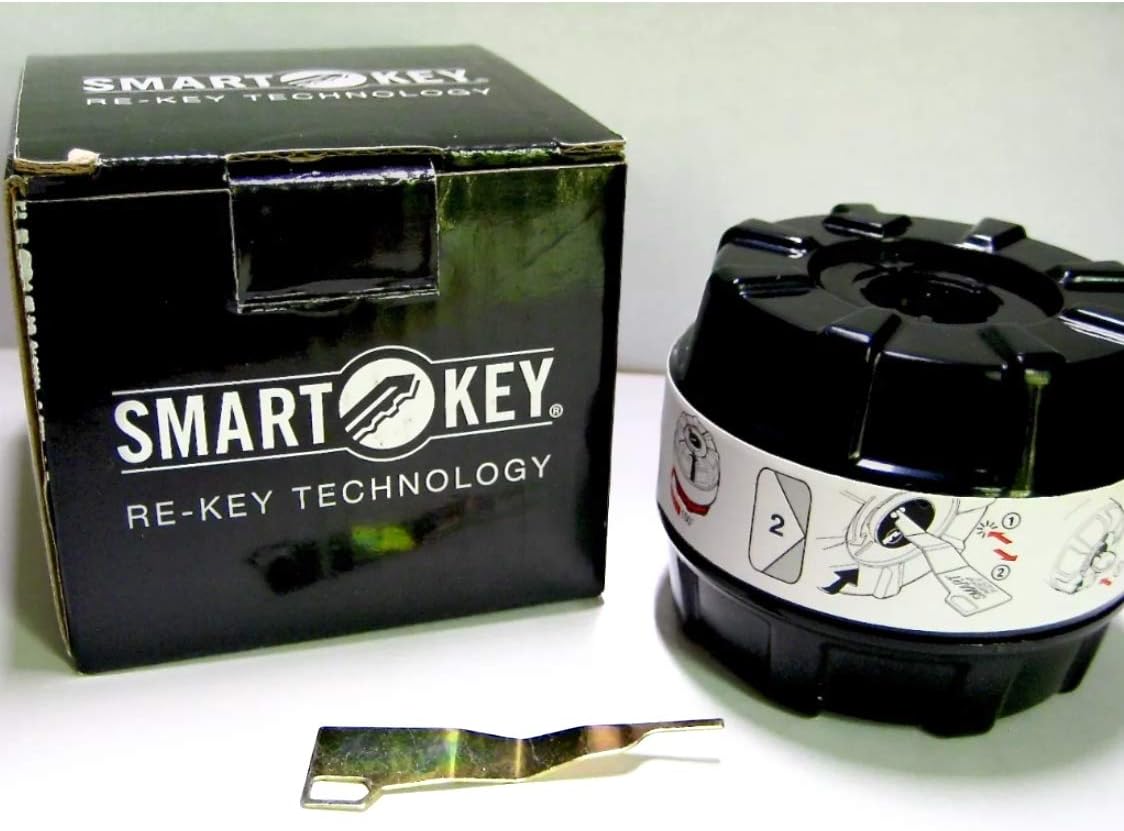
Image: Kwikset SmartKey Reset Cradle, its packaging, and a small instruction sheet. The cradle is black with a white label showing rekeying steps. A small metal rekeying tool is also visible.
Setup
Before using the reset cradle, you must remove the SmartKey cylinder from the lock assembly. This typically requires a cylinder removal tool (sold separately) and careful disassembly of the doorknob or deadbolt. Refer to your specific Kwikset lock's instructions for cylinder removal.
- Remove the Cylinder: Carefully remove the SmartKey cylinder from the lock housing. Ensure no small parts are lost during this process.
- Inspect the Cylinder: Check the cylinder for any damage or debris that might prevent proper operation.

Image: The Kwikset SmartKey Reset Cradle, a black cylindrical device with a white label wrapped around it. The label displays graphical instructions for using the cradle, including steps for inserting a key and rotating the mechanism.
Operating Instructions
Follow these steps to reset a Kwikset SmartKey cylinder using the reset cradle:
- Prepare the Cradle: Hold the reset cradle firmly. Observe the markings on the cradle, which typically indicate "Start" or "Début" and a directional arrow.
- Insert Cylinder: Align the SmartKey cylinder with the opening in the reset cradle. The cylinder has three flats and will only fit into the cradle in one orientation. Insert the cylinder until it sits flush, with the key entry facing upwards.
- Rotate the Cradle: Rotate the outer ring of the cradle in the direction indicated by the arrow on the label (usually clockwise). You may feel a slight click or resistance. Continue rotating until the cradle reaches its stop point.
- Insert Original Key (if available) or Blank Key: If you have the original working key for the cylinder, insert it fully. If the cylinder was improperly keyed and no working key exists, insert a blank Kwikset key or a key that is known to be non-functional for this cylinder.
- Perform Reset: While the key is inserted, use the SmartKey rekeying tool (a small, thin metal tool, often included with Kwikset locks) to press the small reset button located on the side of the cylinder. Press it firmly until you feel a click.
- Remove Key and Cylinder: Remove the key, then carefully remove the cylinder from the reset cradle. The cylinder should now be in a reset state, ready to be rekeyed with a new key.
- Test Cylinder: Before reassembling the lock, insert a new key into the reset cylinder and turn it to ensure it operates smoothly. The key should turn freely. If it does not, repeat the reset process.

Image: A close-up view of the Kwikset SmartKey Reset Cradle. The white label clearly shows the word "Start" and a number "1" with an arrow, indicating the initial step for operation. An "OK!" symbol with a smiley face is also visible.
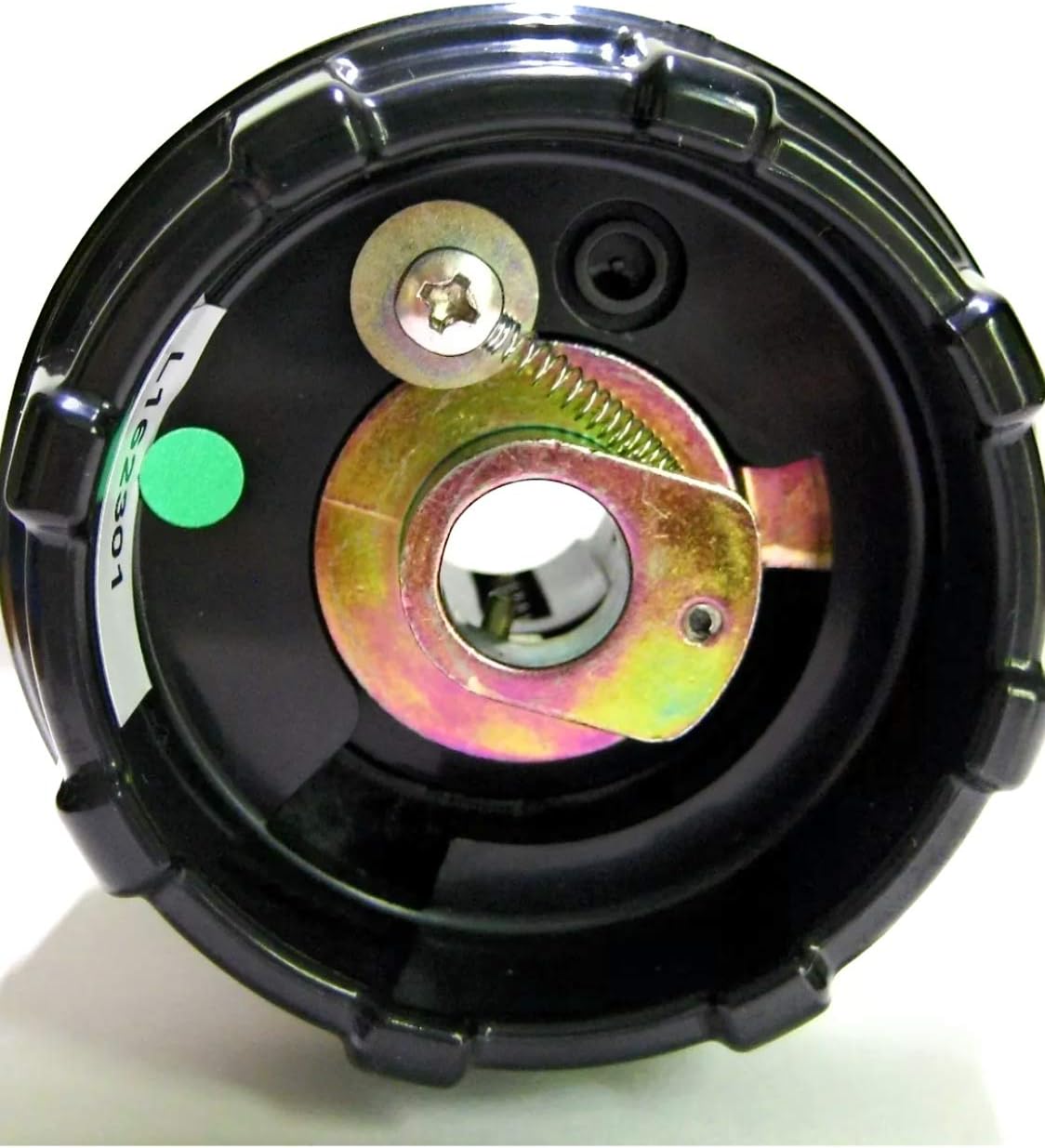
Image: The bottom view of the Kwikset SmartKey Reset Cradle, showing the internal mechanism with a spring-loaded component and a screw. A green sticker with "L162301" is visible on the side.
Maintenance
- Cleaning: Wipe the reset cradle with a dry, soft cloth after each use to remove any dust or debris. Do not use harsh chemicals or abrasive cleaners.
- Storage: Store the reset cradle in a clean, dry place away from extreme temperatures and direct sunlight.
- Inspection: Periodically inspect the cradle for any signs of wear or damage. If the cradle appears damaged, discontinue use and replace it.
Troubleshooting
| Problem | Possible Cause | Solution |
|---|---|---|
| Cylinder does not fit into the cradle. | Incorrect orientation of the cylinder. | Ensure the three flats on the cylinder align with the cradle's opening. The cylinder will only fit one way. |
| Cradle does not rotate. | Cylinder not fully seated or internal mechanism stuck. | Ensure the cylinder is fully inserted and flush. Apply a small amount of lock lubricant to the cylinder's sliders if they appear stuck, then try rotating again. Do not force. |
| Key does not turn freely after reset. | Reset process incomplete or incorrect. | Repeat the operating instructions carefully, ensuring the reset button is pressed firmly and the key is inserted correctly during the reset step. |
| SmartKey rekeying tool does not press the button. | Tool not aligned or cylinder not in reset position. | Ensure the cylinder is properly seated in the cradle and the cradle is rotated to the correct position before attempting to press the reset button. |
Specifications
- Model: Kwikset 83260 SmartKey Reset Cradle
- Material: Plastic
- Dimensions (L x W x H): Approximately 3 x 3 x 2 inches
- Weight: Approximately 0.01 Ounces (0.28 grams)
- Compatibility: Kwikset SmartKey lock cylinders only
Warranty Information
The Kwikset 83260 SmartKey Reset Cradle comes with a manufacturer's warranty. For specific details regarding warranty coverage, duration, and claims, please refer to the warranty documentation included with your purchase or visit the official Kwikset website. Keep your proof of purchase for warranty purposes.
Customer Support
For technical assistance, troubleshooting, or further inquiries regarding the Kwikset 83260 SmartKey Reset Cradle, please contact Kwikset customer support:
- Website: Visit the official Kwikset website for FAQs and support resources.
- Phone: Refer to the contact information provided on the Kwikset packaging or website for customer service phone numbers.
When contacting support, please have your product model number (83260) and purchase information ready.

