
Introduction
Thank you for choosing the Calrad 40-720PHD Composite Video/S-Video to HDMI Converter. This device is designed to convert analog composite video or S-Video signals, along with stereo audio, into a digital 720P HDMI output. It is ideal for integrating older analog video sources, such as CCTV cameras or VCRs, with modern HDMI displays.
This manual provides detailed instructions for the proper installation, operation, and maintenance of your converter. Please read it thoroughly before use and retain it for future reference.
Safety Information
- Ensure the power adapter matches the voltage requirements of your region.
- Do not expose the unit to water, moisture, or excessive humidity.
- Avoid placing the unit near heat sources or in direct sunlight.
- Do not attempt to open or modify the converter. Refer all servicing to qualified personnel.
- Disconnect the power supply during lightning storms or when unused for long periods.
- Keep the unit away from children.
Package Contents
Please check the package contents carefully. If any items are missing or damaged, contact your retailer.
- Calrad 40-720PHD Converter Unit
- Power Adapter
- User Manual (this document)
Product Overview
Familiarize yourself with the ports and indicators on your Calrad 40-720PHD converter.
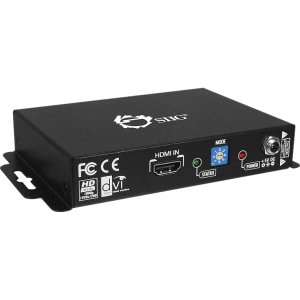
Image: Front and rear view of the Calrad 40-720PHD converter, showing input and output ports, and LED indicators. The device is a compact black box with various connectors.
Front Panel:
- Power LED: Indicates power status.
- Input LED (Red/Green): Red for S-Video input, Green for Composite Video input.
Rear Panel:
- DC 5V: Power input port.
- Composite Video Input (RCA): For connecting composite video sources.
- S-Video Input: For connecting S-Video sources.
- Audio Input (3.5mm): For connecting stereo audio sources.
- HDMI Output: Connects to an HDMI display or receiver.
- Audio Output (3.5mm): Provides simultaneous stereo audio output.
- 50/60Hz Switch: Selects the vertical refresh rate for the HDMI output.
Setup
Follow these steps to connect your Calrad 40-720PHD converter:
- Connect Video Source: Connect your composite video (RCA) or S-Video source to the corresponding input port on the converter. The converter will auto-detect the video source.
- Connect Audio Source: Connect the 3.5mm stereo audio output from your source device to the 3.5mm audio input port on the converter.
- Connect HDMI Display: Connect an HDMI cable from the HDMI Output port on the converter to an HDMI input on your display (TV, monitor, projector).
- Select Refresh Rate: Set the 50/60Hz switch on the rear panel according to your display's compatibility or regional standard.
- Connect Power: Plug the provided power adapter into the DC 5V port on the converter, then plug the adapter into a power outlet. The Power LED will illuminate.
- Verify Input: Check the Input LED on the front panel. It should be Green for Composite Video or Red for S-Video, indicating a detected signal.
Operating
Once all connections are made and power is supplied, the converter will automatically process the input signal.
- Automatic Input Detection: The converter automatically detects whether a Composite Video or S-Video signal is present. The corresponding LED (Green for Composite, Red for S-Video) will light up.
- HDMI Output: The converted 720P HDMI signal, including audio, will be sent to your connected HDMI display.
- Simultaneous Audio Output: The 3.5mm stereo audio output port provides audio simultaneously with the HDMI output, allowing connection to external speakers or an amplifier.
- Resolution: The output resolution is fixed at 720P.
- NTSC/PAL Support: The converter supports NTSC 3.58, PAL-M, and PAL-N composite video standards.
Maintenance
To ensure the longevity and optimal performance of your converter, follow these maintenance guidelines:
- Cleaning: Use a soft, dry cloth to clean the exterior of the unit. Do not use liquid cleaners or aerosols.
- Ventilation: Ensure the unit has adequate ventilation and is not covered, to prevent overheating.
- Storage: When not in use for extended periods, store the converter in a cool, dry place, away from direct sunlight and extreme temperatures.
- Cable Connections: Periodically check all cable connections to ensure they are secure and free from damage.
Troubleshooting
If you encounter issues with your converter, refer to the following table for common problems and solutions.
| Problem | Possible Solution |
|---|---|
| No picture on HDMI display. |
|
| No audio. |
|
| Picture quality is poor or distorted. |
|
| Input LED is not lit. |
|
Specifications
| Model Number | 40-720PHD |
| Input Ports | 1x Composite Video (RCA), 1x S-Video, 1x 3.5mm Stereo Audio |
| Output Ports | 1x HDMI, 1x 3.5mm Stereo Audio |
| Input Video Standards | NTSC 3.58, PAL-M, PAL-N |
| HDMI Output Resolution | 720P |
| Vertical Refresh Rate | 50/60Hz (selectable) |
| Power Supply | DC 5V (included adapter) |
| Product Dimensions | 9.85 x 7 x 3 inches |
| Item Weight | 1.2 pounds |
| Manufacturer | Calrad |
Warranty and Support
This Calrad product is covered by a limited warranty against defects in materials and workmanship. The specific terms and duration of the warranty may vary by region and retailer. Please retain your proof of purchase for warranty claims.
For technical support, troubleshooting assistance, or warranty inquiries, please contact your retailer or visit the official Calrad website for contact information.