
Introduction
The Rokinon 7.5mm F3.5 UMC Fisheye Lens is specifically designed for Micro Four Thirds camera systems, offering an ultra-wide 180-degree diagonal angle of view. This compact lens features a robust construction and advanced optical design, engineered to deliver sharp images and accurate color reproduction. Its manual operation provides precise control for various photographic applications.

Figure 1: Front view of the Rokinon FE75MFT-B Fisheye Lens (Black).
Product Overview
Key Features
- 180-Degree Angle of View: Captures an expansive field of vision, characteristic of fisheye lenses.
- Optical Construction: Features 9 elements in 7 groups for optimized image quality.
- Aperture Range: Adjustable from F3.5 to F22 for versatile lighting conditions.
- Minimum Focusing Distance: Achieves close-up shots at 3.5 inches (0.09m).
- Compact Design: Approximately 1.9 inches long, making it highly portable.
- Ultra Multi-Coating (UMC): Reduces flare and ghosting for improved contrast and color fidelity.
- Built-in Lens Hood: Integrated petal-type lens hood helps to minimize stray light.

Figure 2: Visual representation of the Rokinon 7.5mm Fisheye Lens's optical and design features.
Specifications
| Specification | Value |
|---|---|
| Brand | Rokinon |
| Model Name | FE75MFT-B |
| Focal Length | 7.5 mm |
| Lens Type | Wide Angle, Fisheye |
| Compatible Mountings | Micro Four Thirds |
| Focus Type | Manual Focus |
| Maximum Aperture | F3.5 |
| Minimum Aperture | F22 |
| Real Angle Of View | 180 Degrees |
| Minimum Focusing Distance | 3.5 inches (0.09m) |
| Compatible Camera Models | Olympus PEN, Panasonic Lumix G series |
| Item Weight | 197 Grams |
Setup
Attaching the Lens
- Ensure your camera is powered off.
- Align the red dot on the lens barrel with the corresponding red dot on your camera's lens mount.
- Gently insert the lens into the camera mount.
- Rotate the lens clockwise until it clicks securely into place.
- Remove the front lens cap.

Figure 3: Side view of the Rokinon 7.5mm Fisheye Lens, showing the lens mount.
Removing the Lens
- Ensure your camera is powered off.
- Attach the front and rear lens caps to protect the lens elements.
- Press and hold the lens release button on your camera body.
- Rotate the lens counter-clockwise until it detaches from the camera mount.
- Store the lens in its protective pouch.
Operating the Lens
This Rokinon lens is a manual focus and manual aperture lens. It does not have electronic contacts to communicate with the camera body. Therefore, all focus and aperture adjustments must be made directly on the lens.
Manual Focus
The focus ring is located on the front part of the lens barrel. Rotate this ring to adjust the focus. For Micro Four Thirds cameras, it is often recommended to set the camera to a 'No Lens' or 'Shoot Without Lens' mode in the camera's menu to enable shooting with manual lenses.
Due to the extremely wide angle of view and inherent deep depth of field of a fisheye lens, precise focusing is often less critical. For many shots, especially landscapes or street photography, setting the focus to infinity (∞) or a hyperfocal distance can keep most of the scene in acceptable focus.

Figure 4: Angled view of the lens, showing the manual focus and aperture rings.
Aperture Control
The aperture ring is located closer to the camera body. Rotate this ring to select your desired aperture (F3.5 to F22). Wider apertures (smaller f-numbers like F3.5) allow more light and create shallower depth of field, while narrower apertures (larger f-numbers like F22) allow less light and create greater depth of field.
Built-in Lens Hood
The lens features a permanently attached petal-type lens hood. This hood is designed to block stray light from entering the lens, reducing flare and ghosting, and also provides some physical protection to the front element.
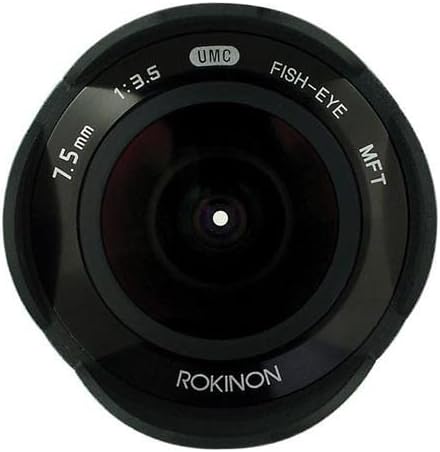
Figure 5: Front view of the lens, highlighting the built-in petal-type lens hood.
Compatible Cameras
This lens is compatible with Micro Four Thirds (MFT) camera systems, including models from Olympus PEN and Panasonic Lumix G series. Ensure your camera is set to allow shooting without a lens attached, as this is a fully manual lens.
Maintenance
Cleaning the Lens
- Use a soft, lint-free microfiber cloth specifically designed for optical surfaces.
- For stubborn smudges, use a small amount of lens cleaning fluid applied to the cloth, not directly to the lens.
- Use a blower brush to remove dust and loose particles before wiping.
- Avoid touching the glass elements with your fingers.
Storage
- Always attach both front and rear lens caps when not in use.
- Store the lens in a dry, cool place, away from direct sunlight and extreme temperatures.
- If storing for extended periods, consider using a dehumidifying agent to prevent mold growth.
Troubleshooting
Common Issues and Solutions
- Camera not recognizing lens / Shutter not firing: Ensure your Micro Four Thirds camera is set to 'Shoot Without Lens' or a similar setting in its menu. Consult your camera's manual for specific instructions.
- Images appear blurry: Verify that the focus ring is correctly adjusted for your subject distance. For wide-angle shots, try setting the focus to infinity (∞).
- Dust on images: Clean the lens elements as described in the Maintenance section. If dust persists, it may be on the camera sensor, requiring professional cleaning.
- Vignetting or dark corners: This is a common characteristic of fisheye lenses, especially at wider apertures. It can often be corrected in post-processing software.
Warranty and Support
The Rokinon FE75MFT-B 7.5mm F3.5 UMC Fisheye Lens typically comes with a 1-year limited warranty from the date of purchase. Please retain your proof of purchase for warranty claims.
For technical support, service, or detailed warranty information, please visit the official Rokinon website or contact their customer service department. Contact information can usually be found on the product packaging or the manufacturer's website.
Official Product Video
Video 1: Official Rokinon 7.5mm F3.5 Fisheye Lens overview. This video provides a brief visual introduction to the lens and its features.


