
ebm-papst W1G250-HH37-52
Instruction Manual
ebm-papst W1G250-HH37-52 DC Axial Fan
Model: W1G250-HH37-52
1. Product Overview
The ebm-papst W1G250-HH37-52 is a high-performance DC axial fan designed for efficient thermal management in various industrial applications. This fan operates on a 24V DC power supply and features a robust ball bearing motor for extended service life. Its optimized design ensures high airflow with reduced energy consumption and acoustic noise.
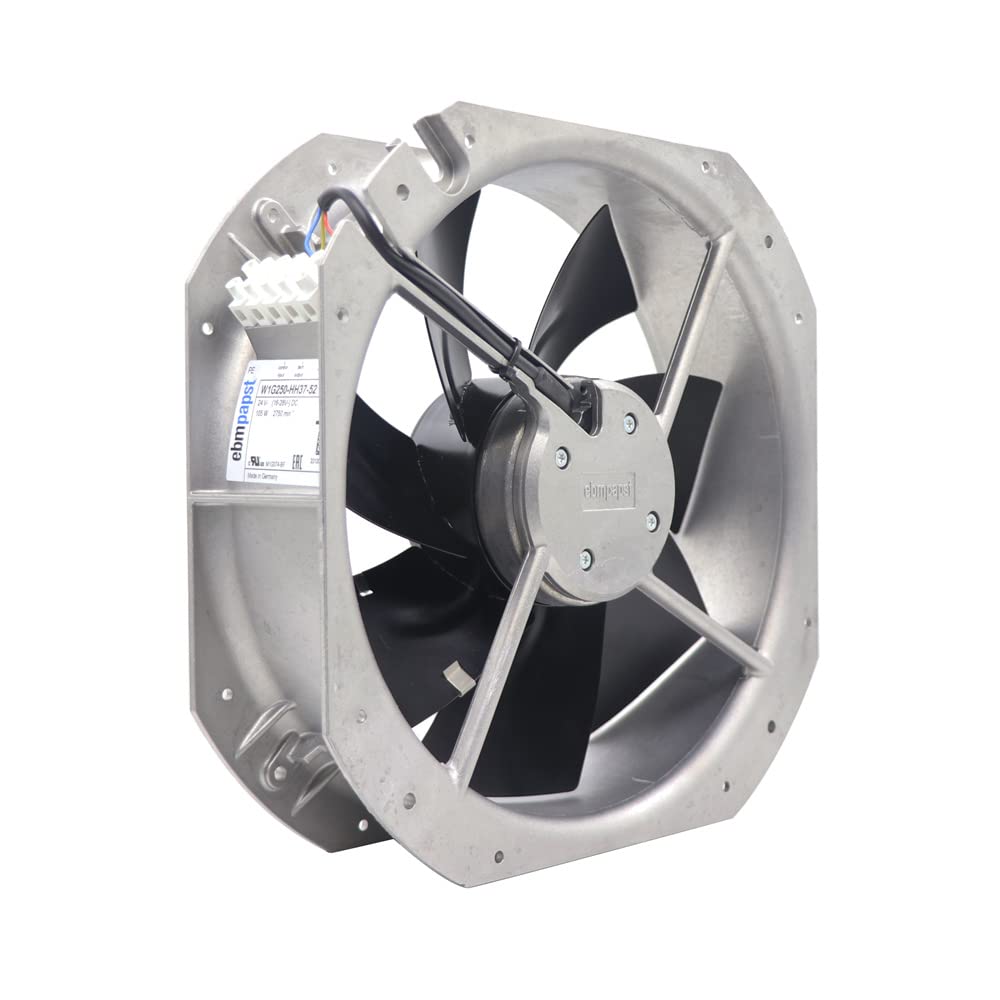
Figure 1: Front view of the ebm-papst W1G250-HH37-52 DC Axial Fan, showing the fan blades, motor, and terminal block.
2. Safety Information
Please read and understand all safety instructions before installing, operating, or maintaining this product. Failure to follow these instructions may result in electric shock, fire, or serious injury.
- Ensure power is disconnected before any installation or maintenance procedures.
- Only qualified personnel should perform installation and wiring.
- Do not operate the fan if any part is damaged or if the housing is open.
- Keep hands and foreign objects away from rotating blades during operation.
- Ensure proper grounding to prevent electrical hazards.
- Operate the fan within the specified voltage and temperature ranges.
3. Setup and Installation
This section provides guidelines for the proper installation of the W1G250-HH37-52 axial fan.
- Unpacking: Carefully remove the fan from its packaging. Inspect for any visible damage.
- Mounting: The fan is designed for secure mounting. Use appropriate fasteners (not included) through the pre-drilled holes on the fan housing. Ensure the fan is mounted on a stable, flat surface to prevent vibration. The fan housing material is die-cast aluminum.
- Wiring: Connect the fan to a 24V DC power supply. Refer to the product label for specific terminal connections (positive, negative, control, tach output). The fan features a 4-pin power connector type. Ensure correct polarity.

Figure 2: Side view of the fan, highlighting the terminal block for electrical connections. Ensure proper wiring according to the label.
- Airflow Direction: Observe the airflow direction indicated on the fan housing or label to ensure it aligns with your cooling requirements.
- Environmental Conditions: Install the fan in an environment where the ambient temperature is within -25°C to 60°C. The fan has an IP42 degree of protection, meaning it is protected against solid objects larger than 1mm and against direct sprays of water up to 15 degrees from the vertical.
4. Operating Instructions
Once properly installed and wired, the ebm-papst W1G250-HH37-52 fan is ready for operation.
- Power On: Apply 24V DC power within the nominal voltage range of 16V to 28V DC.
- Speed Control (if applicable): If your model includes speed control functionality via the control input, adjust as necessary. The fan's nominal speed is 2750 RPM.
- Monitoring: Periodically check the fan's operation to ensure proper airflow and listen for any unusual noises.
5. Maintenance
Regular maintenance ensures optimal performance and extends the lifespan of your fan.
- Cleaning: Periodically clean the fan blades and housing to remove dust and debris. Ensure power is disconnected before cleaning. Use a soft brush or compressed air. Do not use harsh chemicals.
- Inspection: Regularly inspect the fan for any signs of wear, damage, or loose connections. Check the integrity of the wiring and mounting.
- Bearings: The fan features maintenance-free, high-quality ball bearings designed for a long service life. No lubrication is required.
6. Troubleshooting
This section addresses common issues you might encounter with your fan.
| Problem | Possible Cause | Solution |
|---|---|---|
| Fan does not start | No power, incorrect wiring, damaged motor. | Check power supply, verify wiring connections (polarity), inspect for damage. |
| Reduced airflow | Blocked intake/exhaust, dirty blades, incorrect speed setting. | Clear obstructions, clean blades, check speed control settings. |
| Unusual noise or vibration | Loose mounting, foreign object in fan, worn bearings. | Tighten mounting screws, inspect for foreign objects (power off), contact support if bearings are suspected. |
| Overheating | Insufficient ventilation, operating outside temperature range. | Ensure adequate space for airflow, verify ambient temperature is within limits. |
7. Specifications
Detailed technical specifications for the ebm-papst W1G250-HH37-52 DC Axial Fan.

Figure 3: Close-up view of the product label, displaying key electrical and model information.
| Parameter | Value |
|---|---|
| Model Number | W1G250-HH37-52 |
| Brand | ebm-papst |
| Type | Axial Fan |
| Motor | M1G074-BF |
| Nominal Voltage | 24 VDC |
| Nominal Voltage Range | 16 VDC to 28 VDC |
| Speed | 2750 RPM |
| Power Consumption | 105 W |
| Current Draw | 5.0 A |
| Airflow | 1130 CFM (32 m³/min) |
| Dimensions (H x W x D) | 280 mm x 320 mm x 87 mm (approx. 11.02" x 12.6" x 3.43") |
| Weight | 2.3 kg (approx. 5.07 lbs) |
| Min. Ambient Temperature | -25 °C |
| Max. Ambient Temperature | 60 °C |
| IP Rating | IP42 |
| Insulation Class | B |
| Motor Bearing | Ball Bearing |
| Rotor Surface | Painted black |
| Blade Material | Sheet steel, painted black |
| Fan Housing Material | Die-cast aluminum |
| Power Connector Type | 4-Pin |
| UPC | 763595978641 |
8. Warranty and Support
For warranty information, technical support, or service inquiries regarding your ebm-papst W1G250-HH37-52 DC Axial Fan, please contact ebm-papst customer service or your authorized distributor. Keep your purchase receipt and product model number handy for faster assistance.
Manufacturer: ebm-papst