
1. Introduction
This manual provides comprehensive instructions for the safe and effective use of the Simpson 260-8P Relay Protected Analog Multimeter. The Simpson 260-8P is a robust and accurate instrument designed for various electrical measurements in both laboratory and field environments. It features a large, color-coded, mirrored scale for precise readings, AC frequency response up to 100 kHz, zero RFI, and high-energy overload fusing with a varistor-protected meter movement.
Please read this manual thoroughly before operating the device to ensure proper functionality and safety.
2. Safety Information
WARNING: Electrical shock hazard. Improper use of this multimeter can result in injury or death. Always follow safety precautions.
- Always inspect the multimeter, test leads, and accessories for damage before use. Do not use if damaged.
- Ensure the correct function and range are selected before connecting the test leads to the circuit under test.
- Do not attempt to measure voltages or currents exceeding the maximum ratings specified for the instrument.
- Avoid contact with live circuits. Use only one hand when making measurements on high-voltage circuits.
- Always disconnect power to the circuit before measuring resistance or continuity.
- Replace batteries promptly when the low battery indicator appears to maintain measurement accuracy.
- Do not operate the multimeter in wet or damp conditions.
3. Product Overview
The Simpson 260-8P Analog Multimeter features a classic design optimized for clear readings and durable performance. Key components include the meter movement, range selector switch, and input jacks.
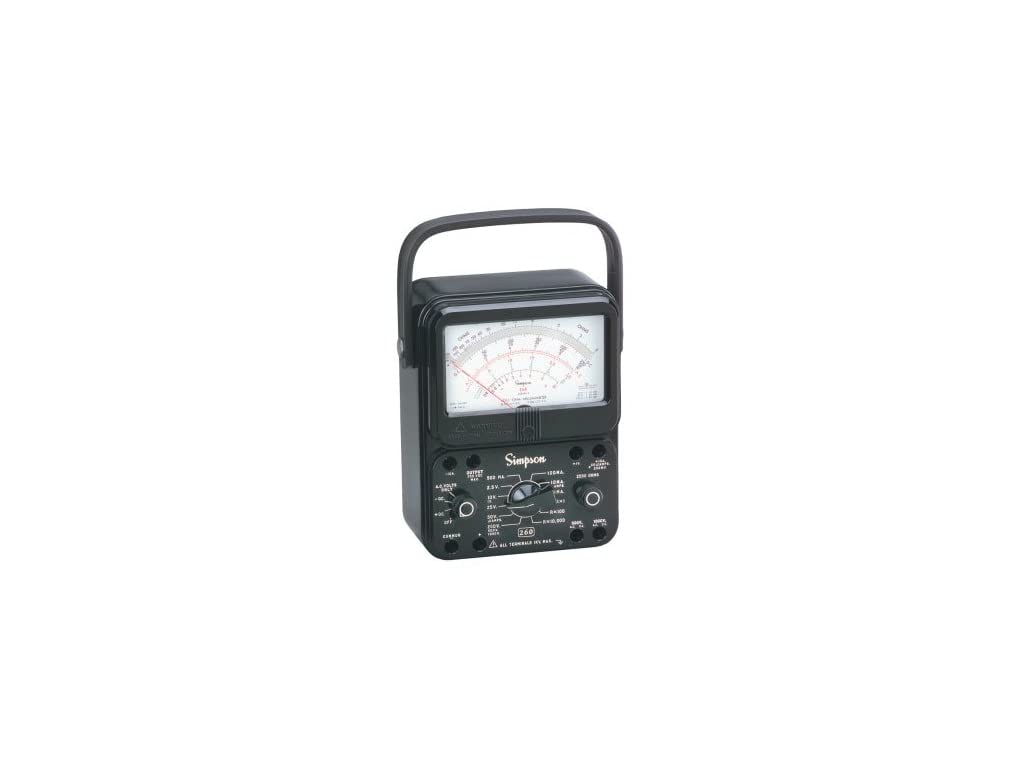
Figure 1: Front view of the Simpson 260-8P Analog Multimeter. This image displays the large analog meter dial, the central rotary range selector switch, and the various input jacks located at the bottom and sides of the unit. A carrying handle is visible at the top.
3.1. Components
- Analog Meter Dial: Displays measurement values using a needle against a calibrated scale. Features a mirrored scale to reduce parallax error.
- Range Selector Switch: A rotary switch used to select the desired measurement function (ACV, DCV, DCA, Ohms) and range.
- Input Jacks: Terminals for connecting test leads. Typically includes common (negative) and positive input jacks for various measurements.
- Zero Ohms Adjustment: A control used to zero the meter before making resistance measurements.
- Overload Protection: Internal relay and fusing system to protect the meter movement from excessive current or voltage.
4. Setup
4.1. Unpacking and Inspection
Carefully remove the multimeter and its accessories from the packaging. Inspect all components for any signs of damage. If any damage is found, do not use the device and contact your supplier.
4.2. Battery Installation
The Simpson 260-8P requires 1.5V and 9V batteries for operation, particularly for resistance measurements. Refer to the battery compartment cover (usually on the back or side) for specific battery types and polarity. Ensure batteries are installed correctly.
4.3. Connecting Test Leads
The multimeter comes with probe test leads equipped with alligator clips. Connect the black test lead to the COMMON (negative) jack and the red test lead to the positive (+) jack appropriate for your measurement type (e.g., for voltage, resistance, or current).
5. Operating Instructions
Before making any measurement, ensure the multimeter is set to the correct function and range. Always start with a higher range and decrease if necessary to avoid overloading the meter.
5.1. Reading the Analog Scale
The Simpson 260-8P features a large, multi-colored scale. Identify the correct scale for your selected function and range. The mirrored strip on the scale helps eliminate parallax error: align your eye so that the needle and its reflection are superimposed.
5.2. Measuring DC Voltage (DCV)
- Connect the black test lead to the COMMON jack and the red test lead to the positive (+) jack.
- Set the range selector switch to the desired DCV range. If the voltage is unknown, start with the highest DCV range.
- Connect the test probes in parallel across the component or circuit to be measured.
- Read the voltage value from the appropriate DCV scale on the meter dial.
5.3. Measuring AC Voltage (ACV)
- Connect the black test lead to the COMMON jack and the red test lead to the positive (+) jack.
- Set the range selector switch to the desired ACV range. If the voltage is unknown, start with the highest ACV range.
- Connect the test probes in parallel across the component or circuit to be measured.
- Read the voltage value from the appropriate ACV scale on the meter dial. The Simpson 260-8P has an AC frequency response up to 100 kHz.
5.4. Measuring DC Current (DCA)
CAUTION: Never connect the multimeter in parallel for current measurements. Always connect in series with the circuit.
- Turn off power to the circuit.
- Connect the black test lead to the COMMON jack and the red test lead to the appropriate current jack (e.g., for mA or A).
- Set the range selector switch to the desired DCA range. Start with the highest range if the current is unknown.
- Open the circuit where current is to be measured and connect the multimeter in series.
- Restore power to the circuit.
- Read the current value from the appropriate DCA scale.
- Turn off power before disconnecting the multimeter and restoring the circuit.
5.5. Measuring Resistance (Ohms)
CAUTION: Ensure the circuit is de-energized and all capacitors are discharged before measuring resistance.
- Connect the black test lead to the COMMON jack and the red test lead to the positive (+) jack.
- Set the range selector switch to the desired Ohms (Ω) range.
- Zero Ohms Adjustment: Short the test leads together. Adjust the "Zero Ohms" knob until the needle points exactly to zero on the Ohms scale. This step must be performed for each resistance range selected.
- Connect the test probes across the component to be measured.
- Read the resistance value from the Ohms scale.
5.6. Overload Protection
The Simpson 260-8P features relay-protected circuitry and high-energy overload fuses. In case of an overload, the internal protection system will activate to prevent damage to the meter movement. If an overload occurs, disconnect the meter, check the circuit, and reset the meter if necessary (refer to specific instructions in the full manual if available, or contact support).
6. Maintenance
6.1. Battery Replacement
When the meter's accuracy for resistance measurements begins to degrade, or if the needle cannot be zeroed on the Ohms scale, it is likely time to replace the internal 1.5V and 9V batteries. Refer to the battery compartment for access and ensure correct polarity during replacement. Use only specified battery types.
6.2. Cleaning
Clean the exterior of the multimeter with a soft, damp cloth. Do not use abrasive cleaners or solvents. Ensure the device is powered off and disconnected from any circuits before cleaning.
6.3. Fuse Replacement
The Simpson 260-8P is equipped with high-energy overload fuses. If the meter ceases to function on a particular current or voltage range after an overload event, a fuse may need replacement. Fuse replacement should only be performed by qualified personnel. Refer to the full service manual for fuse specifications and replacement procedures.
7. Troubleshooting
This section addresses common issues you might encounter with your Simpson 260-8P multimeter.
- Meter does not respond:
- Check battery condition, especially for resistance measurements.
- Ensure test leads are properly connected and not damaged.
- Verify the range selector is set correctly.
- Check for blown fuses (if applicable to the function).
- Inaccurate resistance readings:
- Perform the "Zero Ohms" adjustment for the selected range.
- Replace batteries if they are weak.
- Ensure the circuit under test is completely de-energized.
- Needle does not move or moves erratically:
- Ensure proper connection to the circuit.
- Verify the selected range is appropriate for the measurement.
- If the meter was subjected to a severe overload, internal damage may have occurred. Contact service.
8. Specifications
| Feature | Specification |
|---|---|
| Model Number | 260-8P (Manufacturer Model: 2000607) |
| Product Type | Analog Multimeter |
| Brand | Simpson |
| Power Source | Battery Powered (1.5V and 9V batteries) |
| Overload Protection | Relay Protected, High Energy Overload Fusing, Varistor Protected Meter Movement |
| AC Frequency Response | Up to 100 kHz |
| Dimensions (L x W x H) | 4.85 x 7.15 x 10.4 inches |
| Weight | 3.87 Pounds |
| Included Accessories | 1.5 V and 9 V Batteries, Probe Test Leads With Alligator Clips |
| Certifications | UL 1244 Listed |
9. Warranty and Support
For warranty information and technical support, please refer to the documentation included with your purchase or contact Simpson Electric Co. directly. Keep your purchase receipt as proof of purchase.
Manufacturer: SIMPSON ELECTRIC CO


