
1. Product Overview
The OSIM uPapa OS-8030 is a powerful drum-massager designed to provide targeted relief and relaxation. It features a symmetrical 6-point drum massage system with multiple rhythmic patterns and intensity levels to suit individual preferences. This manual provides essential information for the safe and effective use of your uPapa OS-8030.
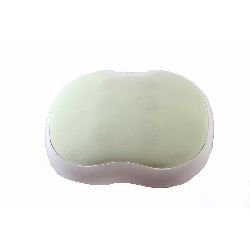
Figure 1.1: Top view of the OSIM uPapa OS-8030 Power Drum-Massager, showing its ergonomic shape.
2. Safety Information
Please read all instructions carefully before using the OSIM uPapa OS-8030. Retain this manual for future reference.
- Always unplug the massager from the power outlet immediately after use and before cleaning.
- Do not use the massager near water or in damp environments.
- Keep the power cord away from heated surfaces.
- Never operate the massager if it has a damaged cord or plug, if it is not working properly, or if it has been dropped or damaged.
- This appliance is not intended for use by persons with reduced physical, sensory, or mental capabilities, or lack of experience and knowledge, unless they have been given supervision or instruction concerning use of the appliance by a person responsible for their safety.
- Consult a doctor before use if you have any medical conditions, are pregnant, or have a pacemaker.
- Do not use on sensitive skin areas, swollen or inflamed areas, or open wounds.
- Do not use for more than 15 minutes at a time to avoid overheating and potential injury.
3. Package Contents
Verify that all items are present in the package:
- OSIM uPapa OS-8030 Power Drum-Massager
- Power Adapter
- User Manual (this document)
4. Product Features
The OSIM uPapa OS-8030 offers the following key features:
- Symmetrical 6-point drum massage for comprehensive coverage.
- 7 rhythmic massage programs to vary the massage experience.
- 7 drumming positions for targeted relief on different body areas.
- 5 adjustable massage intensities to customize your comfort level.
- Convenient controls for easy operation.
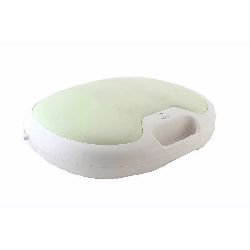
Figure 4.1: Side view of the OSIM uPapa OS-8030, highlighting the control panel.
5. Setup
- Unpack the Device: Carefully remove the OSIM uPapa OS-8030 and all accessories from the packaging.
- Inspect for Damage: Check the massager and power adapter for any signs of damage. Do not use if damaged.
- Connect Power: Insert the power adapter cable into the power input port on the massager. Then, plug the power adapter into a suitable electrical outlet. Ensure the voltage matches the device requirements (refer to specifications).
- Placement: Place the massager on a flat, stable surface or position it comfortably on the desired body area (e.g., back, shoulders, thighs).
6. Operating Instructions
Follow these steps to operate your OSIM uPapa OS-8030:
- Power On: Press the Power button once to turn on the massager. The default massage program will begin.
- Select Massage Program: Press the Mode button repeatedly to cycle through the 7 rhythmic massage programs. Each press will change the program.
- Adjust Drumming Position: Use the Position button to select one of the 7 drumming positions. This allows you to target specific areas.
- Adjust Intensity: Press the Intensity button to increase or decrease the massage intensity. There are 5 levels of intensity.
- Power Off: Press the Power button again to turn off the massager. It is recommended to unplug the device from the power outlet after use.
Note: The massager has an automatic shut-off feature after approximately 15 minutes of continuous use to prevent overheating. If the device stops, allow it to cool down before resuming use.
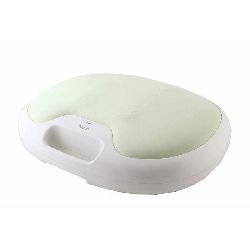
Figure 6.1: Angled view of the OSIM uPapa OS-8030, illustrating the user interface and control buttons.
7. Maintenance and Care
Proper maintenance ensures the longevity and optimal performance of your massager.
- Cleaning: Always unplug the massager before cleaning. Wipe the surface with a soft, slightly damp cloth. Do not use abrasive cleaners, solvents, or harsh chemicals. Ensure no liquid enters the device.
- Storage: Store the massager in a cool, dry place, away from direct sunlight and extreme temperatures. Avoid placing heavy objects on the massager.
- Cord Care: Do not wrap the power cord tightly around the device. Avoid bending or twisting the cord excessively.
8. Troubleshooting
If you encounter issues with your OSIM uPapa OS-8030, refer to the following common problems and solutions:
| Problem | Possible Cause | Solution |
|---|---|---|
| Massager does not turn on. | Not plugged in; power outlet issue; damaged cord/plug. | Ensure power adapter is securely plugged into both the massager and a working electrical outlet. Check the power cord for damage. |
| Massage intensity is weak. | Intensity setting is too low. | Press the Intensity button to increase the massage intensity. |
| Massager stops during use. | Automatic shut-off activated (overheating protection). | This is a normal safety feature. Turn off the massager, unplug it, and allow it to cool down for at least 30 minutes before resuming use. |
If the problem persists after trying these solutions, please contact customer support.
9. Specifications
| Feature | Detail |
|---|---|
| Model Name | OS-8030 |
| Brand | Osim |
| Power Source | Corded Electric |
| Item Weight | 6 kg 480 g |
| Package Dimensions | 50.2 x 41.8 x 16.8 cm |
| Special Features | Symmetrical 6 point drum massage, 7 rhythmic massages, 7 drumming positions, 5 massage intensities |
| Color | Green |
| Manufacturer | Osim |
10. Warranty and Support
Warranty Information: The OSIM uPapa OS-8030 Power Drum-Massager comes with a 1-year limited warranty from the date of purchase. This warranty covers manufacturing defects under normal use. It does not cover damage caused by misuse, accidents, unauthorized modifications, or normal wear and tear.
Customer Support: For technical assistance, warranty claims, or service inquiries, please contact OSIM customer support. Refer to the official OSIM website or your purchase documentation for specific contact details in your region.
You can visit the official Osim Store for more information: Osim Official Store