Product Overview
The Bushnell Neo Golf GPS Rangefinder is a compact and easy-to-use device designed to provide golfers with essential distance information on the course. It comes pre-loaded with thousands of courses and offers features like auto-course recognition and auto hole advance.
- Instantly displays key distances on the course (front, center, back).
- Holds up to 10 GPS golf course files.
- Allows for up to 4 custom points per hole.
- Features an accurate Shot Distance calculator.
- Powered by an internal, rechargeable Li-ion battery.
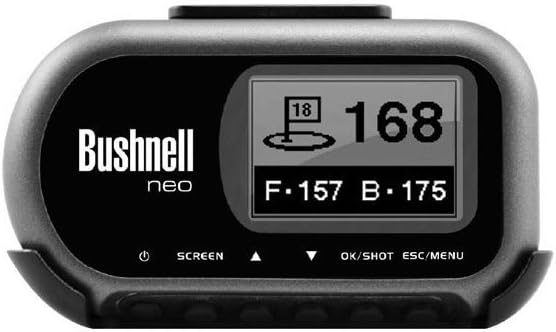
Figure 1: Bushnell Neo Golf GPS Rangefinder. This image shows the device's display, indicating distances to the front, center, and back of the green, along with the current hole number.
Setup
Charging the Device
Before first use, fully charge the Bushnell Neo. Connect the included USB cable to the device and a power source (e.g., computer USB port or USB wall adapter). The battery indicator on the screen will show charging progress.
Initial Course Loading
The Neo comes pre-loaded with over 16,000 American courses. For courses not pre-loaded or for updates, you can download courses from iGolf.com. Refer to the iGolf.com website for detailed instructions on course downloads and synchronization.
Operating Instructions
Powering On/Off
To power on the device, press and hold the power button (usually located on the side or front) until the screen illuminates. To power off, press and hold the power button again until the device shuts down.
Starting a Round
- Ensure the device has a clear view of the sky to acquire GPS satellites.
- Once powered on, the Neo will automatically search for nearby golf courses (Auto Course Recognition).
- Select your desired course from the list displayed.
- The device will automatically advance to the first hole (Auto Hole Advance).
Reading Distances
The main screen displays distances to the front, center, and back of the green. The largest number typically represents the distance to the center of the green.
Using Shot Distance Calculator
To measure a shot, stand at your starting point and activate the shot distance feature (refer to device buttons for specific activation). Walk to where your ball landed, and the device will display the distance traveled.
Custom Points
The Neo allows you to mark up to 4 custom points per hole. This feature is useful for marking hazards, layups, or other points of interest. Consult the device's on-screen menu for instructions on setting and recalling custom points.
Maintenance
Cleaning
Wipe the device with a soft, damp cloth. Do not use abrasive cleaners or solvents. The device is rainproof, but avoid submerging it in water.
Storage
Store the Bushnell Neo in a cool, dry place when not in use. Avoid extreme temperatures.
Battery Care
To prolong battery life, avoid fully discharging the battery frequently. Recharge the device regularly, especially if it will be stored for an extended period.
Troubleshooting
No GPS Signal
- Ensure you are outdoors with a clear view of the sky.
- Wait a few minutes for the device to acquire satellites.
- Move to an open area away from tall buildings or dense tree cover.
Incorrect Distances
- Verify that the correct course and hole are selected.
- Ensure the device has a strong GPS signal.
- Check for updated course maps on iGolf.com.
Device Not Turning On
- Ensure the battery is charged. Connect to a power source and try again.
- Perform a soft reset (refer to the device's specific instructions for button combinations, if available, otherwise suggest holding power button).
Specifications
| Feature | Detail |
|---|---|
| Dimensions | 1.75 by 3.25 by .75 inches |
| Battery Life | Up to 16 hours |
| GPS Chip | SiRFstarIII |
| Pre-loaded Courses | 16,000+ American courses |
| Water Resistance | Rainproof |
| Display Type | High contrast LCD screen |
| Included Components | Belt clip |
| Model Number | 368050 |
Compliance and Safety
The Bushnell Neo Golf GPS Rangefinder adheres to USGA rules for competition play.
Support and Further Information
For additional support, updated course information, or to register your product, please visit the official Bushnell website or iGolf.com. You can also refer to the Bushnell Store on Amazon for more products and information.


