
Product Overview
The Freedom Staff 2.0 Handicap Driving Hand Controls are designed to provide individuals with limited leg mobility the ability to safely and easily operate a vehicle. This portable system allows for acceleration and braking using hand movements, offering an alternative to traditional foot pedals. Constructed from durable aircraft-grade aluminum and stainless steel, the controls are built for reliability and ease of use.
Key Features:
- Universal Compatibility: Designed to fit most vehicles, including large trucks, rental cars, and golf carts, converting them for hand-controlled operation.
- Integrated Steering Knob: Includes a steering knob to facilitate one-hand steering, allowing the other hand to operate the controls.
- Adjustable Design: Customizable length and height to suit individual driver preferences and vehicle configurations.
- Durable Construction: Made from aircraft-grade aluminum and stainless steel for lightweight durability and resistance to rust.
- Intuitive Operation: Accelerate by gently pulling the lever towards you and brake by gently pushing the lever towards the floor.
Package Contents
Upon unboxing your Freedom Staff 2.0 Hand Controls, verify that all components are present and in good condition. The package typically includes the main hand control assembly, a steering knob, and a convenient carry bag for portability.

Image: The Freedom Staff 2.0 Hand Controls disassembled, showing the main control unit, steering knob, and the included carry bag.
The main assembly consists of adjustable rods and levers, designed for quick and secure attachment within the vehicle's footwell. The steering knob is a separate accessory that can be attached to the steering wheel for enhanced control.
Setup and Installation
The Freedom Staff 2.0 Hand Controls are designed for quick and tool-free installation in most automatic transmission vehicles. Follow these steps for proper setup:
- Positioning the Unit: Place the main hand control unit on the floor of the driver's side, ensuring the foot pedals (accelerator and brake) are accessible by the control's foot-end attachments.
- Securing to Pedals: Attach the control's clamps or hooks securely to the accelerator and brake pedals. Ensure a firm grip to prevent slippage during operation.
- Adjusting Length and Height: Extend or retract the adjustable rods to achieve the desired length and height for comfortable and effective operation from your driving position. The lever should be easily reachable with your left hand.
- Steering Column Strap: Loop the provided strap over the steering column and secure it to the hand control unit. This strap helps stabilize the controls and prevents unwanted horizontal movement. Ensure it is snug but does not impede steering.
- Attaching Steering Knob (Optional): If using, attach the steering knob to a convenient position on your steering wheel. This allows for easier one-handed steering while operating the hand controls.
- Final Check: Before driving, gently test the acceleration and braking functions to ensure they engage smoothly and fully. Verify that the unit is stable and does not interfere with any other vehicle controls.

Image: A close-up view of the Freedom Staff 2.0 Hand Controls installed in the footwell of a vehicle, showing its connection to the pedals.
Installation typically takes approximately five minutes, with an additional five minutes for fine-tuning adjustments to suit the driver's personal position and comfort.
Operating Instructions
Operating the Freedom Staff 2.0 Hand Controls is intuitive, designed to mimic the natural feel of driving. It is recommended to practice in a safe, open area before driving in traffic.
- Acceleration: To accelerate, gently pull the control lever towards your body. The further you pull, the more acceleration will be applied.
- Braking: To brake, gently push the control lever away from your body, towards the floor of the vehicle. The harder you push, the more braking force will be applied.
- Steering: Use the steering knob (if installed) with your right hand to control the steering wheel, allowing your left hand to remain free to operate the hand controls. Coordinate steering and control movements for smooth driving.
- Shifting: When shifting between Drive, Reverse, or Park, ensure the hand control lever is in a neutral position to avoid unintended acceleration or braking.
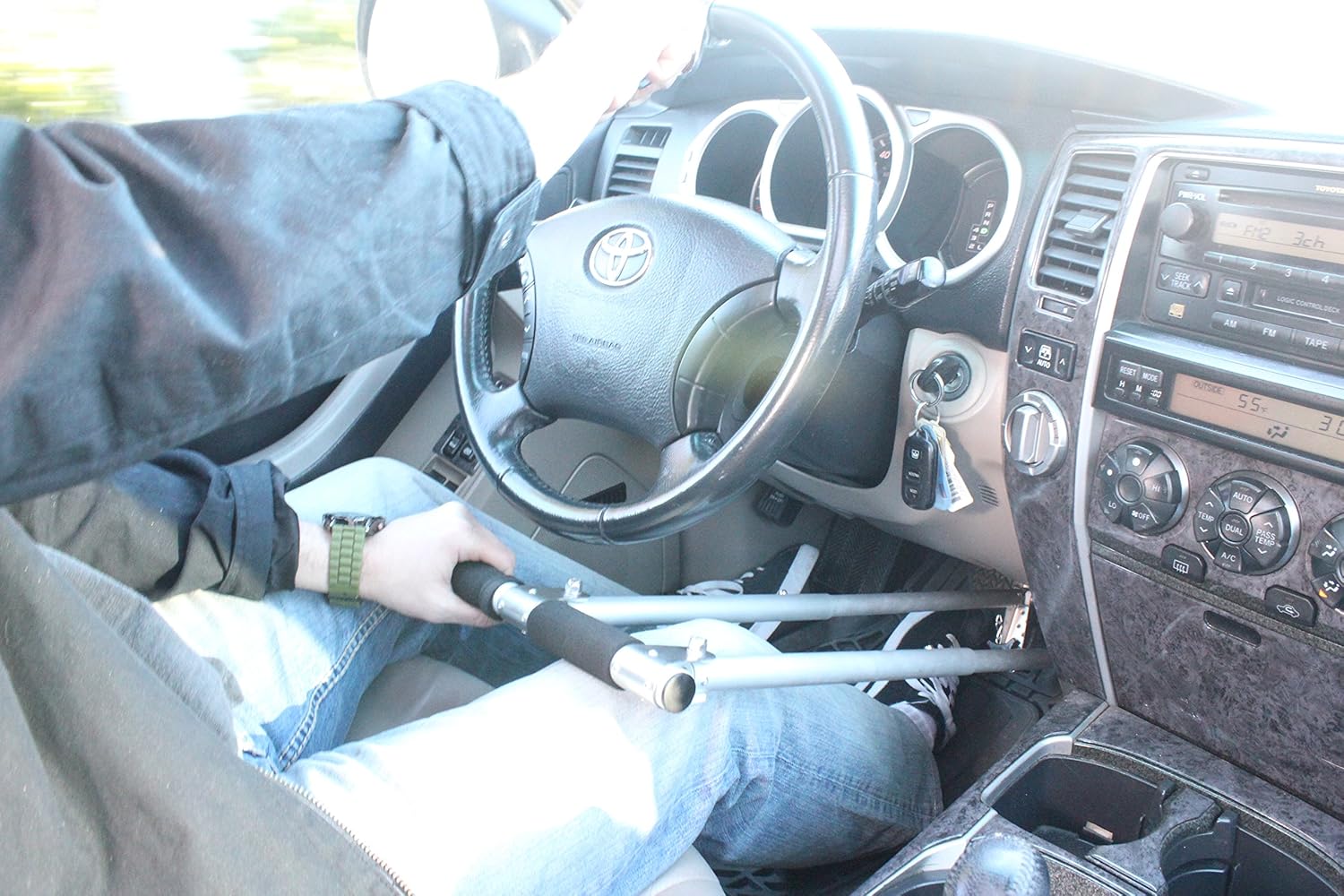
Image: A driver demonstrating the use of the Freedom Staff 2.0 Hand Controls, with one hand on the control lever and the other on the steering wheel.
Developing muscle memory for hand control operation may take some practice. Begin with short sessions in a controlled environment to become comfortable with the system's response.
Care and Maintenance
To ensure the longevity and optimal performance of your Freedom Staff 2.0 Hand Controls, follow these care and maintenance guidelines:
- Cleaning: Wipe down the aluminum and stainless steel components with a damp cloth as needed. Avoid abrasive cleaners that could damage the finish.
- Inspection: Regularly inspect all moving parts, connections, and the steering column strap for any signs of wear, damage, or looseness. Ensure all fasteners are secure.
- Foam Handle Sleeve: The foam handle sleeve may show signs of wear over time. While the core unit is highly durable, the sleeve may require replacement if it becomes significantly worn or damaged.
- Storage: When not in use, store the hand controls in their provided carry bag in a dry, clean environment to protect them from dust and damage.
Troubleshooting
If you encounter issues with your Freedom Staff 2.0 Hand Controls, consider the following common solutions:
- Controls Feel Loose or Unstable:
- Ensure the clamps on the pedals are securely tightened.
- Verify that the strap over the steering column is properly positioned and taut.
- Check that the adjustable rods are locked firmly in place at the desired length.
- Difficulty with Smooth Operation:
- This often requires practice to develop muscle memory. Continue practicing in a safe, controlled environment.
- Re-adjust the length and height of the controls to find a more comfortable and ergonomic position.
- Steering Knob Issues:
- If the steering knob feels loose, ensure it is securely fastened to the steering wheel.
- Some users may prefer an aftermarket steering knob if the included one does not meet their specific needs or preferences.
If problems persist, contact Freedom Staff customer support for further assistance.
Technical Specifications
| Model Number | HC3N |
| Manufacturer | Sylvan Inc. |
| Item Weight | 4.4 pounds |
| Package Dimensions | 23.5 x 9.5 x 3.2 inches |
| Materials | Stainless Steel, Aluminum |
| Fit Type | Universal Fit |
| Vehicle Service Type | Passenger Car, Bus, Van, Truck |
| UPC | 628586532977 |
Important Safety Information
Safe operation of the Freedom Staff 2.0 Hand Controls is paramount. Adhere to the following safety guidelines:
- Always ensure the hand controls are securely installed and adjusted before starting the vehicle.
- Never attempt to operate the vehicle with the hand controls if they feel loose, damaged, or are not functioning correctly.
- Practice extensively in a safe, traffic-free environment until you are fully comfortable and confident with the controls.
- Maintain full attention on the road and your surroundings while driving. Avoid distractions.
- Be aware that the response time and feel of hand controls may differ from traditional foot pedals. Adjust your driving style accordingly.
- Regularly check the condition of the hand controls, especially before long trips.
- Do not modify the hand controls. Any modifications could compromise their safety and functionality.
- Always follow local traffic laws and regulations.


