
Introduction
This manual provides detailed instructions for the operation and maintenance of your RadioShack Analog AM/FM Pocket Radio. Designed for portability and ease of use, this radio allows you to enjoy AM and FM broadcasts wherever you go. Please read this manual thoroughly before using your radio to ensure proper function and longevity.
Product Features
- Classic Rotating Tuning Dial: For precise station selection.
- 1/8" Headphone Jack: Allows for private listening without disturbing others.
- Telescoping Antenna: Enhances reception for clearer audio.
- Wide Frequency Range: AM: 530-1710 kHz; FM: 87.5-108 MHz.
- Compact and Lightweight Design: Ideal for portability.
- Integrated Speaker: 57mm (2.25 Inches) speaker with 0.5W output.
Package Contents
Please check the package contents to ensure all items are present:
- RadioShack Analog AM/FM Pocket Radio
- Telescoping Antenna (integrated)
- Wrist Strap (attached)
Note: 2 AA batteries are required and are not included in the package.
Setup
1. Battery Installation
- Locate the battery compartment cover on the back of the radio.
- Slide the cover downwards to open the compartment.
- Insert two (2) AA batteries, ensuring the correct polarity (+ and -) as indicated inside the compartment.
- Close the battery compartment cover by sliding it upwards until it clicks into place.

Figure 1: Rear view of the radio showing the battery compartment. Ensure correct battery orientation when installing.
2. Antenna Setup
For optimal FM reception, extend the telescoping antenna fully. For AM reception, the internal antenna is typically sufficient, but you may need to rotate the radio for best signal.

Figure 2: Front view of the radio with the telescoping antenna extended for improved FM reception.
Operating Instructions
1. Power On/Off and Volume Control
The power switch and volume control are integrated into a single rotary dial located on the side of the radio.
- To turn the radio ON, rotate the dial clockwise until you hear a click and the radio powers on.
- Continue rotating clockwise to increase the volume.
- Rotate the dial counter-clockwise to decrease the volume.
- To turn the radio OFF, rotate the dial counter-clockwise until it clicks and the radio powers off.
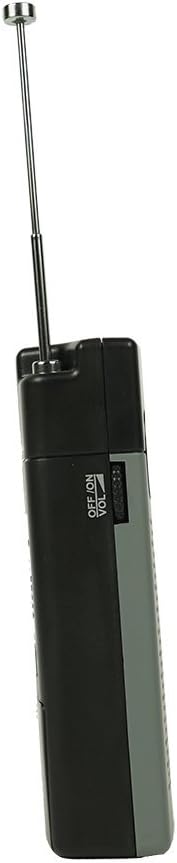
Figure 3: Side view illustrating the combined ON/OFF and Volume control dial.
2. AM/FM Band Selection
A slide switch on the side of the radio allows you to select between AM and FM bands.
- Slide the switch to "AM" for Amplitude Modulation broadcasts.
- Slide the switch to "FM" for Frequency Modulation broadcasts.

Figure 4: Side view showing the AM/FM selector switch and headphone jack.
3. Tuning to a Station
Use the tuning dial to find your desired radio station.
- Once the radio is powered on and the desired band (AM/FM) is selected, slowly rotate the Tuning dial located on the side of the radio.
- Observe the frequency scale on the front of the radio to identify the station frequency.
- Adjust the dial until the desired station is clear.
4. Using Headphones
For private listening, plug standard 1/8" (3.5mm) stereo headphones into the headphone jack located on the side of the radio. The internal speaker will automatically mute when headphones are connected.
Maintenance
Cleaning
Wipe the radio with a soft, damp cloth. Do not use abrasive cleaners or solvents, as they may damage the finish.
Battery Replacement
When the sound becomes distorted or the volume decreases significantly, it is time to replace the batteries. Follow the battery installation steps outlined in the "Setup" section. Always replace both batteries at the same time with new AA batteries.
Important: Remove batteries if the radio will not be used for an extended period to prevent battery leakage and damage to the unit.
Troubleshooting
| Problem | Possible Cause | Solution |
|---|---|---|
| No sound or very low volume. |
|
|
| Poor reception or static. |
|
|
| Tuning dial is stiff or difficult to turn. | Dirt or debris in the mechanism. | Do not force the dial. Contact customer support if the issue persists after gentle cleaning around the dial. |
Specifications
| Model Number | FBA_120-0586 |
| Frequency Range | AM: 530-1710 kHz; FM: 87.5-108 MHz |
| Speaker Size | 57mm (2.25 Inches) |
| Speaker Output | 0.5W |
| Power Source | 2 x AA Batteries (not included) |
| Dimensions (WHD) | 73 mm x 117 mm x 30 mm (approx. 2.87 x 4.61 x 1.18 inches) |
| Item Weight | 10.4 ounces (approx. 295 grams) |
| Headphone Jack | 1/8" (3.5mm) Stereo |
| Included Components | Integrated Telescoping Antenna |
Warranty and Support
For information regarding warranty coverage or technical support for your RadioShack Analog AM/FM Pocket Radio, please refer to the documentation provided at the time of purchase or visit the official RadioShack website. Specific warranty terms may vary by region and retailer.
You can also visit the RadioShack Store on Amazon for additional product information and support resources.