
1. Product Overview
The Honeywell Ademco K10145WH is a Class II, 25.0 Watt, 60 Hz AC transformer designed to provide power to the L3000 LYNX Plus wireless alarm control panel. This two-prong transformer converts standard AC wall current to the required voltage for your security system, ensuring reliable operation.
It is intended for indoor use only and should be installed in a dry location, away from direct sunlight or extreme temperatures.
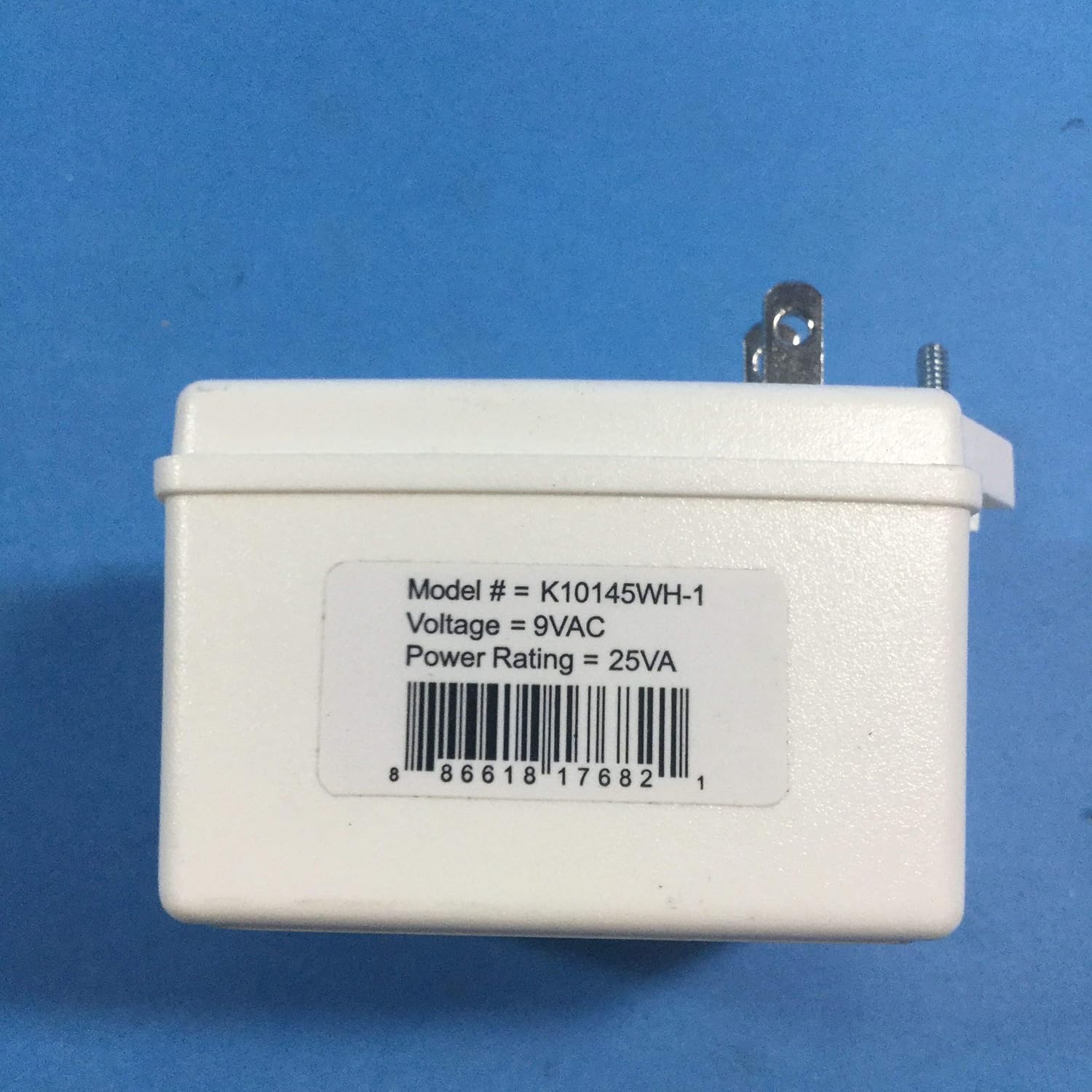
Image 1: Front view of the Honeywell Ademco K10145WH transformer, displaying its product label. The label indicates the model number K10145WH-1, a voltage output of 9VAC, and a power rating of 25VA. A barcode with the UPC 0886618176821 is also visible.
2. Safety Information
- Electrical Hazard: Always disconnect power at the circuit breaker before installing or servicing any electrical components.
- Indoor Use Only: This transformer is designed for indoor use in dry locations. Do not expose to moisture, rain, or extreme humidity.
- Proper Ventilation: Ensure the transformer is installed in an area with adequate ventilation to prevent overheating.
- Secure Connections: All wiring connections must be secure to prevent electrical shorts or loose contacts.
- Compatibility: Use only with compatible devices as specified by Honeywell. Using an incorrect power supply can damage your equipment.
3. Setup and Installation
Follow these steps to properly install your Honeywell Ademco K10145WH transformer:
- Prepare the Installation Area: Ensure the power outlet is easily accessible and located near the LYNX Plus control panel.
- Disconnect Power: Before making any connections, turn off the main power to the alarm system at the circuit breaker.
- Identify Terminals: The transformer features two screw terminals on its back. These are typically labeled for AC output. Refer to your LYNX Plus panel's manual for specific wiring instructions.
- Connect Wiring: Connect the low-voltage wiring from your LYNX Plus control panel to the screw terminals on the transformer. Ensure a secure connection for both wires.
- Plug In Transformer: Once the wiring is securely connected, plug the two-prong transformer into a standard 120V AC wall outlet.
- Restore Power: Turn the main power back on at the circuit breaker. The LYNX Plus panel should now receive power.

Image 2: Rear view of the Honeywell Ademco K10145WH transformer, showing the two standard electrical prongs for wall outlet connection and the two screw terminals for low-voltage wiring to the alarm panel. The Honeywell logo and 'LISTED' certification are also visible.
4. Operating Instructions
The Honeywell Ademco K10145WH transformer operates continuously once plugged into a live AC outlet and connected to the LYNX Plus control panel. It provides the necessary 9VAC power to the panel. No user interaction is required for its operation after proper installation.
The transformer is designed for reliable, long-term power delivery to your security system.
5. Maintenance
The K10145WH transformer requires minimal maintenance:
- Regular Inspection: Periodically inspect the transformer and its wiring for any signs of damage, fraying, or loose connections.
- Cleaning: Keep the transformer free from dust and debris. Use a dry, soft cloth for cleaning. Do not use liquid cleaners.
- Environmental Conditions: Ensure the operating environment remains within specified conditions (dry, moderate temperature).
- Power Disconnection: Always unplug the transformer from the wall outlet before performing any inspection or cleaning.
6. Troubleshooting
If your LYNX Plus panel is not receiving power, consider the following troubleshooting steps:
- No Power to Panel:
- Verify the wall outlet is functional by plugging in another device.
- Check the circuit breaker for the outlet to ensure it has not tripped.
- Ensure the transformer is securely plugged into the wall outlet.
- Inspect the low-voltage wiring connections at both the transformer and the LYNX Plus panel for looseness or damage.
- Transformer Overheating:
- Unplug the transformer immediately.
- Ensure it is not covered or in an enclosed space that restricts airflow.
- If overheating persists after ensuring proper ventilation, the transformer may be faulty and require replacement.
- Physical Damage: If the transformer shows signs of physical damage (cracks, exposed wires, burning smell), discontinue use immediately and replace it.
7. Specifications
| Model Number | K10145WH |
| Input Voltage | 120V AC, 60 Hz |
| Output Voltage | 9VAC |
| Power Rating | 25VA (25.0 W) |
| Class | Class II |
| Dimensions (L x W x H) | 3.3 x 2.3 x 2 inches |
| Item Weight | 11.2 ounces (0.7 lbs) |
| ASIN | B005M3IZXE |
| UPC | 0886618176821 |
8. Warranty and Support
For warranty information or technical support regarding your Honeywell Ademco K10145WH transformer, please refer to the documentation provided with your LYNX Plus wireless alarm control panel or contact Honeywell customer service directly. Support contact details can typically be found on the Honeywell official website or within your product packaging.