
New Comfort 03-700
New Comfort Commercial Air Purifier Ozone Generator Model 03-700 User Manual
Brand: New Comfort | Model: 03-700
1. Important Safety Information
WARNING: Ozone generators produce ozone, which can be harmful if inhaled. This device is intended for use in unoccupied spaces only. Always ensure the area is completely vacant of people, pets, and plants during operation.
After operation, allow sufficient time for the ozone to dissipate and for the treated area to ventilate thoroughly before re-entry. A minimum of 30-60 minutes of ventilation is recommended, or until no ozone odor is detectable.
UV Light Warning: Do not look directly at the UV light for prolonged periods, as this may cause eye irritation.
Keep out of reach of children.

Image 1.1: Warning label on the unit, emphasizing use in unoccupied spaces only and providing EPA establishment number.
2. Product Overview
The New Comfort Commercial Air Purifier Ozone Generator Model 03-700 is designed to effectively eliminate tough odors and improve air quality in large spaces. It utilizes ozone generation and UV light technology to neutralize various airborne contaminants.

Image 2.1: Front view of the New Comfort Commercial Air Purifier Ozone Generator, showing the control dial and air intake.
Key Features:
- Powerful Ozone Output: Produces 3000 mg of ozone per hour.
- Odor Elimination: Effectively removes smoke, pet odors, dust, dirt, viruses, pesticides, cleaning fume odors, cigarette smoke, paint odors, cooking odors, water damage, and decaying material.
- Adjustable Settings: Features a 60-minute timer and a 'HOLD' function for continuous operation.
- UV Light Integration: Includes a built-in UV light for enhanced purification.
- Durable Construction: Built with high-end steel for longevity.
- Portable Design: Lightweight and easy to transport with a foldable handle.
- Coverage: Cleans areas up to 4,000 sq. ft.

Image 2.2: Key features of the ozone generator, including ozone output, timer, and UV light.

Image 2.3: Visual representation of various odors and contaminants the unit is designed to eliminate.
3. Setup
Follow these steps to set up your New Comfort Ozone Generator:
- Unpack the Unit: Carefully remove the ozone generator and its components from the packaging.
- Insert Ozone Plates: Ensure the three washable ozone plates are correctly inserted into their designated slots at the rear of the unit. Refer to Image 3.1 for guidance.
- Position the Unit: Place the unit in the center of the unoccupied area you wish to treat. Ensure there is adequate airflow around the unit.
- Connect Power: Plug the power cord into the unit's plug insert and then into a standard electrical outlet.

Image 3.1: Rear view of the unit with labels for handle, ozone plate storage, air intake, fuse cover, and power plug insert. Includes three washable ozone plates.
4. Operating Instructions
Always ensure the area is completely unoccupied before operating the ozone generator.
- Select Operation Mode: Use the mechanical knob on the front of the unit to select your desired operation mode:
- Timer Mode (1-60 Minutes): Turn the knob clockwise to set the desired treatment duration in minutes. The unit will operate for the set time and then automatically turn off.
- HOLD Mode: Turn the knob to 'HOLD' for continuous operation. Use this mode with caution and only for specific applications where extended treatment is necessary. Always ensure the area remains unoccupied.
- Initiate Operation: Once the mode is selected, the unit will begin generating ozone and the UV light will activate.
- Evacuate the Area: Immediately leave the treated area.
- Ventilation After Treatment: After the treatment cycle is complete (or after manually turning off the unit in HOLD mode), allow the area to ventilate for at least 30-60 minutes before re-entry. Open windows and doors if possible to aid ventilation.
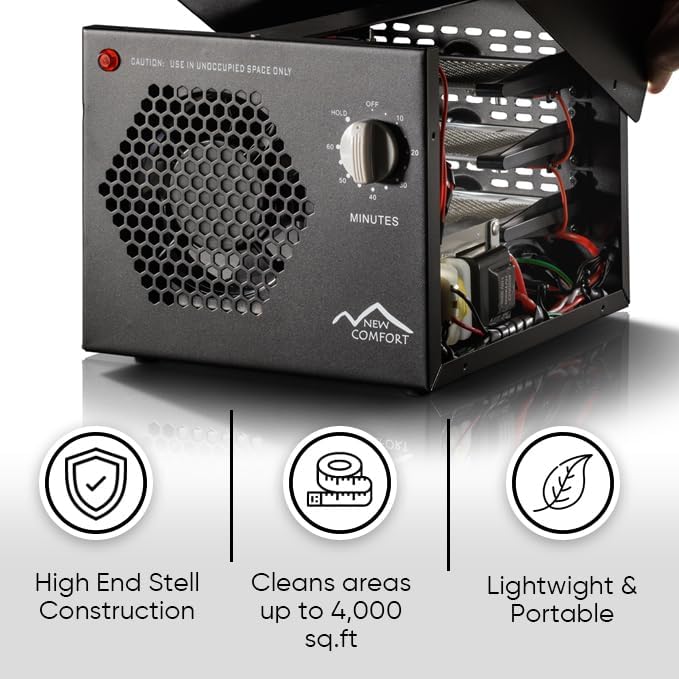
Image 4.1: The unit's robust construction and capacity to clean large areas.
5. Maintenance
Regular maintenance ensures optimal performance and longevity of your ozone generator.
Cleaning Ozone Plates:
The ozone plates are washable and should be cleaned periodically, depending on usage and air quality. Dirty plates can reduce ozone output.
- Disconnect Power: Always unplug the unit from the power outlet before performing any maintenance.
- Remove Plates: Carefully slide out the ozone plates from their slots at the rear of the unit.
- Clean Plates: Wash the plates with mild soap and water. Rinse thoroughly and allow them to air dry completely before re-inserting. Ensure no moisture remains.
- Re-insert Plates: Slide the clean, dry ozone plates back into their slots.
UV Light Bulb:
The UV light bulb has a limited lifespan. If the UV light is no longer illuminating, it may need replacement. Contact customer support for replacement parts and instructions.

Image 5.1: Internal view highlighting the UV light and ozone plates, key components for air purification.
6. Troubleshooting
If you encounter issues with your ozone generator, refer to the following common problems and solutions:
| Problem | Possible Cause | Solution |
|---|---|---|
| Unit does not turn on | No power, loose connection, or blown fuse. | Check power cord connection. Ensure outlet is functional. Inspect and replace fuse if necessary. |
| Weak ozone output | Dirty ozone plates. | Clean the ozone plates as described in the Maintenance section. |
| UV light not working | UV bulb has reached end of life. | Contact customer support for a replacement UV bulb. |
| Odor persists after treatment | Insufficient treatment time or poor ventilation. | Increase treatment duration. Ensure proper ventilation after treatment. Clean ozone plates. |
If the problem persists, please contact New Comfort customer support.
7. Specifications
| Feature | Detail |
|---|---|
| Brand | New Comfort |
| Model Number | 03-700 |
| Ozone Output | 3000 mg/hour |
| Coverage Area | Up to 4000 sq. ft. |
| Product Dimensions | 8.5"D x 11"W x 9"H |
| Item Weight | 8 pounds |
| Noise Level | 52 Decibels |
| Controller Type | Mechanical Knob |
| Wattage | 40 watts |
| Included Components | Power Cord, Set of 3 Ozone Plates |

Image 7.1: Dimensions of the New Comfort Commercial Air Purifier Ozone Generator.
8. Warranty and Support
New Comfort is committed to product quality and customer satisfaction.
Warranty Information:
For detailed warranty information, please refer to the documentation included with your product or visit the official New Comfort website. Warranties typically cover parts and labor for manufacturing defects.
Customer Support:
If you require assistance with setup, operation, maintenance, or troubleshooting, please contact New Comfort customer support. Our experts are available to help you with any product-related inquiries.
For product help, visit the New Comfort Brand Store or contact the manufacturer directly.
Related Documents - 03-700
 |
New Comfort SS12000 Commercial Ozone Generator: User Manual & Operation Guide Comprehensive user manual for the New Comfort SS12000 commercial ozone generator. Covers quick start, specifications, usage, control panel, applications, maintenance, troubleshooting, and warranty information. |
 |
QuickStick HT Gen 2 to QuickStick HT 5700 Motor Controller Migration Guide Migrate your industrial automation systems from Rockwell Automation's QuickStick HT Gen 2 motor controllers to the advanced QuickStick HT 5700 series. This comprehensive migration guide provides detailed information on system design, installation, configuration, and replacement workflows for QuickStick HT 5700 (MMI-HT-C2198-D032) and related components. Covers catalog numbers 700-1384-01, 700-1398-00, 700-1563-00, and more. |
 |
novotegra Insertion System Brickwork Facade Mounting Instructions Comprehensive mounting instructions for the novotegra Insertion System designed for brickwork facades, detailing safety, general conditions, tools, components, installation steps, and maintenance. |
 |
PAPAGO! Airfresh S10D Air Purifier: Quick Start Guide, Specifications, and Features Comprehensive guide for the PAPAGO! Airfresh S10D air purifier, covering setup, specifications, functions, features, maintenance, and warranty information. Learn how to use and care for your device. |
 |
Aussie Bondi II Elite LP Gas Grill Owner's Manual Official owner's manual for the Aussie Bondi II Elite LP Gas Grill, covering assembly, safety, operation, maintenance, and troubleshooting. |
 |
WG-03 Air Aromatherapy Purifier: User Manual and Operation Guide Comprehensive instructions for the WG-03 Air Aromatherapy Purifier by Waogao. Learn about product parameters, function display, operation methods, maintenance, WiFi connection, and safety precautions. |
Ask a question about this manual
Ask about setup, troubleshooting, compatibility, parts, safety, or missing instructions. Manuals+ will review the question and use this page’s manual context to help answer it.