1. Introduction
Welcome to your new Gullor Fountain Pen Model 800. This manual provides essential instructions for the proper setup, operation, and maintenance of your writing instrument. Adhering to these guidelines will ensure optimal performance and extend the lifespan of your pen.
2. Product Overview
The Gullor Fountain Pen Model 800 is a finely crafted writing instrument designed for a smooth writing experience. It features a Mother of Pearl white finish, a golden dragon clip with ruby eyes, and a Medium (M) 18KGP Silver Nib. The pen utilizes a push-on/pull-off cap mechanism.
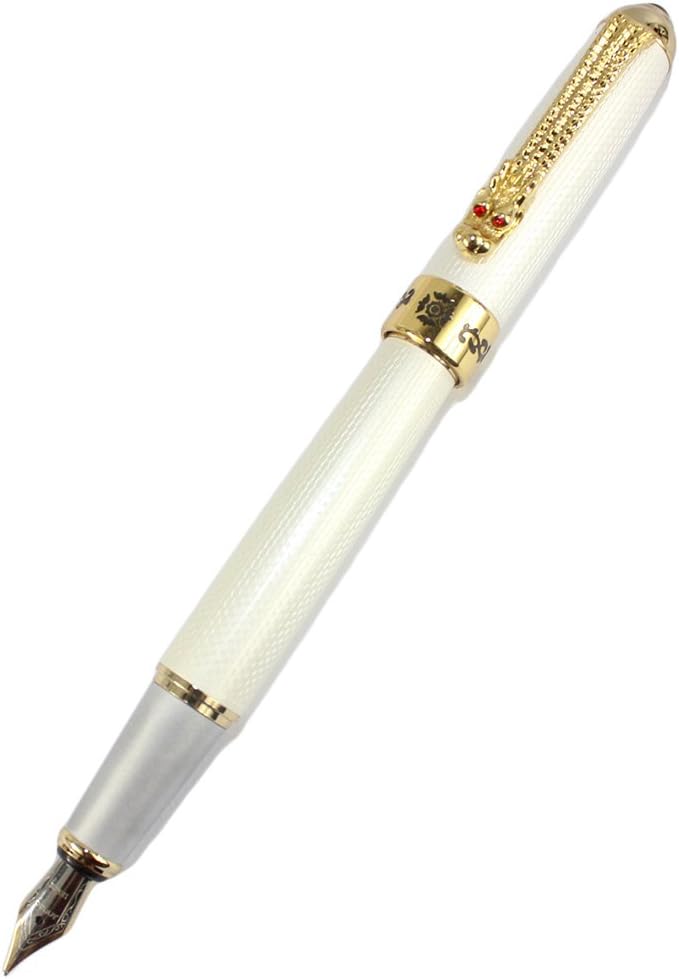
Figure 2.1: Full view of the Gullor Fountain Pen Model 800, capped, showcasing its white mother-of-pearl finish and golden dragon clip.
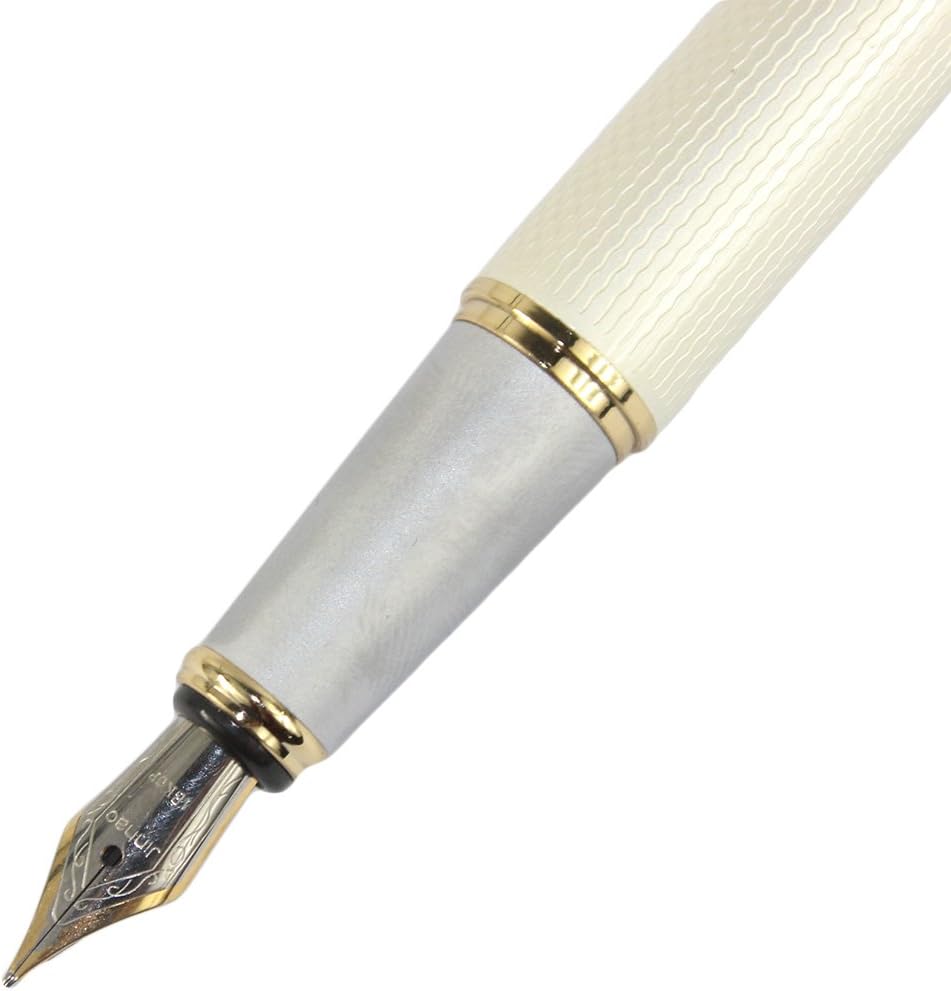
Figure 2.2: Close-up of the pen's nib and grip section, showing the Medium (M) 18KGP Silver Nib and the transition from the white barrel to the silver grip.
Components:
- Cap: Protects the nib and prevents ink from drying. Features a push-on/pull-off mechanism and a decorative golden dragon clip.
- Barrel: The main body of the pen, housing the ink reservoir.
- Grip Section: The area where the pen is held during writing.
- Nib: The writing tip of the pen, a Medium (M) 18KGP Silver Nib.
- Ink Converter: An internal mechanism for drawing ink from a bottle.

Figure 2.3: The pen with its cap removed and the ink converter exposed, illustrating the internal mechanism for ink loading.
3. Setup
Your Gullor Fountain Pen Model 800 does not come pre-filled with ink. You will need to install an international standard ink cartridge or fill the included converter with bottled ink.
3.1 Installing an Ink Cartridge
- Unscrew the barrel from the grip section.
- If a converter is already installed, gently pull it out.
- Insert a new international standard ink cartridge firmly into the grip section until you feel it puncture.
- Reattach the barrel by screwing it back onto the grip section.
3.2 Filling the Converter with Bottled Ink
- Unscrew the barrel from the grip section.
- Ensure the converter is securely attached to the grip section.
- Twist the converter's piston mechanism counter-clockwise until the piston is fully extended towards the nib.
- Submerge the entire nib into a bottle of fountain pen ink.
- Slowly twist the converter's piston mechanism clockwise to draw ink into the converter.
- Remove the nib from the ink bottle and gently wipe any excess ink from the nib and grip section with a soft cloth.
- Reattach the barrel by screwing it back onto the grip section.
3.3 Priming the Nib
After installing a new cartridge or filling the converter, it may take a moment for the ink to flow to the nib. If the pen does not write immediately, gently tap the nib on a piece of paper or lightly shake the pen downwards to encourage ink flow. Avoid excessive force.
4. Operation
4.1 Writing
Hold the pen comfortably, allowing the nib to rest at a natural angle on the paper. Fountain pens require minimal pressure; the ink flows by capillary action. Experiment with different angles and pressures to find your preferred writing style.
4.2 Capping the Pen
When not in use, always cap the pen to prevent the ink from drying out in the nib. The Gullor Model 800 features a push-on/pull-off cap. Ensure the cap is securely seated to maintain an airtight seal.
5. Maintenance
Regular cleaning is crucial for maintaining optimal ink flow and preventing clogging, especially when changing ink colors or if the pen has been unused for an extended period.
5.1 Cleaning the Nib and Feed
- Remove the ink cartridge or converter.
- Rinse the nib and grip section under cool, running water until the water runs clear.
- For a more thorough cleaning, use the converter to repeatedly draw and expel clean water until no ink residue is visible.
- Allow the nib and grip section to air dry completely before reassembling or refilling with ink.
5.2 Storage
Store your fountain pen capped and in a horizontal position when not in use. For long-term storage, it is recommended to clean the pen thoroughly and store it empty to prevent ink from drying and clogging the feed.
6. Troubleshooting
| Problem | Possible Cause | Solution |
|---|---|---|
| No ink flow / Hard starting | Dry nib, clogged feed, empty cartridge/converter, air bubble. | Prime the nib (Section 3.3). Ensure cartridge/converter is full and properly seated. Clean the pen (Section 5.1). |
| Skipping / Inconsistent line | Low ink, dry nib, paper quality, misaligned nib tines. | Check ink level. Clean the nib. Try different paper. If tines are misaligned, seek professional repair. |
| Leaking ink | Loose components, damaged cartridge/converter, extreme temperature changes. | Ensure all parts are securely tightened. Replace cartridge/converter if damaged. Avoid extreme temperatures. |
7. Specifications
- Brand: Gullor
- Model Number: Refillable Fountain Pen 800
- Item Weight: 2.11 ounces
- Package Dimensions: 6.77 x 1.61 x 0.98 inches
- Color: Mother of Pearl (White)
- Closure: Push-on/Pull-off Cap
- Material Type: Mother of Pearl
- Point Type: Medium (M) 18KGP Silver Nib
- Line Size: Approximately 0.5mm
- Ink Compatibility: International Standard Cartridges or Bottled Ink (via included converter)
8. Warranty Information
This product is covered by the manufacturer's standard warranty against defects in materials and workmanship. Please retain your proof of purchase for any warranty claims. For specific warranty terms and conditions, refer to the documentation provided at the time of purchase or contact Gullor customer support.
9. Support
For further assistance, technical support, or inquiries regarding your Gullor Fountain Pen Model 800, please contact Gullor customer service through their official website or the retailer from whom the product was purchased. Provide your model number and a detailed description of the issue for efficient support.