
Introduction
This manual provides essential instructions for the setup, operation, maintenance, and troubleshooting of your Big Ben Racing Wheel with Pedals (Model BB 297508). This racing wheel is designed to enhance your gaming experience on PlayStation 2, PlayStation 3, and PC platforms. Please read this manual thoroughly before use to ensure proper functionality and longevity of your device.
Setup
- Connect the Racing Wheel: Plug the USB connector of the racing wheel into an available USB port on your PlayStation 2, PlayStation 3, or PC.
- Connect the Pedals: Connect the pedal unit cable to the designated port on the back of the racing wheel. Ensure the connection is secure.
- Secure the Racing Wheel:
- Table Mounting: Place the racing wheel on a stable, flat surface. Use the integrated clamping system to secure it firmly to the table edge. Tighten the clamp until the wheel is stable.
- Lap Position: For use on your lap, ensure the base is stable and comfortable. The design allows for two driving positions to suit your preference.
- PC Driver Installation (if necessary): For PC use, your operating system (Windows XP/Vista/7) may automatically install the necessary drivers. If not, please refer to the manufacturer's website for driver downloads.
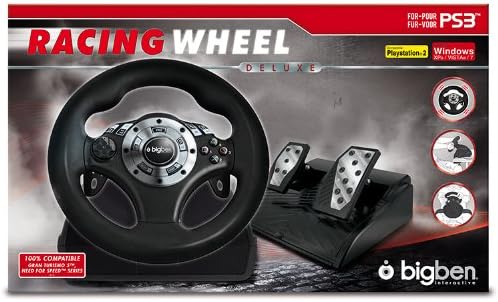
Image: Side view of the Big Ben Racing Wheel, illustrating the connection points for the pedal unit and the USB cable.
Operating Instructions
- Power On: Turn on your PlayStation console or PC. The racing wheel should be automatically detected.
- Basic Controls:
- Steering Wheel: Rotate the wheel up to 180 degrees for precise steering control.
- Pedals: Use the right pedal for acceleration and the left pedal for braking.
- Buttons: The wheel features various programmable buttons. Refer to your game's control settings to customize button assignments.
- Sensitivity Adjustment: The racing wheel offers 3 levels of sensitivity adjustment. This allows you to fine-tune the steering response to match your driving style and game requirements. Consult your game's options menu for specific sensitivity settings or use the dedicated button on the wheel if available.
- Driving Positions: The wheel supports two driving positions: on a table (secured with the clamp) or on your lap. Choose the position that offers the most comfort and control for your gaming session.

Image: The Big Ben Racing Wheel and pedal unit, showcasing the main controls and overall design.
Maintenance
- Cleaning: Use a soft, dry cloth to clean the surfaces of the racing wheel and pedals. Avoid using abrasive cleaners, solvents, or excessive moisture, as these can damage the device.
- Storage: When not in use, store the racing wheel and pedals in a cool, dry place, away from direct sunlight and extreme temperatures. Avoid placing heavy objects on the device.
- Cable Care: Do not bend or crimp the cables excessively. Always grasp the plug, not the cable, when disconnecting.
Troubleshooting
- Wheel Not Recognized:
- Ensure all cables (USB and pedal unit) are securely connected.
- Try plugging the USB cable into a different USB port on your console or PC.
- For PC, verify that the necessary drivers are installed. Check Device Manager for any unknown devices or driver issues.
- Restart your console or PC.
- Controls Unresponsive:
- Check if the racing wheel is properly powered on (if applicable, though typically USB powered).
- Ensure the game you are playing supports racing wheel input.
- Verify in-game control settings to ensure the wheel is selected as the primary controller.
- Pedals Not Working:
- Confirm that the pedal unit cable is firmly connected to the racing wheel.
- Test the pedals in a different game or calibration utility (if available on PC).
Specifications
| Model Number | BB 297508 |
| Compatibility | PlayStation 2, PlayStation 3, PC (Windows XP/Vista/7) |
| Wheel Diameter | 23 cm (9.05 inches) |
| Wheel Rotation | 180 degrees |
| Sensitivity Levels | 3 adjustable levels |
| Pedals | Accelerator, Brake |
| Driving Positions | 2 (Table, Lap) |
| Product Dimensions (L x W x H) | 24.99 x 41 x 27 cm (9.84 x 16.14 x 10.63 inches) |
| Product Weight | 3.7 kg (8.16 lbs) |
Warranty and Support
Specific warranty information for the Big Ben Racing Wheel with Pedals (Model BB 297508) is not provided in the available product data. For detailed warranty terms, technical support, or spare parts availability, please contact Big Ben Interactive directly or refer to the documentation included with your purchase. Keep your proof of purchase for any warranty claims.