
Introduction
This manual provides essential instructions for the safe and efficient installation, operation, and maintenance of your Matala MPC-120C1 1/2HP Rocking Piston Aeration System. Please read this manual thoroughly before using the product and retain it for future reference. This system is designed to provide robust aeration for ponds and water features, housed within a durable, weather-resistant cabinet.
Safety Instructions
- Always disconnect power before performing any maintenance or service on the unit.
- Ensure the unit is connected to a Ground Fault Circuit Interrupter (GFCI) protected outlet.
- Do not operate the unit if the power cord is damaged. Contact qualified personnel for repair or replacement.
- The cabinet must be located above pond water level and outside of any flood zones.
- Do not bury the cabinet.
- Keep children and pets away from the unit during operation.
- Ensure proper ventilation around the cabinet to prevent overheating.
Setup
- Location Selection: Choose a stable, level location for the cabinet. The cabinet should be positioned above the pond's water level and in an area not prone to flooding. It must be within 50 feet of the pond's shore for optimal air hose connection.
- Cabinet Placement: Place the cabinet on its solid support base to ensure a level installation. The landscape green color helps it blend with outdoor environments.
- Air Hose Connection: Connect your air hose (not included) to the external heat protection hose leading from the compressor within the cabinet. Ensure a secure, airtight connection.
- Power Connection: Plug the compressor into the built-in GFCI outlet located inside the cabinet. Then, connect the cabinet's main power cord to a suitable outdoor GFCI-protected electrical outlet.
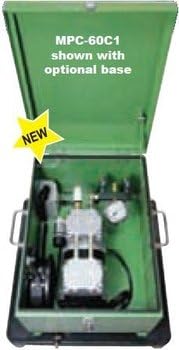
Figure 1: An illustration of a Matala aeration system cabinet (model MPC-60C1 shown, similar in design to MPC-120C1). This image displays the internal components, including the compressor and manifold system, housed within the green, locking metal cabinet. Note the external hose connection point and the overall compact design.
Operating Instructions
- Initial Start-up: Once all connections are secure and the unit is properly positioned, ensure the GFCI outlet is reset if necessary. Turn on the power to the unit.
- Monitoring Operation: The compressor will begin to operate, providing aeration to your pond. The built-in cross-flow ventilation fan will activate to maintain optimal operating temperatures within the cabinet.
- Continuous Operation: The Matala MPC-120C1 is designed for continuous operation. Monitor the air output to ensure consistent performance.
- Shut Down: To turn off the system, simply disconnect the main power from the electrical outlet.
Maintenance
- Regular Cleaning: Periodically clean the exterior of the cabinet to remove dirt and debris. Ensure the ventilation openings are clear and unobstructed.
- Air Filter Inspection: The compressor contains an air filter that should be inspected and cleaned or replaced regularly (e.g., every 3-6 months, depending on environmental conditions). Refer to the compressor's specific instructions for filter maintenance.
- Hose and Diffuser Check: Inspect the air hose and diffusers (if applicable) for any blockages, leaks, or damage. Clear any obstructions to maintain efficient airflow.
- Internal Inspection: Annually, or as needed, open the cabinet to inspect internal components for wear, loose connections, or signs of damage. Ensure the cooling fan is operating correctly.
Troubleshooting
| Problem | Possible Cause | Solution |
|---|---|---|
| Unit does not turn on | No power to outlet; GFCI tripped; Loose power connection; Compressor fault | Check power supply; Reset GFCI; Secure all connections; Contact support if fault persists |
| Low or no airflow | Blocked air filter; Kinked or damaged air hose; Clogged diffusers; Compressor issue | Clean/replace air filter; Inspect and clear air hose; Clean diffusers; Contact support if compressor fault |
| Unit is overheating | Blocked ventilation; Excessive ambient temperature; Fan malfunction | Clear ventilation openings; Ensure proper cabinet placement; Check cooling fan operation; Contact support |
| Unusual noise or vibration | Loose components; Compressor wear; Unit not level | Check for loose parts and tighten; Ensure unit is on a level surface; Contact support for compressor inspection |
Specifications
| Feature | Detail |
|---|---|
| Model Name | MPC 120C1 |
| Brand | Matala |
| Power Source | Corded Electric |
| Maximum Power | 0.5 Horsepower (1/2 HP) |
| Motor Horsepower | 0.5 Horsepower |
| Noise Level | 62 Decibels |
| Item Weight | 55 Pounds |
| Package Dimensions | 12 x 12 x 12 inches |
| Color | Green |
| Material | Other (Cabinet: Metal) |
| Style | Portable |
| Special Feature | Heavy Duty, Full Locking Metal Cabinet, Built-in GFCI Outlet, Cross-flow Ventilation Fan |
Warranty and Support
Warranty information for the Matala MPC-120C1 Rocking Piston Aeration System is typically provided with the product packaging or can be found on the official Matala website. For specific warranty details, claims, or technical support, please refer to the manufacturer's official documentation or contact Matala customer service directly.
Manufacturer: MATALA