
System-S 10001001083025
System-S Backup Battery Charger Extender User Manual
Model: 10001001083025 | Brand: System-S
Product Overview
The System-S Backup Battery Charger Extender is a portable power solution designed to provide extended battery life and charging capabilities for various compatible devices. It features a protective circuit to prevent overcharging, an LED charging indicator, and an on/off switch for power management.
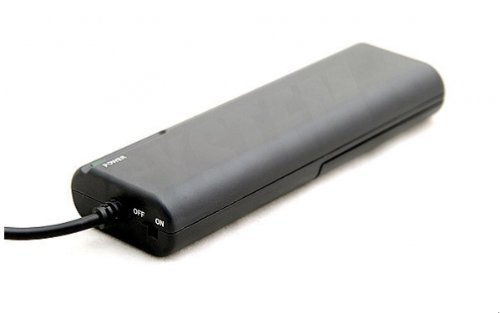
Image: The System-S Backup Battery Charger Extender, showing its compact, rectangular design, power input, and on/off switch. This device serves as a portable power source for compatible electronics.
Key Features:
- Protective circuit with IC chip to prevent overcharging.
- LED charging indicator for status monitoring.
- Utilizes four AA-size batteries (not included) for power.
- On/off switch to prevent power leakage.
- Supports simultaneous charging and device operation.
- Current limited with reverse circuit protection.
- Pocket-sized, lightweight, and durable design.
- Connects directly to standard device ports.
- Compatible with 1.2V and 1.5V Mignon AA batteries.
- CE & UL Certified.
Setup Instructions
- Insert Batteries: Open the battery compartment (usually located on the back or side of the extender) and insert four (4) AA-size batteries. Ensure correct polarity (+/-) as indicated inside the compartment. Both 1.2V rechargeable and 1.5V alkaline AA batteries are compatible.
- Connect to Device: Locate the standard charging port on your compatible device. Connect the extender's integrated cable plug into your device's charging port.
- Power On: Slide the "ON/OFF" switch on the extender to the "ON" position. The LED power indicator should illuminate, indicating that the extender is active and providing power.
Note: Batteries are not included with the extender and must be purchased separately.
Operating Instructions
- Charging Your Device: Once connected and powered on, the extender will begin charging your device's internal battery. The LED charging indicator will provide status feedback.
- Backup Power: The extender can also serve as a direct power source, allowing you to use your device even when its internal battery is depleted or while it is being charged.
- Simultaneous Use: You can continue to use your device while it is being charged by the extender.
- Power Off: When not in use, slide the "ON/OFF" switch to the "OFF" position to prevent power leakage and conserve the extender's battery life.
- Overcharge Protection: The built-in protective circuit prevents your device from being overcharged, ensuring battery longevity and safety.
Maintenance
- Cleaning: Use a soft, dry cloth to clean the exterior of the extender. Do not use liquid cleaners or abrasive materials.
- Storage: Store the extender in a cool, dry place away from direct sunlight and extreme temperatures. If storing for extended periods, remove the AA batteries to prevent leakage.
- Battery Care: Replace AA batteries when the extender's performance diminishes. Dispose of used batteries according to local regulations.
- Avoid Moisture: Do not expose the extender to water or excessive humidity.
Troubleshooting
| Problem | Possible Cause | Solution |
|---|---|---|
| Extender not powering on / LED not lit. |
|
|
| Device not charging. |
|
|
| Short charging time. |
|
|
Technical Specifications
| Brand | System-S |
| Model Number | 10001001083025 |
| Power Source | 4 x AA Batteries (1.2V or 1.5V) |
| Cord Length | 12 inches (approx. 30.5 cm) with plug connector |
| Certifications | CE & UL Certified |
| Package Dimensions | 18.03 x 4.32 x 2.29 cm |
| Item Weight | 249 g |
| First Available Date | 24 September 2014 |
Warranty and Support
For specific warranty information, please refer to the documentation provided with your purchase or contact the seller directly. System-S products typically come with a standard manufacturer's warranty covering defects in materials and workmanship.
If you encounter any issues or require technical assistance, please contact the retailer or the manufacturer's customer support. Keep your purchase receipt as proof of purchase for warranty claims.
Manufacturer: System-S
Ask a question about this manual
Ask about setup, troubleshooting, compatibility, parts, safety, or missing instructions. Manuals+ will review the question and use this page’s manual context to help answer it.